Players practising directional cues
If footsteps and approaches matter in your games, start with a headset connection your platform accepts and check its headphone audio settings before choosing on appearance or driver size.


Choose a headset that connects to your console or PC in the way you intend to play before weighing up drivers, equaliser controls or battery life. For directional practice, check the platform’s headphone audio settings as well as the headset: PlayStation offers PS5 headphone 3D-audio profiles, while Xbox Support says Windows Sonic works with a stereo headset. A wired connection avoids charging; wireless gives you more freedom from a cable but makes exact-model compatibility and charging part of the decision.
If footsteps and approaches matter in your games, start with a headset connection your platform accepts and check its headphone audio settings before choosing on appearance or driver size.
If a cable to your controller or computer gets in the way, consider a wireless model whose adapter or connection method works with your device. Leave room for its adapter and plan when to charge it.
If you want game audio alongside phone audio or calls, check whether the exact headset supports both connections at once and which device receives your microphone.
Choose when: You want to avoid headset charging and have a suitable connection at your controller or computer.
Trade-off: The cable may limit where you sit or move.
Choose when: You want to sit away from the display without a headset cable and the exact adapter works with your platform.
Trade-off: It uses a compatible connection and needs charging.
Choose when: You need game audio and phone audio together on a model that explicitly supports simultaneous connections.
Trade-off: Hearing both sources does not mean your microphone can transmit to both.
| Concern | What to check | Who this matters to |
|---|---|---|
| Directional audio | Check your game’s headphone options and the console or PC spatial-audio settings. PlayStation provides PS5 headphone 3D-audio profiles; Xbox Support says Windows Sonic works with a stereo headset. | If I practise responding to footsteps and approaches, I need to hear where a cue comes from rather than choose by driver size alone. Around 31% of consumers put directional-audio setup first. |
| Connection compatibility | Identify the controller, USB or PC connection you will use, then check the manufacturer’s instructions for the exact headset variant. | When I move between a console and a PC, I do not want to buy a headset whose intended connection works on only one of them. Compatibility is the primary need for around 31% of consumers. |
| Wireless and second-device audio | Check adapter support and charging needs. For phone audio alongside a game, confirm simultaneous listening and microphone routing separately. | A cable is awkward where I sit, or I want to hear my phone without losing game audio. Roughly 19% of consumers make that flexibility their main concern. |
| Fit and team chat | Consider ear-pad fit, microphone controls and the seller’s change-of-mind return terms before relying on a long-session setup. | If I practise through several matches with team chat, pressure on my ears or an awkward microphone would matter throughout the session. For about 19% of consumers, fit and communication come first. |
A large TV or monitor does not tell you whether your console accepts a headset’s controller connection or wireless adapter. PlayStation directs users of third-party wireless headsets to the manufacturer’s instructions.
Note your console or PC model and intended connection, then check compatibility for the exact headset variant.
Xbox Support says Windows Sonic can be used with a stereo headset, so a headset’s surround branding alone does not establish which spatial-audio option you need.
Try the platform’s available headphone setting with a compatible headset, then decide whether another format or headset feature serves your games.
SteelSeries says the Arctis Nova 7 can play 2.4 GHz and Bluetooth audio simultaneously, but its microphone cannot transmit to both sources at once.
If calls or Discord must work alongside game chat, check the exact model’s microphone routing before buying.
Ear-pad materials and headband descriptions cannot tell you how a headset will feel with your glasses or over a full practice session.
Check the adjustment and pad design, and read the seller’s change-of-mind return conditions before testing the fit.
The Arctis Nova range is relevant if you are comparing platform variants and want audio controls or, on selected models, two wireless audio sources.
The wired Cloud III is a reference point for players comparing connections across a PC and consoles.
The PRO X wireless models are relevant when comparing connection options and PC audio controls.
These options cover wired play and wireless setups for different gaming devices. Match the named platform and your intended connection before deciding whether a cable, charging or second-device audio matters more to you.
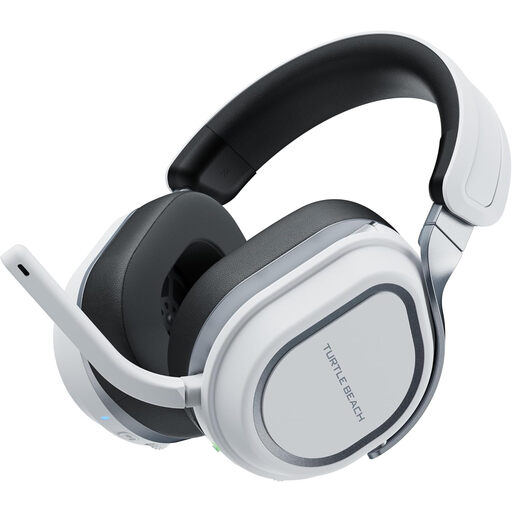 Image unavailable
Consider this wireless variant if you play on PS5, PS4 or PC away from your screen. If phone audio or calls must run alongside a game, confirm how this exact headset routes audio and its microphone before relying on both devices.
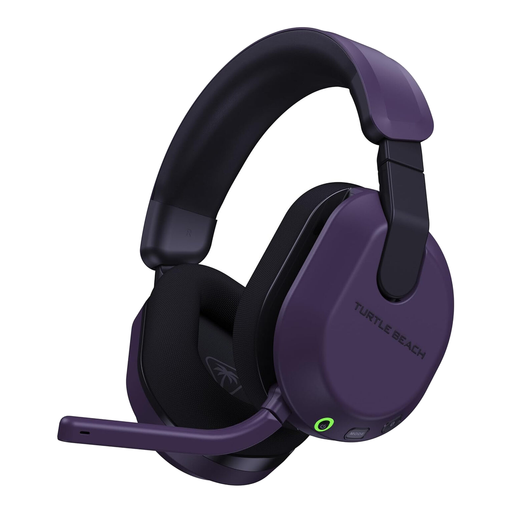 Image unavailable
This wireless variant is named for Xbox Series X|S, Xbox One and PC play where a headset cable would be inconvenient. Confirm its intended wireless connection on your device and allow for charging; do not assume the same connection route applies to PlayStation.
 Image unavailable
Consider the ROG Pelta if you want a wireless headset for a setup away from the display. Check the connection method for your exact console or PC before ordering; in particular, confirm compatibility separately if you intend to use an Xbox.
 Image unavailable
Consider this wired model if avoiding headset charging matters more than moving without a cable. Check that your controller or computer has a suitable connection, or identify the adapter you would need, before choosing it for large-screen play.
No. Screen size does not determine headset compatibility; the console or PC and the connection you plan to use do. Check the controller, USB or wireless route first, then set up the platform’s available headphone audio options.
Yes. Xbox Support says Windows Sonic can be used with a headset connected through the controller or an Xbox wireless accessory. Select the headphone setting on your Xbox rather than assuming a headset’s surround label determines the available option.
Open the PS5 sound settings and select 3D Audio for Headphones. PlayStation lets you create a personalised profile or choose a preset; compare the options by how clearly you can identify sound direction in your games.
Some dual-wireless headsets allow both audio sources, but microphone behaviour depends on the model. SteelSeries says the Arctis Nova 7 can play 2.4 GHz and Bluetooth audio together while its microphone sends voice to only one source at a time; check the manual for the headset you choose.
Check your local council’s electrical-equipment collection options or a retailer take-back route rather than putting it straight into ordinary household waste. GOV.UK guidance on electrical and electronic equipment notes that products can fall within its scope even when they do not connect to a mains supply.