
24/7 Customer Support

Free returns

Same-day & Next-day Delivery

Quality Guaranteed

Unlock Your Welcome Offers: FREE Delivery | Up to 80% OFF | Free 30-day JoyPlus trial
Download the APP
Buying gaming headsets can seem straightforward until you compare connection types, platform support, microphone performance and comfort. A low-priced headset may look suitable, but hidden compromises can lead to poor fit, unreliable chat or a connection that does not work with your console.
This guide explains the practical specifications to check before buying, then matches several options to different gaming habits and budgets.
An RGB gaming headset can add colour to a desktop setup, but lighting does not improve sound quality, microphone clarity or wireless reliability. Some models also require a separate USB connection for lighting while the audio uses a 3.5mm plug. Check how many ports your setup has and whether the lighting can be switched off.
A Bluetooth gaming headset is convenient for phones and tablets, but Bluetooth can introduce more delay than a dedicated 2.4GHz wireless connection. For competitive FPS games, look for a low-latency gaming headset using a USB receiver or choose a wired model.
Also check whether wireless audio works on your specific platform. For example, some headsets support PlayStation or Nintendo Switch through a USB dongle, while others only support Bluetooth or wired audio on selected devices.
“Noise-cancelling microphone” usually refers to reducing background sound picked up during voice chat. It does not necessarily mean active noise cancellation for the listener. A closed-back over-ear gaming headset can provide passive isolation, but the result depends on the ear-cup seal, materials and fit.
Choose the connection that matches how you play:
For PS5, Xbox and Nintendo Switch, always read the listed compatibility information. A headset that works with PS5 may not work wirelessly with Xbox, even if both consoles have USB ports.
A gaming headset with microphone should make voice chat clear without requiring constant adjustment. Useful features include a flexible boom, flip-to-mute function, removable microphone and in-line mute controls.
A unidirectional or directional microphone is generally intended to focus more on the speaker’s voice, while an omnidirectional microphone may capture sound from a broader area. If you play in a shared room, position the microphone close to your mouth and check whether the model offers software-based microphone adjustment.
For long sessions, check the headband padding, ear-cushion material, clamping pressure and overall weight. A soft memory-foam cushion can help distribute pressure, while an adjustable headband allows a more secure fit.
Over-ear gaming headsets should surround the ears rather than press directly on them. This can improve passive noise isolation, although glasses, hair and head shape affect the seal. Lightweight construction is helpful for extended use, but a lighter frame may use more flexible plastic, so look for replaceable cushions or reinforced components if durability is important.
A 40mm or 50mm driver describes its diameter, not automatically its sound quality. Stereo audio can be perfectly suitable for music, chat and most games. A surround sound gaming headset may use virtual processing to create a wider positional effect, often through console settings or PC software.
Features such as Windows Sonic, Dolby Atmos, DTS Headphone:X or 7.1 virtual surround may require platform support, software or an additional purchase. Treat them as compatibility features rather than a guarantee of improved performance in every game.
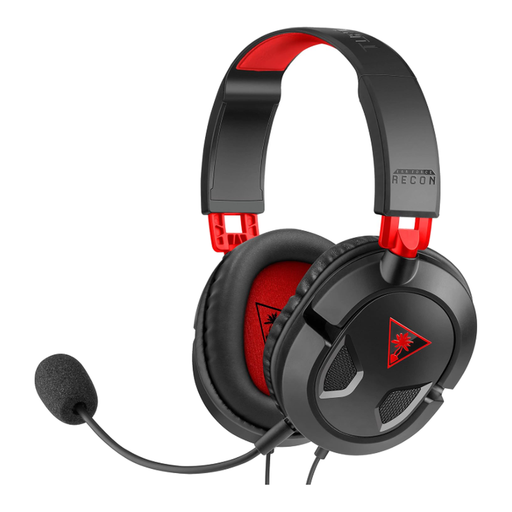
Why This Fits Their Persona: A practical choice for UK gamers starting with PC, Xbox or PlayStation gaming who prefer plug-and-play use without charging.
Its 3.5mm connection avoids battery and wireless compatibility concerns. The removable microphone also prevents it being in the way when listening to music or watching films.
40mm speakers, removable microphone, in-line volume and mute controls and broad compatibility through a 3.5mm jack.
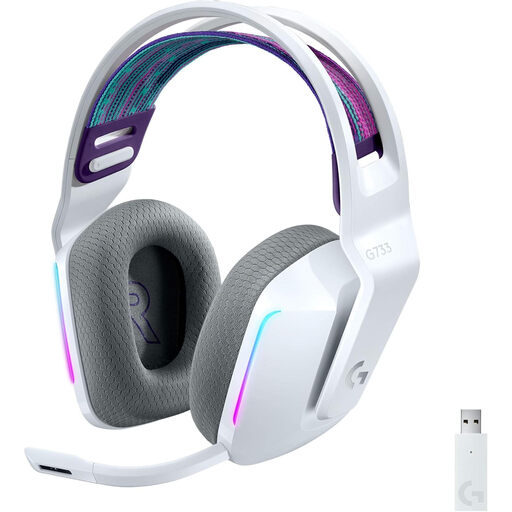
Why This Fits Their Persona: Designed for PC and PlayStation users who want wireless freedom, adjustable lighting and software controls for audio and microphone settings.
It uses a dedicated LIGHTSPEED USB receiver rather than relying only on Bluetooth. The stated battery duration also distinguishes use with lighting from use without lighting.
278g weight, up to 20m wireless range, up to 29 hours without lighting, detachable microphone and PC software support.

Why This Fits Their Persona: Suitable for regular PC and PlayStation players who want extended wireless sessions, Bluetooth switching and app-based audio adjustment.
It clearly separates 2.4GHz wireless for PC and PlayStation from Bluetooth for mobile use, helping buyers select the appropriate connection.
Up to 40 hours of battery life, QuickSwitch between sources, 40mm drivers, memory-foam cushions and a 10-band EQ in the companion app.
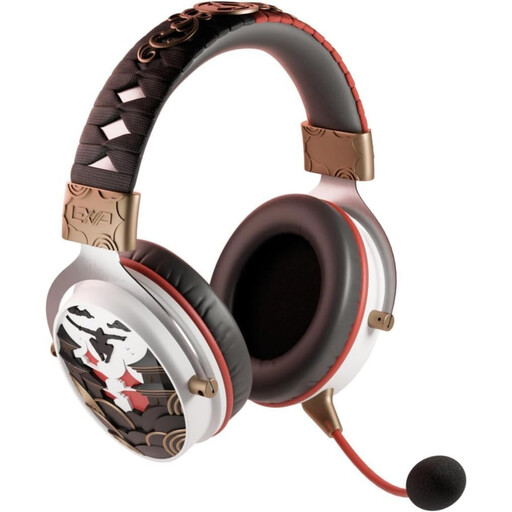
Why This Fits Their Persona: A flexible option for gamers moving between PC, PlayStation, Nintendo Switch and mobile devices, with themed styling for franchise fans.
It offers 2.4GHz, Bluetooth 5.4 and 3.5mm wired modes, so buyers are not limited to a single connection method.
50mm drivers, detachable microphone, up to 30 hours of wireless use and compatibility with PC, PS4, PS5, Switch, Android and iOS.
We have compiled a complete, real-time list of products that fully satisfy these strict selection criteria and UK safety regulations.
A wired gaming headset avoids battery management and usually provides a direct connection with no wireless pairing step. This can be useful for competitive players who prioritise consistent audio. A 2.4GHz wireless model can also be suitable when it is designed for low-latency use and the receiver is compatible with the gaming platform.
Lifespan depends on construction, storage and usage. Avoid stretching the headband unnecessarily, keep cables away from chair wheels and store electronic headsets in a dry place. Replaceable ear cushions and headband pads can be useful for frequent players because these parts experience regular wear.
A wired model uses power from the connected device, while a wireless headset needs periodic charging. Battery duration varies according to volume, lighting and connection mode. Turning off RGB lighting and charging with the supplied USB cable can help reduce unnecessary energy use. For hearing safety, keep volume at a moderate level and take regular breaks.