
24/7 Customer Support

Free returns

Same-day & Next-day Delivery

Quality Guaranteed

Unlock Your Welcome Offers: FREE Delivery | Up to 80% OFF | Free 30-day JoyPlus trial
Download the APP
Buying gaming headsets can seem straightforward until you compare wireless standards, platform support, microphone types and comfort features. A headset that works well with a PC may need a separate adapter for a console, while an impressive-looking RGB gaming headset may offer little benefit if its microphone or ear cushions are poorly designed.
This guide explains the practical specifications to check before buying, highlights common marketing traps and matches selected products to different gaming habits.
Bluetooth is convenient for phones, tablets and general listening, but it may introduce a delay that is noticeable in fast-paced games. A 2.4GHz wireless headset with a USB receiver is generally the more suitable option for responsive PC or console gaming, provided the receiver is compatible with your device.
Some models offer several connection methods. This can be useful, but check exactly which mode supports each platform. A headset may use 2.4GHz on a PC, Bluetooth on a mobile phone and USB-C or 3.5mm for wired play.
RGB lighting changes the appearance of a setup but does not improve sound quality, microphone clarity or comfort. If you are considering an RGB gaming headset, first check the practical features: ear cushion design, headband adjustment, connection type and control layout.
Lighting can also affect battery life. For example, the Logitech G733 lists up to 29 hours without lighting and up to 20 hours with standard lighting, so the advertised battery figure needs to be read in context.
A 3.5mm headset is often convenient for controllers, laptops and the Nintendo Switch, but desktop PCs may require separate microphone and headphone connections. Some wired models include a PC splitter for this reason.
For wireless models, verify whether the USB receiver is supplied and whether it connects through USB-A or USB-C. Also check whether the product is designed for your console. A PS5 gaming headset, Xbox gaming headset or Nintendo Switch headset may have different wireless requirements.
A wired gaming headset sends audio directly through a cable, avoiding battery charging and reducing the risk of wireless interference. Look for a removable or well-protected cable, especially if the headset will be used daily.
A Bluetooth gaming headset is useful for mobile devices and music, but Bluetooth alone may not be the preferred connection for competitive gaming. For quick-response play, consider a model with a dedicated 2.4GHz wireless connection or a wired mode.
Tri-mode headsets provide 2.4GHz, Bluetooth and wired connections. They tend to suit people who switch between a desktop, console and mobile device, although additional features can increase cost.
For multiplayer games and streaming, look for a gaming headset with microphone that can be positioned close to your mouth. A boom microphone is usually easier to position than a built-in microphone. Flip-to-mute or physical mute controls are useful when you need to stop transmitting quickly.
“Noise-cancelling microphone” generally refers to reducing unwanted background sound picked up by the microphone. It does not necessarily mean that the earcups actively block all outside noise. Read the product information carefully and consider whether the microphone is detachable, adjustable or equipped with a pop filter.
Over-ear gaming headphones should surround the ears without pressing heavily against them. Memory foam or fabric-covered cushions can be more comfortable during longer sessions, while synthetic leather may offer greater passive sound isolation but can feel warmer.
Check the listed weight where available. The ASUS ROG Pelta weighs 309g, the Logitech G733 weighs 278g and the Turtle Beach Airlite Fit weighs 228g. Weight is only one factor, as headband padding and clamping pressure also affect comfort.
Use a moderate volume and take regular breaks. Prolonged exposure to high volume may damage hearing, regardless of headset type.
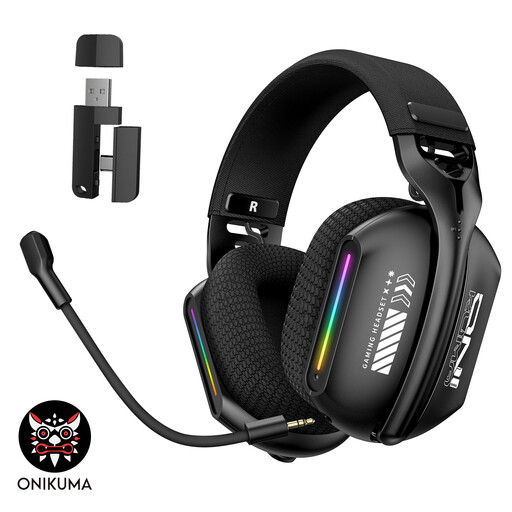
Why This Fits Their Persona: Its three connection modes suit new PC or laptop gamers who want to move between 2.4GHz wireless, Bluetooth V5.3 and wired use without buying separate headsets.
It provides more than Bluetooth alone, while the adjustable 360° microphone helps avoid the fixed-position microphone problem.
2.4GHz, Bluetooth and wired connectivity; memory foam ear cushions; adjustable headband; RGB lighting.

Why This Fits Their Persona: It is suited to players who want one headset for PC, PlayStation, Nintendo Switch and mobile devices, with detailed specifications and multiple connection options.
The listed tri-mode design makes the connection method clear, while the detachable boom microphone avoids committing users to a permanently extended mic.
50mm titanium-plated diaphragm drivers; USB-C wired mode; detachable microphone; up to 70 hours in 2.4GHz mode with RGB off.

Why This Fits Their Persona: The combination of 2.4GHz wireless for PC and PlayStation with Bluetooth for mobile use suits frequent players who regularly change devices.
Its QuickSwitch control makes the two wireless sources easier to manage, while the stated battery capacity helps buyers plan charging intervals.
Up to 40 hours of battery life; 10-band EQ through the Swarm II app; memory foam cushions; flip-to-mute microphone.
We have compiled a complete, real-time list of products that fully satisfy these strict selection criteria and UK safety regulations.
A low-latency 2.4GHz wireless headset can be suitable for competitive FPS play because it uses a dedicated USB receiver rather than standard Bluetooth alone. Wired models remain a straightforward option if you want to avoid charging and wireless pairing. Check that the headset supports your PC or console before ordering.
Lifespan depends on storage, cleaning, cable strain, battery care and frequency of use. Keeping the headset dry, wiping the earcups with a soft cloth and avoiding sharp bends in the cable can help. Models with replaceable ear cushions or headband pads may be easier to maintain over time.
Wired headsets draw power from the connected device, while wireless models need periodic USB-C charging. Charging frequency depends on battery capacity, lighting and volume. Turning off RGB lighting when it is not needed can reduce charging frequency on some models.