Choose a wired headset for a fixed commentary desk, a 2.4 GHz wireless model if moving without a cable matters, or a dual-wireless model if you also need to hear phone audio. Before choosing, check how the microphone works with your streaming device and software: PC-only voice controls and limits on sending microphone audio to two devices can change which connection suits you.
Who these headsets suit
Commentary-first PC streamers
If you stream from a fixed desk and want to adjust your voice, a wired USB headset with PC voice-processing controls is worth considering. Check that its software works on the computer you use for streaming; Logitech G, for example, limits the advanced Blue VO!CE controls on its PRO X Wired to PC use through G HUB.
Long-session wireless commentators
If you want to move around your home office without taking off your headset, compare charging arrangements, published weight and fit as well as the connection. SteelSeries and Razer state battery-life figures for relevant wireless models, but those figures do not tell you how comfortable a headset will feel throughout your stream.
Phone-and-game multitaskers
If you need to hear phone audio alongside your game, check for simultaneous audio mixing rather than Bluetooth alone. SteelSeries says its Arctis Nova 7 line can mix Bluetooth and 2.4 GHz audio, but its microphone cannot send your voice to both sources at once.
What matters when choosing
Decide how many audio sources you need to hear, then check the microphone path on your streaming platform. A cable, a wireless dongle and a phone connection solve different desk-setup problems.
Wired USB
Choose it when: You stream at a fixed PC desk and want a USB audio path without a charging routine.
Trade-off: The cable limits movement, and software controls may be PC-only; Logitech G specifies that advanced PRO X Wired features require G HUB on PC.
2.4 GHz wireless
Choose it when: You want game audio without a cable across your home-office desk.
Trade-off: Charging becomes part of your routine, and the dongle must work with your gaming and streaming devices.
2.4 GHz plus Bluetooth
Choose it when: You need to hear phone audio and game audio together; SteelSeries specifies this mixing for Arctis Nova 7 Gen 2.
Trade-off: Hearing both sources does not mean speaking to both: SteelSeries says the microphone cannot send voice to both during a Bluetooth call.
| Concern |
What to check |
Who this matters to |
| Commentary voice |
Check microphone operation on your streaming device and whether any voice-processing controls work there. Listen to a local recording before going live. |
If I want to adjust how my commentary sounds, I need controls that work in my actual streaming setup, not just a feature named on the box. Around 33% of consumers put voice control first. |
| Wireless movement |
Check the dongle connection, charging arrangements and whether the headset can be used while charging. |
When I step away from my desk during a long session, a cable gets in the way; I would rather manage charging than stay tethered. For around 27% of consumers, cable-free movement is the primary concern. |
| Comfort and room noise |
Compare published weight and earcup materials, and assess the fit. Keep listening volume moderate rather than turning it up to mask room noise. |
I may wear the headset for an entire stream, so fit and a manageable listening level matter more to me than extra audio modes. Wearing comfort and room noise come first for around 20% of consumers. |
| Device and audio routing |
Match the connector or dongle to your devices; if you need phone audio, confirm both audio mixing and where the microphone sends your voice. |
If I use a phone alongside my game, I need to know whether I can hear both and still send commentary where it belongs. Around 20% of consumers prioritise device fit and routing. |
Mistakes to avoid
-
Assuming microphone software works on every device
A headset can connect to more than one platform while its enhanced voice controls work on only one. Logitech G says advanced Blue VO!CE and DTS functions on the PRO X Wired require PC use through G HUB.
Check the exact model’s compatibility information, separating basic microphone operation from software-based processing.
-
Assuming dual audio means dual microphone output
Hearing a Bluetooth call and game audio together does not establish that your boom microphone can feed the call and stream simultaneously. SteelSeries says the Arctis Nova 7 microphone cannot send voice to both sources at once.
Map out which device needs to receive your voice before choosing a phone-plus-game headset.
-
Choosing by surround-sound claims alone
An advertised listening mode does not answer whether your streaming device receives the microphone or whether the headset fits comfortably through a long session.
Check your platform, connector, microphone controls, fit and charging needs before weighing optional listening modes.
-
Turning up the volume to cover room noise
The World Health Organization notes that louder sound and longer exposure increase the risk of hearing damage.
Start at a moderate volume, take listening breaks and assess whether a better-fitting headset helps you hear clearly without turning it up.
Brands to consider for this setup
Logitech G
Relevant if you want a PC desk headset with software-adjustable voice controls, or are considering a wireless gaming model.
- Logitech G specifies an external USB sound card and Blue VO!CE filters for the PRO X Wired.
- Its advanced Blue VO!CE and DTS functions on that model require PC and G HUB; do not assume they carry over to a console setup.
Razer
Offers wired USB and 2.4 GHz wireless BlackShark models relevant to different commentary desk arrangements.
- Razer specifies a USB Type-A audio path for the BlackShark V2 X USB and wireless, Bluetooth and wired-use modes for the BlackShark V2 HyperSpeed.
- Microphone descriptions and battery-life figures are manufacturer claims; check recorded voice quality and fit for your own setup.
SteelSeries
Relevant when hearing game audio and phone audio together is part of your commentary workflow.
- SteelSeries specifies simultaneous 2.4 GHz and Bluetooth audio for Arctis Nova 7 Gen 2.
- SteelSeries says the Arctis Nova 7 microphone cannot send voice to both sources at once during a Bluetooth call.
Audeze
Relevant if persistent home-office noise makes active noise cancellation a feature you want to assess.
- Audeze specifies planar magnetic drivers and active noise cancellation for Maxwell 2 ANC.
- Audeze says its laboratory noise-cancellation result can vary with fit, firmware, environment and noise source; it is not a promise of the same result at your desk.
Joybuy headset options
These options cover wired and wireless headsets for a home-office commentary desk. Choose by your device connections and microphone workflow rather than assuming every wireless model handles phone audio or every wired model uses USB.
 No image available
ASUS ROG Pelta Wireless Gaming Headset, Black
Consider this wireless model if you want to move around your home-office desk without a headset cable.
Check its connection mode, available ports and microphone routing against the devices you use to game and stream.
View on Joybuy
 No image available
Logitech ASTRO A10 Gen 2 Wired Gaming Headset, White
A wired option to consider if your commentary setup stays at one desk and you do not want a charging routine.
Check the audio connection and microphone operation with your streaming device; do not assume it has a USB audio path.
View on Joybuy
 No image available
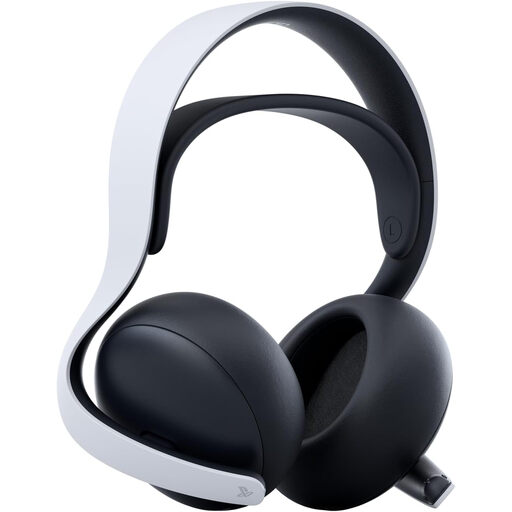
Sony PULSE Elite Wireless Headset, White
Consider this wireless headset if your gaming and streaming devices suit its connection arrangement.
Before planning to use phone audio during commentary, confirm both the audio-mixing behaviour and where the microphone sends your voice.
View on Joybuy
 No image available
Edifier G2II USB Wired Gaming Headset, Black
A USB wired option for a fixed commentary desk if that connection suits your streaming device.
Its product name specifies 50 mm drivers and names PC, Mac and PS4 compatibility. Check microphone operation and any software controls on the system you intend to use.
View on Joybuy
 No image available
ONIKUMA K8 Wired Gaming Headset with Flexible Mic
Consider this wired headset if a positionable microphone suits your fixed-desk commentary setup.
Its product name identifies PC and Xbox use. Check how both headset audio and microphone connect to your particular device before ordering.
View on Joybuy
Common questions
Does a wired USB headset make sense for game commentary?
Yes, if you stream from a fixed desk and your computer accepts its USB audio connection. Razer specifies USB Type-A connectivity for the BlackShark V2 X USB, while Logitech G specifies an external USB sound card for the PRO X Wired. Check that your streaming software recognises the microphone.
Can one headset play game and phone audio at the same time?
Some dual-wireless headsets can mix those sources: SteelSeries specifies 2.4 GHz game audio alongside Bluetooth phone audio for Arctis Nova 7. That does not make its microphone a two-device output; SteelSeries says it cannot send voice to both sources at once during a Bluetooth call.
Will headset voice-enhancement software work on a console?
Do not assume it will. Logitech G says the advanced Blue VO!CE and DTS features of its PRO X Wired work only on PC through G HUB. Check the exact model’s console compatibility separately from basic headset and microphone operation.
How can I keep listening comfortable during a long stream?
Start at a moderate volume, take breaks and check the fit before relying on a headset for long sessions. The World Health Organization notes that louder sound and longer listening duration increase hearing risk; if room noise makes you turn up the volume, assess the headset’s fit and isolation instead.


