What matters when choosing
Start with the device and connection you will use for practice, then assess how the headset fits over a full session and whether its audio and chat controls work on that device.
| Concern |
What to check |
Who this matters to |
| Fit over long sessions |
Compare the exact variant’s stated weight and cushion material; check fit-adjustment and return terms before relying on a comfort claim. |
If I practise for hours, pressure or heat could distract me before the session ends. Around 29% of consumers put long-session fit first. |
| Audio controls and cues |
Check which stereo, EQ or virtual-surround settings work on your device and whether they require software or activation. |
I want to adjust the sound for the cues I use in my game, without assuming a surround label will help. Around 29% of consumers chiefly prioritise audio control. |
| Connection and platform fit |
Match the exact variant’s cable or receiver to your main device; check gaming and Bluetooth modes separately. |
When I move during practice or switch devices, the connection must suit each setup. Roughly 24% of consumers put connection and platform fit first. |
| Team communication |
Check microphone operation on your device and whether the controls you need depend on an app. |
For coordinated drills, I need teammates to hear my calls through the connection I actually use. About 18% of consumers make team communication their primary concern. |
Joybuy headsets for these needs
These headsets offer wired or wireless choices for long gaming practice. Compare the connection and listed device support of each model with your setup; the product order is not a judgement that one fit or sound profile will suit everyone.
 No image available
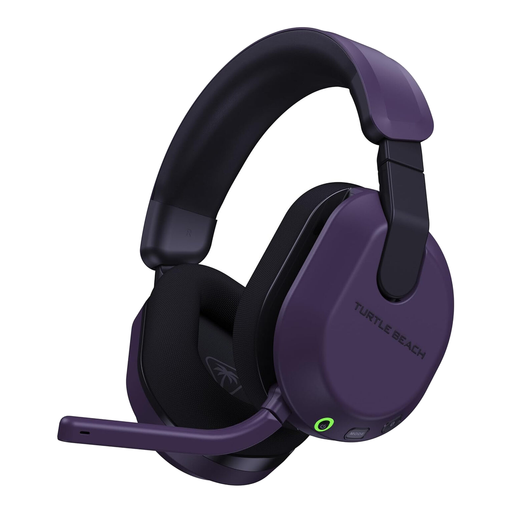
Turtle Beach Stealth 600 Gen3 Wireless, Xbox and PC, Purple
Consider this wireless option for practice on a listed Xbox or PC setup when avoiding a headset cable matters. Check the exact connection to your device and whether its fit suits a long session.
View on Joybuy
 No image available
ASUS ROG Pelta Wireless, Black
This is a cable-free option to consider if movement is central to your practice. Confirm how the wireless connection works with your gaming device and which audio controls are available on that platform.
View on Joybuy
 No image available
Logitech ASTRO A10 Gen 2 Wired, White
A wired headset suits desk-based practice if its connection matches your gaming device and you prefer not to manage charging. Allow for the cable when planning how far you move during play.
View on Joybuy
 No image available
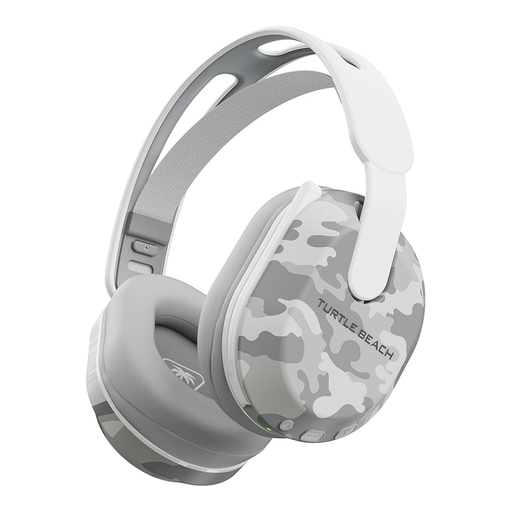
Turtle Beach Stealth 500 Wireless, PlayStation and PC, Arctic Camo
Consider this model for cable-free practice on a listed PS5, PS4 or PC setup, with Bluetooth for an additional connection need. Its title states up to 40 hours of battery life; check the gaming connection and device-dependent audio features before choosing it.
View on Joybuy
 No image available
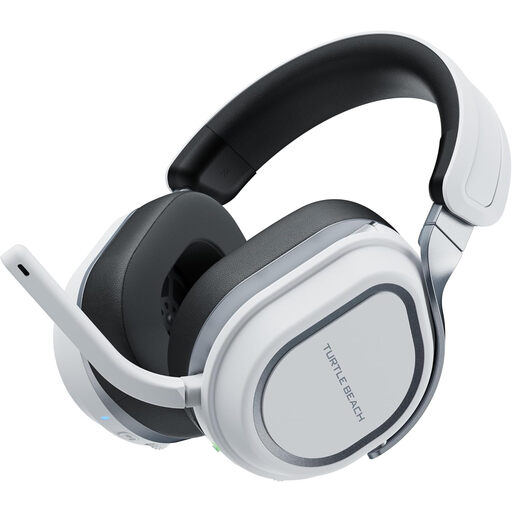
Turtle Beach Stealth 700 Gen 3 Wireless, PlayStation and PC, White
This wireless model is a choice to assess for practice on a listed PS5, PS4 or PC. Check its connection modes and personal fit before relying on it for extended sessions, particularly if you also plan to use another device.
View on Joybuy
Common questions
Should I choose wired, Bluetooth or 2.4 GHz wireless for competitive practice?
Choose by the connection supported by your main gaming device. A compatible wired headset avoids charging, while a model with a supported 2.4 GHz gaming connection removes cable drag; do not assume its Bluetooth mode serves the same gaming use.
Will a headset’s 7.1 surround feature work on both PC and console?
Do not assume it will: virtual surround can depend on the exact variant, operating system and software. Razer’s current UK BlackShark V2 X page specifies Windows 11 for its 7.1 feature, while a Joybuy Green-variant listing describes Windows 10 64-bit and registration or activation; check the model or MPN and its own instructions before buying.
How can I judge whether a headset will stay comfortable for a long session?
Use stated weight, cushion material and adjustment as shortlisting points, not a guarantee of fit. Consider pad options and the retailer’s return terms if pressure, heat or wearing glasses could affect your choice.
What should I do with an old gaming headset?
Use an appropriate electrical recycling or take-back route when the headset reaches the end of its useful life. In the UK, Recycle Your Electricals identifies retailer take-back, council services and recycling points as routes to check locally.


