Long-session support-role players
If you make frequent callouts and stay in team chat for extended sessions, consider how the ear cups and headband feel over time, how easily you can mute, and whether your voice remains intelligible in your room.


For long support-role sessions, choose a gaming headset by fit and practical microphone and mute controls before treating surround-sound labels as decisive. If you need phone audio without losing game sound, require explicitly simultaneous connections; otherwise weigh charging interruptions against cable drag and check compatibility with your gaming platform.
If you make frequent callouts and stay in team chat for extended sessions, consider how the ear cups and headband feel over time, how easily you can mute, and whether your voice remains intelligible in your room.
If you need game sound while monitoring a phone or second chat source, look for explicit simultaneous 2.4 GHz and Bluetooth audio. SteelSeries documents this on the Arctis Nova 7 Wireless Gen 2, while Razer documents it on the BlackShark V3.
If a charge break would disrupt practice, compare battery ratings in the connection mode you will use. HyperX gives separate 2.4 GHz and Bluetooth ratings for the Cloud III S Wireless; also check that the receiver works with your gaming device.
Start with fit and callout controls, then decide whether freedom from charging or hearing a second device matters more to your sessions.
| Concern | What to check | Who this matters to |
|---|---|---|
| Comfort over long sessions | Consider stated weight, ear-cup materials and headband adjustment; check how the fit works with glasses if you wear them. | If pressure or warmth distracts you during extended practice, fit takes priority over audio extras. Around 36% of consumers would put long-session comfort first. |
| Team communication | Check boom-microphone design, mute access and which microphone controls work on your platform. | When quick callouts matter, you need to mute promptly and be understood by teammates. Clear, controllable communication would come first for around 29% of consumers. |
| Charging continuity | Compare battery ratings in the same wireless mode and check whether the headset can be used while charging. | If charging breaks interrupt practice, time between charges may matter more than a cable-free setup alone. Around 21% of consumers would prioritise avoiding those interruptions. |
| Game and phone audio | Look for explicit simultaneous 2.4 GHz and Bluetooth support, not Bluetooth availability alone. | If you must hear a phone without leaving game audio, switching between connection modes will not meet that need. Concurrent audio would be the primary concern for around 14% of consumers. |
A headset that switches between Bluetooth and 2.4 GHz cannot keep phone audio and game sound playing together. SteelSeries describes simultaneous dongle and mobile audio for the Arctis Nova 7 Wireless Gen 2; Razer describes mode switching for the BlackShark V2 HyperSpeed.
Check the exact model specification for wording that confirms both audio sources can play simultaneously.
HyperX rates the Cloud III S Wireless for up to 120 hours on 2.4 GHz and up to 200 hours in Bluetooth mode. Its Bluetooth figure is not a like-for-like comparison with another headset's 2.4 GHz rating.
Compare the mode you will use for gaming, and check charging options if short breaks between sessions matter.
Weight is only one part of long-session comfort; clamp pressure, ear-cup shape and materials also affect how a headset feels to the wearer.
Use published dimensions and materials to narrow your choices, then check the retailer's return procedure before assessing fit.
Headset compatibility does not necessarily include every spatial-audio or EQ feature. Razer states that BlackShark V3 THX Spatial Audio 7.1.4 requires Windows 11 version 23H2 or later.
Check the requirement for the particular feature you want on your operating system, separately from basic headset compatibility.
The Arctis Nova 7 Wireless Gen 2 is worth examining if you need game audio and mobile audio at the same time.
The Cloud III S Wireless is relevant if you want a padded wireless headset with a detachable boom microphone and long rated battery life.
The BlackShark V2 HyperSpeed and BlackShark V3 illustrate different connection and communication priorities within Razer's headset range.
These wired and wireless gaming headsets offer different ways to manage long practice sessions and team chat. Check each model's connection and platform requirements against your setup rather than assuming the features discussed above apply to every headset.
 No image available
Consider this wireless model if you want to avoid cable drag during team practice. Assess its fit and microphone intelligibility with your setup before relying on it for long callout-heavy sessions.
 No image available
Choose a wired headset if avoiding battery charging matters more to you than moving without a cable. Check whether the cable placement, fit and voice-chat performance suit your gaming setup.
 No image available
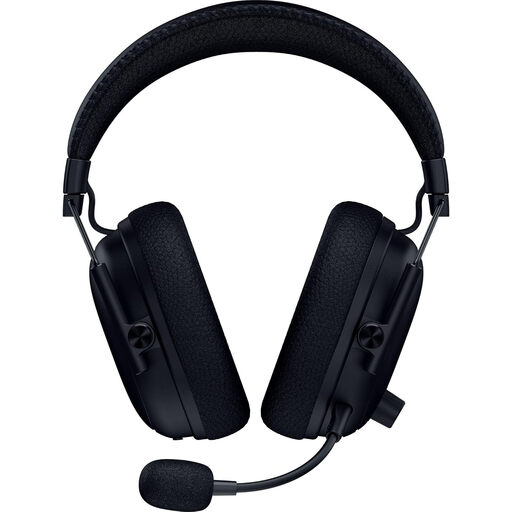
Consider this wireless model if quick access to team-chat controls is central to your practice. Its listing says this variant has no Bluetooth, so it is not the choice for hearing Bluetooth phone audio alongside game audio; check platform support for your device.
 No image available
This USB wired headset is a choice for a compatible desk-based gaming setup where charging is an unwelcome interruption. The product title lists 50 mm drivers; that specification alone does not establish how clearly you will hear teammates or how comfortable it will feel over time. The listing says it is not for Xbox.
Only if you need to hear a phone or another Bluetooth source while game audio continues. SteelSeries specifies simultaneous dongle game audio and Bluetooth mobile audio for the Arctis Nova 7 Wireless Gen 2; check the wording for the exact headset you are considering, because Bluetooth support alone does not promise this function.
Compare manufacturer ratings for the same connection mode. HyperX rates the Cloud III S Wireless for up to 120 hours on 2.4 GHz and up to 200 hours in Bluetooth mode, so its Bluetooth figure should not be compared directly with another headset's 2.4 GHz gaming rating.
Check the software requirement for the exact feature, separately from basic headset compatibility. Razer states that BlackShark V3 THX Spatial Audio 7.1.4 requires Windows 11 version 23H2 or later; that condition does not establish availability on a console or another operating system.
For applicable UK distance purchases, GOV.UK says consumers can tell the seller within 14 days of receiving an item that they want to cancel. Check the retailer's procedure and conditions before testing and returning a headset; change-of-mind cancellation is separate from remedies for goods that are faulty, damaged or misdescribed.