Console party-chat players
If you play on Xbox or PlayStation, check that the exact headset and connection method carry microphone chat on your console—not just game audio.


Choose the connection for your gaming device before comparing headset features. A compatible 3.5 mm headset can provide game audio and a microphone through a controller; USB and wireless models need model-specific checks for chat support, adapters and platform variants. If you mainly play at a PC or Mac desk and already have headphones, a separate USB microphone is another option, but it adds a second device to set up.
If you play on Xbox or PlayStation, check that the exact headset and connection method carry microphone chat on your console—not just game audio.
A wired connection avoids headset charging and wireless pairing. If you prefer cable-free play, check the required receiver, available USB port and the model’s stated PC compatibility.
At a PC or Mac desk, a separate USB microphone lets you keep your headphones, provided you have room for the microphone and can select it as your chat input.
Start with the device you play on and the connection it accepts, then check microphone chat and any features you expect to use. The four setups below solve different parts of that decision.
Choose it when: your controller or device has a compatible headset port and you want an integrated microphone without headset charging.
Allow for: a cable, and check which extra features work through that connection.
Choose it when: the exact headset states audio and microphone support over USB for your PC or console.
Allow for: a USB port; console compatibility and feature support vary by model.
Choose it when: cable-free play matters and the exact console or PC variant supports your intended wireless connection.
Allow for: charging and, depending on the model, an adapter, receiver or platform-specific version.
Choose it when: you already have headphones and mainly play at a PC or Mac desk.
Allow for: microphone placement and separate input settings; do not assume console chat support.
| Concern | What to check | Who this matters to |
|---|---|---|
| Platform and variant | Match the full model and variant name to your device; confirm that its stated connection carries both audio and microphone chat. | I switch between devices and need to know which connection actually handles chat on each one. Around 31% of consumers put exact platform fit first. |
| Simple voice chat | Check for an integrated microphone and mute control, plus a compatible 3.5 mm port if connecting through a controller. | I want to join a session without charging or pairing a headset, even if that means using a cable. Roughly 31% of consumers make straightforward voice chat their priority. |
| Cable-free use | Check the required receiver or adapter, its supported platform variant and the manufacturer’s battery estimate. | Moving without a controller cable matters more to me, and I can accommodate charging and wireless setup. Around 23% of consumers prioritise that flexibility. |
| Existing headphones | Check the microphone’s computer requirements, available USB connection and how your game or chat app selects an input. | I like my current headphones and have desk space for a separate microphone. Roughly 15% of consumers put keeping their headphones first. |
Xbox documents a console connection for its Xbox Wireless Headset but says that headset does not use a wired 3.5 mm connection. Logitech G also lists distinct Xbox and PlayStation versions of Astro A30.
Match the exact variant and its connection method to each device you intend to use; a Bluetooth label alone does not establish console chat support.
A wireless setup may also occupy a USB port and require charging.
SteelSeries says Arctis Pro can provide Xbox audio and microphone through a 3.5 mm controller connection, but ChatMix, surround sound and RGB are unavailable in that mode.
If a particular control or audio feature matters to you, check its availability for the exact platform and connection—not just whether the headset connects.
Elgato documents Wave:3 MK.2 as a computer-connected USB microphone. Using separate headphones and a microphone also means selecting the right audio input and positioning the microphone.
Consider this setup chiefly for PC or Mac desk play; confirm the individual microphone and chat application before relying on it elsewhere.
Xbox’s own connection guidance is useful when choosing between a controller-connected headset and an Xbox wireless model.
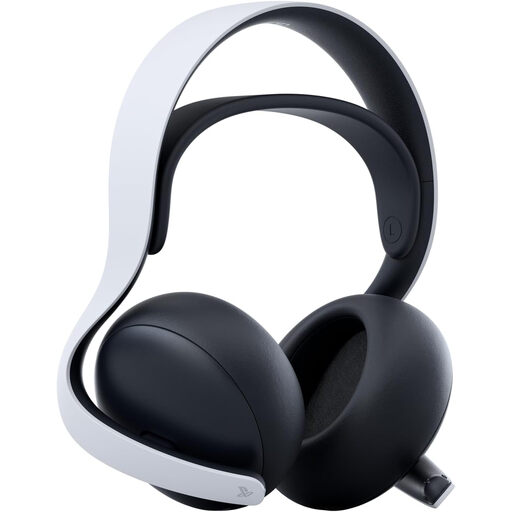
The PULSE Elite is a PlayStation wireless option for players considering PS5 alongside compatible PC or Mac use.
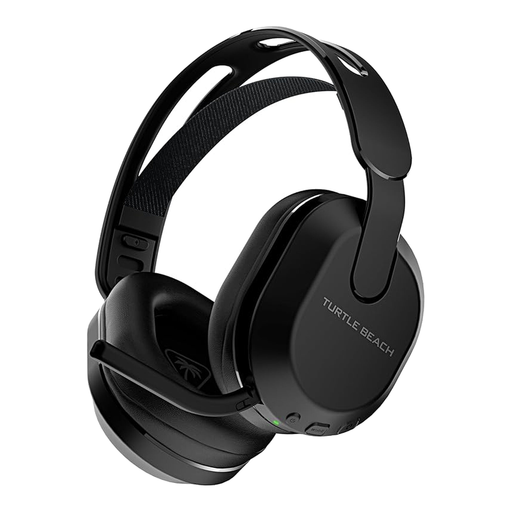
The Stealth 500 range is relevant to players considering a gaming wireless connection alongside Bluetooth.
Its wired A10 and wireless A30 lines address different connection preferences.
Its Arctis Pro documentation illustrates why connection and feature support need separate checks.
Wave:3 MK.2 provides a separate-microphone reference for a PC or Mac desk setup.
These choices cover wired 3.5 mm, wired USB and wireless headsets, plus a separate desk microphone. Choose by the connection and device you actually use; the microphone kit also requires separate headphones.
 No image available
Consider this for multiplayer chat through a compatible 3.5 mm controller or device port. Logitech G describes the A10 as a wired headset with a flip-to-mute microphone; check the port on the device you plan to use.
 No image available
Consider this for PS5 voice chat if you want the PULSE Elite wireless connection. PlayStation says it connects to PS5 using a PlayStation Link USB adapter; confirm the adapter is included with the item you receive. Check Xbox chat compatibility separately if you also play on Xbox.
 No image available
Consider this variant if you want cable-free play on one of its named platforms. Turtle Beach describes Stealth 500 wireless and Bluetooth connection options; check the exact variant’s receiver, microphone-chat support and charging arrangements. Confirm a different variant’s compatibility before buying for Xbox.
 No image available
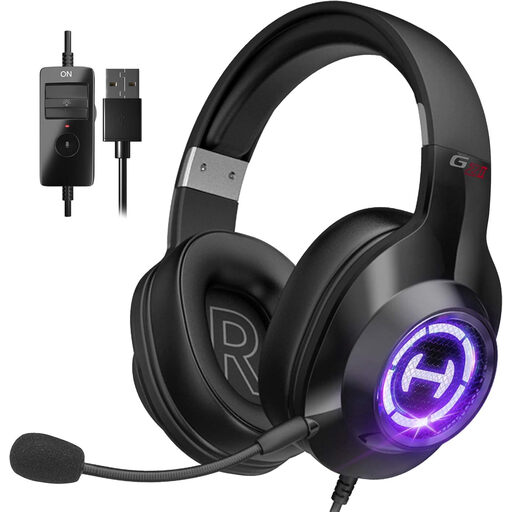
Consider this if you want a wired USB headset for a PC or PS4 setup. The listed configuration names a microphone and 50 mm drivers; confirm microphone-chat operation through the USB connection on your intended device. This listed model excludes Xbox.
 No image available
Consider this for a computer-desk setup if you want to keep using separate headphones. The kit names USB and XLR connections, a mute button, headphone jack and gain control. It is a microphone rather than a headset: check your chat app’s input settings and confirm console compatibility before considering console play.
Yes, if the headset and controller are compatible. Xbox Support says compatible headsets can connect through a compatible Xbox controller’s 3.5 mm jack; check the headset’s microphone provision as well as its audio connection.
No—do not treat Bluetooth support as confirmation of Xbox console chat. Xbox Support distinguishes its Xbox Wireless Headset’s console wireless connection from Bluetooth use with compatible other devices, so check the exact model’s Xbox connection method.
Yes. PlayStation Support says PULSE Elite connects to PS5 using its included PlayStation Link USB adapter. Check that the adapter is supplied with the item you buy; other wireless headset models may use different connections.
Yes, particularly for a PC or Mac desk setup where you can position the microphone and select it as the chat input. Elgato’s Wave:3 MK.2 documentation describes a USB-C computer connection and headphone-monitoring jack; confirm the requirements of whichever microphone and chat app you choose.