For ranked strategy matches at a fixed PC desk, a wired USB headset avoids charging; choose a wireless model with a dedicated 2.4 GHz gaming connection if movement or switching devices matters more. In a dark room, check that mute and volume controls are easy to reach, then confirm platform-specific features, microphone arrangements and fit before choosing.
Who needs which features?
Ranked strategy shot-callers
If you coordinate teammates throughout a match, microphone placement and a reachable mute control deserve attention alongside playback sound. SteelSeries and Razer describe these features on particular models, but their specifications do not establish how clearly you will be heard in your room.
Long-session desk players
If matches keep you at a PC for hours, weigh ear-pad material, fit and isolation against connection choice. A stated weight or cushion material can narrow your shortlist, but cannot settle comfort for your head shape or glasses.
Low-light setup minimalists
If you would rather adjust volume or mute without looking for an on-screen control, inspect the headset’s physical controls and connection routine. SteelSeries specifies on-ear volume and mute controls for the Arctis Nova 5.
What matters when choosing?
Wired USB at a fixed PC desk
Choose when: You mainly play at one PC and would rather avoid charging.
Trade-off: A cable limits movement, and advertised processing may depend on the operating system; Razer restricts the BlackShark V2 X USB’s 7.1 feature to Windows 10 64-bit.
Wireless gaming connection
Choose when: Leaving the desk without a cable or switching between compatible devices matters more. SteelSeries specifies 2.4 GHz and Bluetooth switching for the Arctis Nova 5.
Trade-off: Charging becomes part of your routine, and each connection mode needs to support your intended device.
| Concern | What to check | Who this matters to |
|---|
| Game-audio detail |
Try game cues with your preferred settings; confirm that any advertised spatial audio or EQ works with your platform and connection. |
I need to pick out alerts and teammate callouts without relying on a surround label as proof of clarity. Around 29% of consumers put game-audio detail first. |
| Team communication |
Check microphone arrangement, the mute control and any software requirements for voice processing. |
When I coordinate a team, being understood matters more to me than extra sound effects. Clear voice communication is the primary concern for around 29% of consumers. |
| Long-session fit |
Compare stated weight and pad materials, then check fit and the retailer’s change-of-mind return terms. |
I play for extended stretches and do not want pad pressure or heat to distract me. Around 21% of consumers prioritise comfort and isolation. |
| Low-light operation |
Locate physical mute and volume controls; confirm the connector or dongle and its device compatibility. |
In a dark room, I want to make common adjustments without searching the screen or changing a connection mid-match. Easy controls and a suitable connection come first for around 21% of consumers. |
Buying pitfalls
-
Assuming surround and voice software work everywhere
A connector that fits does not establish that every advertised software feature works. Razer limits the BlackShark V2 X USB’s 7.1 feature to Windows 10 64-bit; Logitech G says advanced Blue VO!CE and DTS Headphone:X 2.0 on the PRO X Wired work only on PC through G HUB.
Match the exact model, connection and feature requirements to the device on which you play.
-
Choosing wireless without planning for charging
Cable-free movement brings a charging routine. Manufacturer battery figures should not be treated as a guarantee for every volume level or connection mode.
Check the claimed runtime, charging connection and whether the exact model offers a wired fallback that suits your device.
-
Turning up the volume to overcome distractions
The World Health Organization’s 2025 guidance on video gameplay and esports addresses risks associated with unsafe listening; a headset’s isolation is not a reason to keep increasing volume.
Use a comfortable level and take breaks. Check the available volume controls rather than assuming a particular headset has a safety mode.
-
Treating pad material as proof of comfort
Stated weight and cushioning cannot tell you how a headset will fit with your glasses, ear shape or preferred room temperature.
Use those specifications to shortlist models, check the seller’s change-of-mind return terms and assess fit promptly after delivery.
Brands to consider
SteelSeries
The Arctis Nova 5 is a reference point for buyers considering wireless connection switching and headset controls.
- SteelSeries specifies 2.4 GHz and Bluetooth switching, on-ear mute and volume controls, and companion-app game-audio presets for the Arctis Nova 5.
- Check compatibility for the exact variant and your platform; presets are not evidence of a competitive advantage.
Razer
The BlackShark V2 X USB provides a wired-USB reference for a fixed PC setup.
- Razer specifies USB Type-A connectivity, a 240 g weight, closed earcups and a cardioid microphone for this model.
- Its advertised 7.1 feature is available only on Windows 10 64-bit, according to Razer; weight alone cannot establish comfort.
Logitech G
Its cited models illustrate different connection and PC-software considerations.
- Logitech G specifies LIGHTSPEED wireless, Bluetooth, 3.5 mm wired connectivity and a choice of leatherette or breathable-velour memory-foam pads for the PRO X 2 LIGHTSPEED.
- On the separate PRO X Wired, Logitech G limits advanced Blue VO!CE and DTS Headphone:X 2.0 features to PC use through G HUB.
Joybuy product choices
These choices cover wired over-ear headsets, a wireless over-ear option and wireless in-ear gaming earbuds. Use the connection and fit checks above to decide which form suits your ranked-match setup.
 No image available
ONIKUMA K8 wired gaming headset with flexible mic
Consider this over-ear model if you prefer a wired headset for team chat. Its title identifies a flexible microphone and RGB lighting; check the audio connections your device requires and whether the controls are easy to find by touch.
View on Joybuy
 No image available
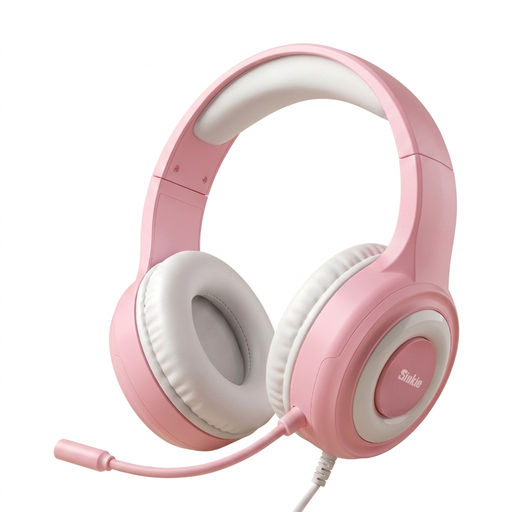
Siukie CH25 wired gaming headset, 50 mm driver
This over-ear option may suit a wired setup where its listed connections match your device. The title names a 3.5 mm jack and USB connection; confirm what each plug is used for and check the mute and volume control layout before buying for a dark room.
View on Joybuy
 No image available
Edifier G2II USB wired gaming headset, black
Consider this model for a fixed setup using a compatible USB connection and a microphone for team chat. Its title lists 7.1 surround and a 50 mm driver, neither of which establishes how clearly it will reproduce your game cues; confirm device compatibility and the physical control layout.
View on Joybuy
 No image available
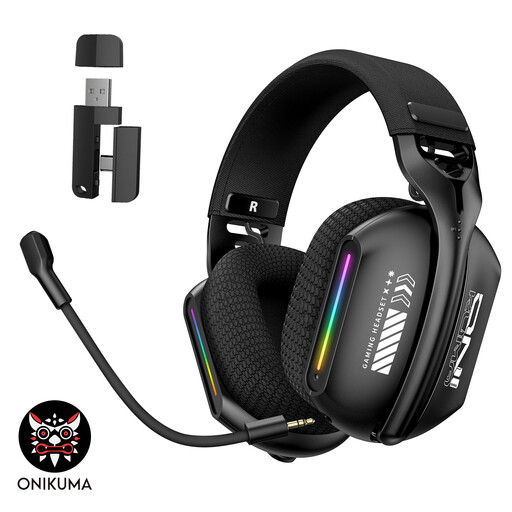
ONIKUMA GT808 triple-mode wireless gaming headset
This rechargeable over-ear model is worth considering if you want a wireless alternative to a fixed wired setup. Its title specifies 2.4 GHz wireless operation; confirm how each connection mode works with your device, along with charging needs and the mute and volume controls.
View on Joybuy
 No image available
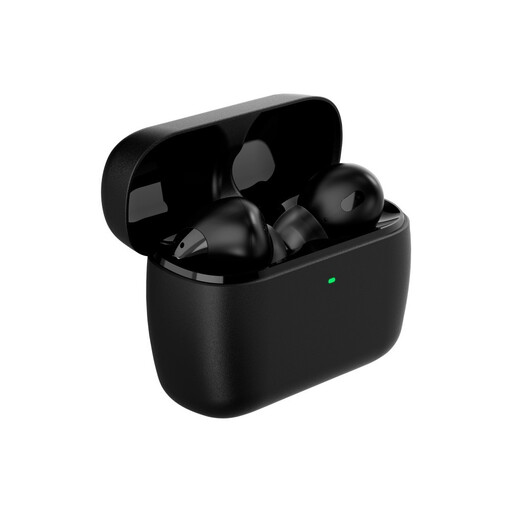
HyperX Cloud MIX Buds 2 gaming earbuds with mic
Choose an in-ear form only if it suits how you play through longer matches; these are earbuds, not an over-ear headset. Check the required connection for your gaming device, in-ear fit, battery routine and available controls before buying.
View on Joybuy
Frequently asked questions
Should I use a wired or wireless headset for ranked strategy matches?
Choose wired USB if you mainly play at one compatible PC desk and prefer not to manage charging; choose wireless if cable-free movement or switching devices matters more. Check that the exact wireless model has the gaming connection and dongle compatibility you need: SteelSeries specifies 2.4 GHz and Bluetooth switching for the Arctis Nova 5, while Logitech G lists LIGHTSPEED, Bluetooth and 3.5 mm options for the PRO X 2 LIGHTSPEED.
Will surround sound or microphone software work on every device?
No: those features can depend on the exact headset, operating system and software. Razer restricts the BlackShark V2 X USB’s 7.1 feature to Windows 10 64-bit; Logitech G says advanced Blue VO!CE and DTS Headphone:X 2.0 on the PRO X Wired work only on PC through G HUB.
How should I manage volume during long matches?
Keep volume at a comfortable level rather than repeatedly increasing it to overcome distractions, and take breaks. The World Health Organization’s 2025 safe-listening guidance addresses video gameplay and esports, but its recommended device and software measures should not be assumed to exist on every headset.
What if a headset bought from a trader is faulty?
Contact the seller and keep proof of purchase; a faulty-goods remedy is distinct from a retailer’s voluntary change-of-mind return policy. GOV.UK’s guidance on the Consumer Rights Act 2015 describes repair or replacement remedies for faults discovered more than 30 days after purchase or delivery. Which remedy applies depends on the circumstances of the fault.


