For competitive replay review in a dark room, start with audio settings you can use on your platform, a fit you can tolerate through long sessions and controls you can find by touch. A wired headset suits a desk-based setup without battery charging; multi-mode wireless suits switching between supported devices. Consider premium wireless features only if their microphone or tuning options serve your review routine, rather than assuming a manufacturer's positional-audio or latency claim will improve every game.
Who this choice matters to
Competitive replay analysts
If you repeatedly pause and review plays to locate footsteps, shots or other directional cues, check whether the headset's EQ or game-audio profiles work with your review platform. A listed audio feature does not establish that it will clarify every game's mix.
Long-session night reviewers
If you wear a headset for extended sessions, compare cushion materials, stated weight and controls you can find without bright lighting. Clamp pressure, seal and comfort still depend on your fit.
Team-review communicators
If you discuss clips live, check the microphone and any voice-processing options on your chosen platform. Consider how much room noise you want to block without losing awareness of important sounds around you.
What to check when choosing
Wired at the desk
Choose when: You review mainly at one desk and prefer not to manage a headset battery.
Trade-off: The cable limits movement, and features such as the Razer BlackShark V2 X's listed 7.1 surround have platform conditions.
Multi-mode wireless
Choose when: You want to move between supported gaming and Bluetooth devices or adjust the headset without reaching for a cable.
Trade-off: Connection modes and controls vary by model and platform version, and battery ratings are manufacturer claims.
Premium competitive wireless
Choose when: You will use the model's microphone settings or software audio tuning during regular team review.
Trade-off: Advanced specifications do not establish a more comfortable fit or a clearer replay mix for your game.
| Concern | What to check | Who this matters to |
|---|
| Replay audio cues |
Check whether EQ, presets or spatial-audio settings work with your platform and game; compare settings using familiar clips. |
When I review a close play, I want to pick out directional cues without assuming a preset improves the original mix. Roughly 33% of consumers put replay-audio cues first. |
| Long-session comfort |
Compare stated weight and cushions, then assess seal and pressure, particularly if you wear glasses. |
For a lengthy night session, I need a headset I can keep wearing without distracting pressure or heat. Comfort is the primary need for roughly 27% of consumers. |
| Dark-room controls and devices |
Locate volume and mute controls; confirm the connection mode and platform version for each device you use. |
I want to adjust volume by touch and move between my review devices without breaking concentration. Around 20% of consumers chiefly value those controls and connections. |
| Calls and room noise |
Check microphone and voice-software support, alongside how much surrounding sound the earcups block. |
If teammates discuss clips with me, they need to hear my commentary, while I may still need to notice sounds in the room. Clear communication and manageable noise come first for roughly 20% of consumers. |
Buying pitfalls
-
Assuming audio software works on every platform
A surround or EQ option can depend on the operating system and exact model. Razer specifies Windows 11 for the BlackShark V2 X's 7.1 surround feature.
Check the feature requirements against the device, game and software you use for replay review.
-
Treating wireless modes as interchangeable
Bluetooth, 2.4 GHz wireless and device-specific pairing are different connection routes. HyperX limits Cloud III S Wireless Instant Pair compatibility to selected OMEN laptops; SteelSeries describes switching between 2.4 GHz and Bluetooth on the Arctis Nova 5.
Confirm the connection each review device requires and whether the exact headset version supports it.
-
Expecting premium specifications to improve every replay
A microphone or latency claim does not show that a headset will fit you better or make every game's audio easier to interpret.
Consider premium wireless features when you will use their microphone or tuning controls; otherwise compare what a wired or other wireless model offers for your routine.
-
Turning up the volume to overcome background noise
Long, loud listening sessions can put hearing at risk. Isolation can reduce distractions, but it may also make important room sounds harder to notice.
Keep volume only as high as needed, reduce external noise where practical and take listening breaks.
Relevant brands to consider
SteelSeries
The Arctis Nova 5 is relevant if tactile controls and switching between supported wireless connections matter during review.
- SteelSeries lists on-ear controls, 2.4 GHz/Bluetooth Quick-Switch and more than 100 game-audio presets for the Arctis Nova 5.
- Choose the version for your primary platform and check that the presets you want apply to your game; the stated battery life is a manufacturer rating.
Logitech G
The PRO X3 LIGHTSPEED is relevant to PC-oriented reviewers who intend to configure audio and microphone settings.
- Logitech G lists a 10-band EQ and a 48 kHz/16-bit microphone for the PRO X3 LIGHTSPEED.
- Check software support on your platform and assess fit separately; those specifications do not establish an advantage in every replay mix.
Razer
The BlackShark line offers a wired V2 X route and a wireless V3 Pro route with different connection and feature priorities.
- Razer lists the BlackShark V2 X at 240 g with memory-foam cushions and a cardioid microphone.
- Its listed 7.1 surround requires Windows 11. Razer's low-latency statement for the V3 Pro is a manufacturer claim, not a result to assume across setups.
HyperX
The Cloud III S Wireless is relevant if you value a choice of supported wireless connection modes and a long claimed battery rating.
- HyperX lists 2.4 GHz wireless, Bluetooth or Instant Pair and a claimed battery life of up to 120 hours.
- Instant Pair is specified for selected OMEN laptops; check your device and connection mode before relying on it.
Joybuy headset choices
These wired and wireless headsets offer different starting points for desk-based replay review, tactile adjustment and platform choice. Check the exact variant and the audio features you intend to use before selecting one.
 No image available
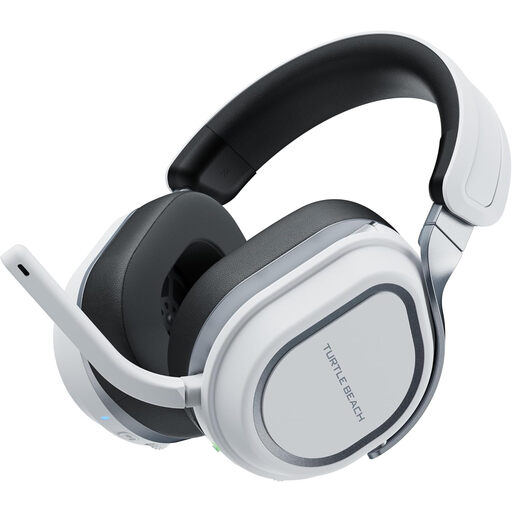
Turtle Beach Stealth 700 Gen 3 Wireless, PlayStation/PC, White
Consider this variant if wireless replay review across your supported PlayStation or PC setup matters. Its title identifies PS5, PS4 and PC; check that the controls and audio settings you want work on your chosen device, and assess fit for long sessions.
View on Joybuy
 No image available
ASUS ROG Pelta Wireless, Black
This wireless option is worth considering if you want to compare audio settings during replay review. Confirm which Armoury Crate EQ or virtual-surround functions work on your platform, and compare any available mode with the game's native mix.
View on Joybuy
 No image available
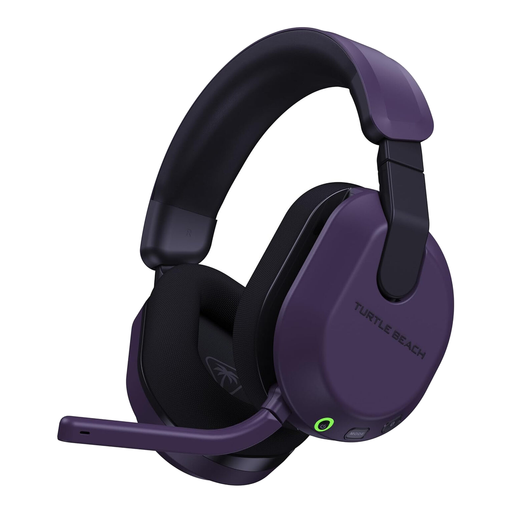
Turtle Beach Stealth 600 Gen3 Wireless, Xbox/PC, Purple
Consider this variant if your replay-review setup uses Xbox or PC and you prefer wireless connection. The title identifies Xbox Series X|S, Xbox One and PC; confirm the connection mode and audio-feature support on the exact device you use.
View on Joybuy
 No image available
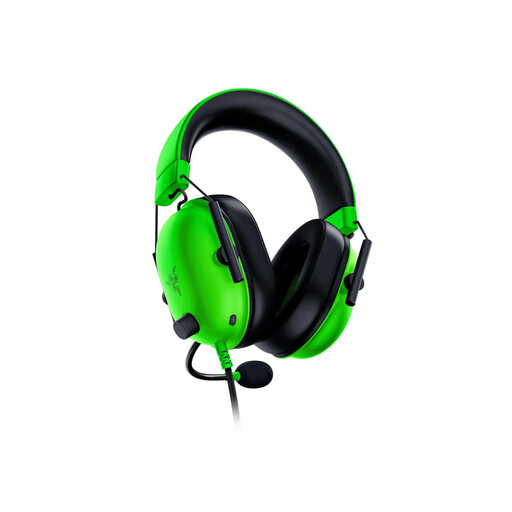
Razer BlackShark V2 X, Green
This wired model suits a desk-based review setup if your device has a suitable headset connection. Razer lists the BlackShark V2 X at 240 g with memory-foam cushions; check fit yourself and confirm the Windows version and activation requirements before relying on its 7.1 surround feature.
View on Joybuy
 No image available
Edifier G2II USB Wired, Black
Consider this USB wired headset if you review replays at a PC or PS4 and need a microphone. The product title lists a 50 mm driver and 7.1 surround feature; check whether its software audio settings work on your exact device before making them part of your decision.
View on Joybuy
Frequently asked questions
Do I need a special headset because the room is dark?
No special audio specification follows from room darkness. Controls you can find by touch are more relevant to adjusting volume or mute without turning on bright lighting; SteelSeries lists on-ear controls on the Arctis Nova 5.
Should I use surround audio when reviewing competitive replays?
Use it only if the feature works on your device and helps you interpret familiar clips. Razer specifies Windows 11 for the BlackShark V2 X's 7.1 surround; compare an available headset setting with the game's native mix rather than assuming surround is more accurate.
How can I judge comfort before a long review session?
Use stated weight and cushion construction to narrow your options, then assess fit if possible and check the seller's return terms. Razer lists the BlackShark V2 X at 240 g with memory-foam cushions, but those details cannot predict pressure or comfort for every wearer.
How should I manage volume during long night sessions?
Keep the volume only as high as needed and take regular breaks. Royal Free London NHS Foundation Trust advises keeping headphone volume at no more than 60% of maximum, limiting use to an hour at a time and taking at least a five-minute break each hour.


