Who this choice matters to

Players using more than one platform

If you move between a PC and consoles, check the connection and voice-chat route for each device. PlayStation Support UK describes a specific adapter route for PULSE Elite on compatible computers; a console label alone does not establish compatibility with your other systems.

Players sharing a quiet home

If someone nearby is sleeping, studying or watching television, consider what they can hear from your earcups as well as what your microphone picks up. RTINGS found disappointing external-noise isolation in its test of the Arctis Nova 5 family, illustrating why the exact model matters.

Players focused on team chat

If teammates need to hear you clearly during games, check the microphone design and the supported chat connection before choosing extras for phone listening. RTINGS identifies gaming dongles as a route for keeping wireless game audio in sync.

What to check before buying

Wired headset

Consider it when: You play from one position and would rather use a cable than manage charging.

Trade-off: The cable limits movement, and you still need to confirm that its plug and microphone work with your controller or device.

Gaming dongle or base-station wireless

Consider it when: You want freedom to move around your setup and a gaming-focused wireless connection; RTINGS favours dongle-based connections where game-audio timing matters.

Trade-off: You need compatible connection hardware and space for any base station, as well as a charging routine.

ConcernWhat to checkWho this matters to
Platform and chat compatibility Match the exact variant, connector or adapter and voice-chat route to your devices and games. Nintendo UK says Switch 2 cannot use Bluetooth microphones. When I move between systems, I need game sound and my microphone to work on the device I actually use. For roughly 36% of consumers, compatibility is the primary concern.
Sound around other people Look for model-specific leakage and isolation evidence, then assess the headset at your usual listening volume. Playing while someone nearby needs quiet makes me care about how much game sound escapes into the room. Around 29% of consumers put disturbance control first.
Game timing and voice clarity Check the supported gaming wireless link and microphone arrangement; seek tests of the exact connection where timing matters. In team games, I need speech others can understand without game audio feeling out of sync. Clear chat and timing are the main priority for roughly 21% of consumers.
Comfort and daily upkeep Assess fit and earcup pressure; for wireless models, consider charging and where any base station will sit. During longer sessions, I want a headset I can wear comfortably without an awkward charging routine. Roughly 14% of consumers make comfort and ease of use their primary concern.

Buying pitfalls

  • Assuming Bluetooth game audio includes microphone chat

    A Bluetooth headset can play sound on Nintendo Switch 2, but Nintendo UK says its Bluetooth microphone cannot be used and audio latency may occur.

    Check whether your game uses in-game chat, console chat or a phone app, then confirm a microphone connection that works with that route.

  • Choosing by model family rather than platform variant

    Similarly named wireless headsets can use different console connections or adapters. Support for one system does not establish support for another.

    Check the complete variant name and the supplied adapter or cable against every device on which you intend to use voice chat.

  • Treating earcup design as proof of quiet play

    External-noise isolation, sound leakage and microphone noise handling are different properties. RTINGS found disappointing isolation in its tested Arctis Nova 5 family; that result should not be assumed for every headset.

    Seek tests of the exact model and assess leakage in your room at a moderate listening volume.

  • Adding a base station without planning the setup

    A base station can help with switching between supported systems, but it adds hardware to the playing area and does not establish better household-noise isolation.

    Consider one if its supported switching arrangement serves the systems you use; otherwise check whether a simpler connection meets your needs.

    Allow space for the station and its connections, as well as time to manage charging and setup.

Brands to consider

SteelSeries

The Arctis Nova 5X is relevant if you want to investigate a dongle-based headset for several systems. SteelSeries UK lists PC, PlayStation and Switch among its supported devices.

  • Its published device list gives you specific connections to check against your setup.
  • Check Xbox and chat support for the exact variant and connection. RTINGS found poor external-noise isolation in its tested Nova 5 family.

Logitech G ASTRO

The ASTRO A50 Gen 5 is aimed at a setup that switches between gaming systems through its base station, according to Logitech G UK.

  • Logitech G UK lists Xbox, PS5, PC and Nintendo Switch among the systems supported by its PLAYSYNC Audio arrangement.
  • Plan for a base station and check the exact variant. RTINGS' low-latency finding for A50 X must not be assumed to apply to A50 Gen 5.

Sony PlayStation

PULSE Elite suits investigation for a PS5-led setup that may also include a compatible computer. PlayStation Support UK describes using its PlayStation Link USB adapter with compatible PC and Mac USB-audio devices.

  • The stated adapter route makes the intended PS5 and compatible-computer connections clear.
  • Do not assume voice-chat support on another console; check its connection separately. Sony's latency and microphone-noise-rejection descriptions are manufacturer claims.

Razer

Razer positions Barracuda X for players who also want to switch between gaming and phone audio.

  • Razer describes 2.4 GHz and Bluetooth switching and a detachable microphone for Barracuda X.
  • Check console support for the exact version. Nintendo UK says Bluetooth microphones cannot be used on Switch 2, regardless of the headset's microphone hardware.

Joybuy product choices

These headsets cover wired choices for a fixed gaming position, an Xbox-and-PC-oriented wireless choice, and a PlayStation-led wireless choice. Check each model against your own chat route and shared-room needs.

White Logitech ASTRO A10 Gen 2 gaming headset

Logitech ASTRO A10 Gen 2 Wired Headset – White

Consider this wired option if you play from a fixed position and want to avoid charging. Confirm that its connection and microphone suit your controller and game chat, and assess sound leakage at your usual volume.

View on Joybuy
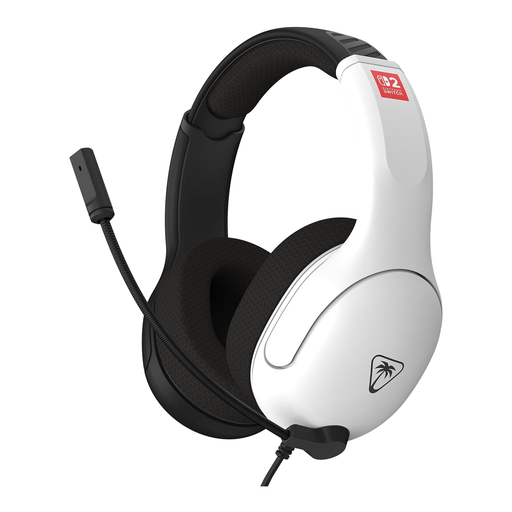
Black and white Turtle Beach Airlite Fit NSW2 headset

Turtle Beach Airlite Fit NSW2 Headset – Black & White

This is a wired choice to consider for Nintendo Switch 2 play. Confirm that its microphone works with your particular game and chat method; wired operation alone does not settle that question. Assess leakage in the room where you play.

View on Joybuy
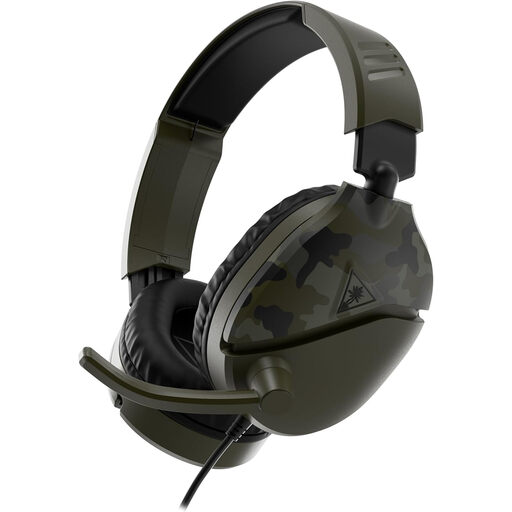
Camo green Turtle Beach Recon 70 gaming headset

Turtle Beach Recon 70 Gaming Headset – Camo Green

Consider this wired model if you want to check one headset against several gaming devices. Its product title names Xbox Series X|S, Xbox One, PS5, PS4, Nintendo Switch and PC; verify the connection and microphone chat path for each device you will use. Check leakage separately.

View on Joybuy
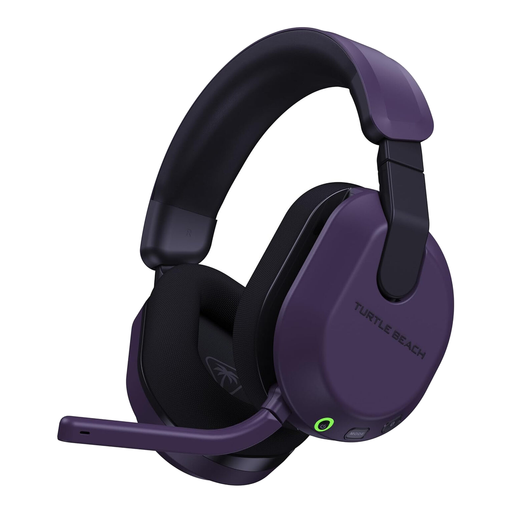
Purple Turtle Beach Stealth 600 Gen3 wireless gaming headset

Turtle Beach Stealth 600 Gen3 Wireless Headset – Xbox/PC, Purple

Consider this wireless model for an Xbox or PC multiplayer setup where movement matters. Check transmitter and game-chat compatibility for your exact device, plan for charging, and assess leakage before relying on it in a quiet room.

View on Joybuy
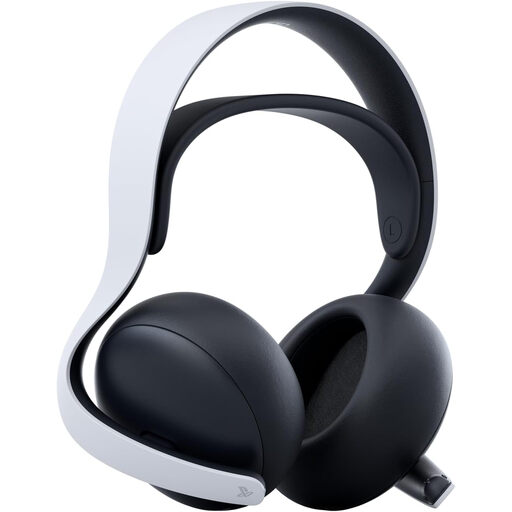
White Sony PULSE Elite wireless headset

Sony PULSE Elite Wireless Headset – White

Consider PULSE Elite for a PS5-led setup. PlayStation Support UK describes its PlayStation Link USB adapter route for PS5 and compatible PC or Mac USB-audio devices. Check any other console connection separately, and assess leakage in your room.

View on Joybuy

Frequently asked questions

Can a Bluetooth headset provide voice chat on Nintendo Switch 2?

Not through its Bluetooth microphone: Nintendo UK says Switch 2 cannot use Bluetooth microphones, although it can pair with Bluetooth audio devices. Nintendo also warns that Bluetooth audio latency may occur, so confirm a supported microphone route for the chat method you intend to use.

Does an Xbox Wireless Headset connect to a Windows PC the same way it connects to Xbox?

Not necessarily. Xbox Support describes Bluetooth or a compatible USB-C cable as Windows connection routes for the Xbox Wireless Headset. Check the headset generation and the connection you plan to use before assuming the Xbox console connection carries over.

How can I tell whether a headset will disturb someone nearby?

Assess sound escaping from the headset at your normal game and chat volume in the room where you play. Ask someone nearby what they can hear, and check whether outside noise makes you raise the volume; RTINGS' isolation finding for the tested Arctis Nova 5 family shows why earcup design alone is not enough to judge the exact model.

What if a headset does not match its description?

For UK purchases, GOV.UK says a refund must be offered if an item is faulty, misdescribed or does not do what it is supposed to do. That is different from deciding a correctly described headset is uncomfortable or leaks too much sound for your room; check the retailer's change-of-mind terms before ordering if you need to try it at home.