Who this suits

Late-night shared-house gamers

Students who need personal game audio while housemates are studying or sleeping, and who benefit from a quick physical mute control for chat. A headset can contain your own game audio, but it cannot settle wider household noise issues.

Students switching between devices

Players moving between a laptop, console and phone who need to check the actual connection route, whether that is a controller jack, USB audio, a wireless dongle or Bluetooth.

Console-first voice-chat players

PS5- or Xbox-primary players who want platform-specific pairing and chat controls, while still checking what changes when they use a PC, mobile device or another console.

Buying priorities

Wired 3.5 mm

Choose it when: You use several devices with a compatible headset socket and want a setup without charging or wireless pairing.

Keep in mind: USB-only surround or software features may not work through a controller jack.

USB-dongle wireless

Choose it when: You need wireless game audio on compatible PC, PlayStation, Switch or USB-C devices and may switch to a phone.

Keep in mind: Check the exact platform edition, charging routine and whether Bluetooth can do the job you expect.

Console-specific wireless

Choose it when: One console is your main system and its direct pairing and chat controls matter more than universal compatibility.

Keep in mind: Controller-jack, Bluetooth and PC functions can be more limited than on a general-purpose wired headset.

Priority What to check Your needs
Connection and chat compatibility Check the headset plug, dongle or wireless protocol against your exact console, controller, laptop and chat app. Confirm whether the device uses a combined headset socket and which controls work on each connection. I need both game audio and microphone input on the device I actually use, not just a headset that connects in some form.
Microphone control Look for a reachable mute button, flip-to-mute or retractable boom. Check whether mic monitoring, auto-mute or voice isolation works through your intended wired, USB or Bluetooth route. I want to stop voice transmission quickly when someone nearby is studying or asleep, while keeping my speaking level down.
Comfort and upkeep Compare maker-stated weight only for the exact variant. Check pad material, clamp feel, glasses comfort and whether replacement cushions are available for that model in the UK. I need a fit I can wear for study and play sessions; listed weight or memory foam alone cannot predict comfort for me.
Wireless charging and service Use advertised battery life as a charging-frequency guide rather than a guarantee. Confirm the receiver, dongle and seller support route, and keep your order confirmation. I can accept charging if wireless movement matters, but I also want to know what happens if a dongle, cable or ear pads need replacing.

Common buying pitfalls

  • Assuming wireless works on every console

    Bluetooth, USB-dongle wireless, PlayStation Link and Xbox wireless are different systems. For example, the Xbox Wireless Headset has no 3.5 mm audio, while PULSE Elite uses its PlayStation Link adapter for PC and Mac.

    List your main device, controller model and available ports before buying, then confirm the exact headset variant and the features available over each connection.

  • Mistaking chat noise reduction for room-noise control

    Auto-mute, voice isolation and microphone processing affect what chat listeners receive; they do not make your spoken voice inaudible to someone in the same house.

    Choose an easy-to-reach mute method, lower your speaking volume and agree quiet periods separately with housemates.

  • Paying for PC USB features you cannot use through a controller

    Some surround and software functions need a USB adapter and desktop software. A controller-jack connection can be a different operating mode.

    Separate essential connection and chat functions from optional PC software features before deciding which model is worth considering.

  • Ignoring pads, dongles and proof of purchase

    Ear cushions and wireless accessories can be model-specific, while warranty claims may need to begin with the original seller and require proof of purchase.

    Check UK availability of replacement cushions, dongles and cables for the exact model, save your invoice and use a seller whose support route you can access.

Relevant headset brands

SteelSeries

A multi-platform headset brand with wired and wireless Arctis Nova models. The Nova 5P is aimed at users who need USB-C-dongle game audio across compatible devices and Bluetooth switching.

  • SteelSeries states that the Nova 5P supports PC, PlayStation, Switch, Chromebook, selected handhelds and compatible USB-C phones and tablets.
  • Platform edition matters; a PlayStation-oriented model should not be assumed to support Xbox wireless features.

PlayStation

Official PlayStation audio hardware for PS5-first students who want PlayStation Link connectivity and a retractable boom microphone.

  • PULSE Elite has physical volume and microphone-mute controls, plus stated Bluetooth and PlayStation Link options.
  • Sony says not all devices work with the headset, and PC or Mac use relies on the supplied adapter.

Xbox

An official Xbox option for Xbox-first players who want direct console pairing and Xbox-oriented game and chat controls.

  • Microsoft lists compatibility with Xbox Series X|S, Xbox One, Windows PCs and Bluetooth-capable mobile devices, with microphone monitoring and voice-isolation features.
  • It has no 3.5 mm wired audio, and its game/chat balance dial does not work over Bluetooth.

Corsair

A wired-headset option for students prioritising a no-charging, controller-friendly 3.5 mm route across compatible devices.

  • The HS55 SURROUND has a stated 3.5 mm connection, flip-to-mute microphone and on-ear volume roller.
  • Its Dolby 7.1 and iCUE features are limited to PC or Mac with the USB adapter.

Logitech G

A wireless option for users who prioritise a light headset and PC or PlayStation wireless use alongside Bluetooth for other devices.

  • Logitech G lists LIGHTSPEED compatibility for PC, Mac, PS4 and PS5 on the G435.
  • Check exact Xbox support and controller-jack operation rather than assuming they are included.

Joybuy product options

Joybuy product options for late-night gaming and voice chat in a shared student house, covering wired, wireless and console-focused connection routes.

Logitech Astro A10 Gen 2 wired gaming headset in white

Logitech Astro A10 Gen 2 Wired Headset – White

A wired option for late-night controller or computer play with a flip-to-mute boom for quickly stopping chat transmission.

Stated closed-back over-ear design, 3.5 mm wired connection, removable cable, in-line volume control, replaceable cushions and headband pad, 246 g stated weight, and included PC splitter.

Check the 3.5 mm connection and splitter arrangement for your exact controller, laptop or handheld. Closed-back construction does not establish sound-leakage performance.

Joybuy
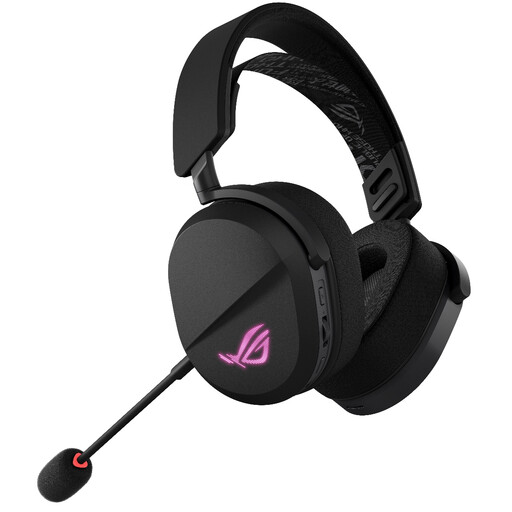
ASUS ROG Pelta wireless gaming headset in black

ASUS ROG Pelta Wireless Gaming Headset – Black

Designed for students alternating between desk, console and mobile use who want distinct 2.4 GHz, Bluetooth and USB-C wired routes.

Stated detachable boom microphone, mute control with LED indicator, on-ear controls, breathable fabric cushions, adjustable elastic headband and 309 g stated weight.

The stated up-to-70-hour figure applies to 2.4 GHz use with RGB off. Confirm whether USB-C wired mode carries both audio and microphone input on your intended device; Xbox compatibility is not stated here.

Joybuy
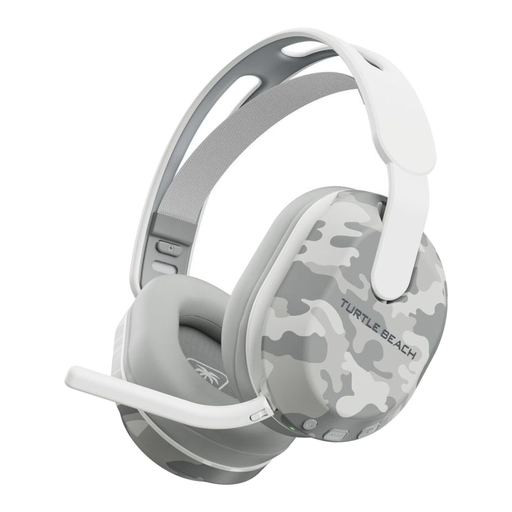
Turtle Beach Stealth 500 wireless gaming headset for Xbox and PC in Arctic Camo

Turtle Beach Stealth 500 for Xbox & PC – Arctic Camo

An Xbox-focused wireless choice with a flip-to-mute boom and microphone monitoring for console chat.

Stated Xbox Series X|S, Xbox One, Windows PC and Bluetooth-mobile compatibility, 2.4 GHz wireless, QuickSwitch, USB-C charging, on-ear controls and memory-foam cushions.

No 3.5 mm route is stated. The catalogue gives conflicting 233 g and 450 g weight figures, so do not use weight alone to compare comfort; battery life is an advertised maximum.

Joybuy
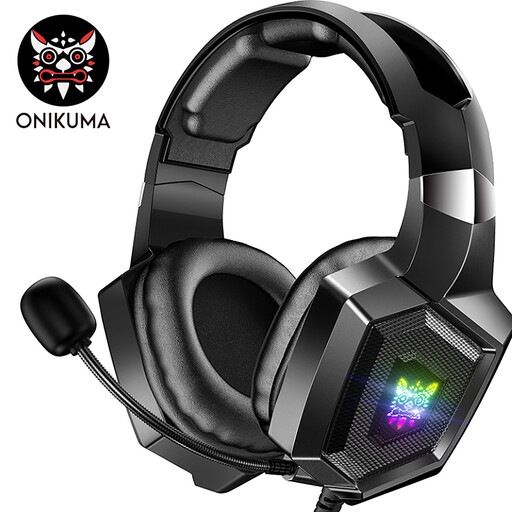
ONIKUMA K8 wired gaming headset with flexible microphone

ONIKUMA K8 Wired Gaming Headset with Flexible Mic

A no-charging desk-gaming option with in-line volume and microphone-mute controls for quick adjustments.

Stated separate 3.5 mm microphone and headphone plugs, flexible microphone, over-ear cushions and USB-powered RGB lighting.

Check whether your controller, laptop or phone needs a splitter or adapter for the separate audio and microphone connections. The USB connection is stated for lighting, not console audio or chat.

Joybuy
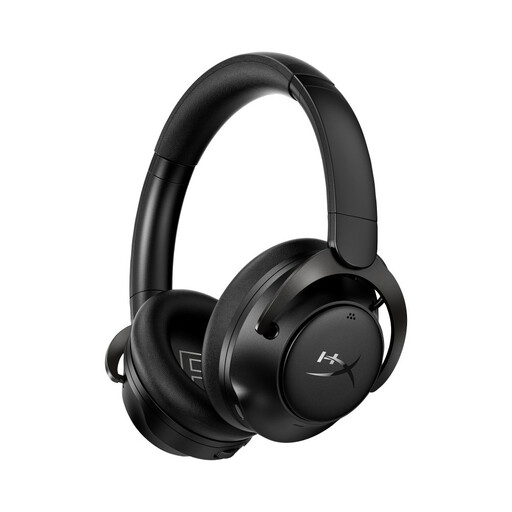
HyperX Cloud MIX 2 dual wireless over-ear gaming headset

HyperX Cloud MIX 2 Dual Wireless Over-Ear Headset

A dual-wireless option for PC, PlayStation or Switch users who also use Bluetooth with a phone.

Stated USB-C wireless dongle, Bluetooth mode, onboard controls, over-ear memory-foam cushions and microphone noise-cancelling feature.

Confirm the exact variant before buying: Xbox compatibility, detachable-microphone status, physical mute control, battery runtime and service options are not clear for this SKU.

Joybuy

Frequently asked questions

Will a Bluetooth gaming headset work for Xbox console gaming?

Do not assume it will. Xbox Support says the Xbox One console does not have Bluetooth functionality, while the official Xbox Wireless Headset uses direct Xbox wireless pairing for consoles. A headset can support Bluetooth for a phone, tablet or Windows device without supporting Bluetooth game audio on an Xbox console.

Can I use a 3.5 mm gaming headset through an Xbox controller?

Yes, where the controller has a standard 3.5 mm headset port and the headset uses a compatible plug. Xbox Support says compatible headsets can connect through the 3.5 mm jack on an Xbox Wireless Controller or Elite Wireless Controller; check whether an older controller or PC needs a splitter or adapter.

Does microphone noise reduction make late-night gaming quiet for housemates?

No. Auto-mute, voice isolation and microphone noise reduction are intended to reduce unwanted sound sent through voice chat, not your spoken voice or other noise in the room. Use a physical mute control, speak more quietly and agree household quiet expectations separately.

How should I assess sound leakage before buying?

Do not treat driver size, surround mode or a passive-noise claim as a leakage measurement. Keep the volume low during late sessions and prioritise a stable, comfortable seal. For qualifying online purchases from a trader, GOV.UK says customers generally have 14 days from receipt to notify cancellation and a further 14 days to return the item, subject to applicable terms and the condition of the return.

What should I compare for warranty, ear pads and battery service?

Keep proof of purchase and check whether the seller or brand handles a claim. SteelSeries says purchases through other sellers may need to begin with the original seller, while Razer requires valid proof of purchase for a limited-warranty claim. Check replacement-part availability for the exact model, including cushions, dongles and cables.