For historical-adventure games in a shared student room, consider a wired headset if you play at a desk and want to avoid charging; consider wireless if moving between devices or away from the desk matters more. Check earcup fit for room noise, compatibility with your devices and any software requirements for surround features before choosing.
Who needs which features?
Shared-room immersion seekers
If voices or other room noise interrupt game dialogue, look closely at earcup design and fit. Razer describes the closed earcups on its BlackShark V2 X USB as providing sound isolation; how well any headset seals will also depend on the wearer.
Long-session story players
Extended exploration makes headset weight, padding and charging breaks worth considering. Razer states a weight of 240 g for the BlackShark V2 X USB, while HyperX describes memory-foam cushioning for its Cloud III range.
Multi-device student gamers
If you alternate between a game and phone audio, check how the headset changes connections. SteelSeries specifies a USB-C dongle and switching between 2.4 GHz and Bluetooth for the Arctis Nova 5; compatibility depends on the devices and variant you choose.
What matters when choosing?
Start with the distraction that affects dialogue in your room, then weigh long-session comfort against the connections your gaming and phone devices need.
| Concern | What to check | Who this matters to |
|---|
| Room-noise isolation |
Check earcup design and fit; if you use voice chat, check the microphone design too. |
When other people are talking nearby, I want to follow quiet dialogue without turning up the volume to overcome the room noise. Around 36% of consumers put shared-room focus first. |
| Long-session comfort |
Compare stated weight and padding, and consider how often a wireless model needs charging. |
If I play through a long stretch of exploration, pressure from the headset or a charging break matters more than extra connection modes. Comfort and uninterrupted use come first for around 36% of consumers. |
| Device flexibility |
Match the connector and wireless modes to each device; check any app or operating-system requirements. |
I switch between gaming and phone audio, so I need both connections to work with my actual devices. Around 28% of consumers prioritise that flexibility. |
Buying pitfalls
-
Assuming surround sound works on every device
Razer states that the BlackShark V2 X USB’s 7.1 surround feature is available only on Windows 10 64-bit. A compatible connection alone does not establish that the software feature will work.
Check the exact model’s operating-system and software requirements for any surround feature you intend to use.
-
Choosing a USB headset by connector shape alone
USB Type-A headsets and USB-C wireless dongles have different host requirements. An adapter does not necessarily make every audio, microphone or software feature available.
List your gaming device, its available ports and any second device before choosing a connection type.
-
Turning up the volume because the earcups block some noise
Isolation can reduce distractions, but it does not make excessive listening levels harmless. The NHS identifies damage from loud noise over many years as a possible cause of gradual hearing loss.
Keep the volume comfortable rather than using isolation as a reason to raise it.
-
Planning around the maximum battery rating
Manufacturers describe wireless battery figures as “up to” ratings; connection mode and use can affect how long a headset runs between charges.
Choose wireless if its charging routine fits your sessions, and check the conditions attached to the exact model’s rating.
Relevant brands to consider
SteelSeries
The Arctis Nova 5 is a wireless option to examine if you switch between game audio and a phone.
- SteelSeries specifies game-audio presets, a USB-C dongle for named compatible devices and switching between 2.4 GHz and Bluetooth.
- Check support for your exact device and Nova 5 variant; wireless use also requires charging.
Razer
The BlackShark V2 X USB is a wired, PC-oriented model for desk play in a shared room.
- Razer specifies closed earcups, a noise-cancelling microphone, USB Type-A connectivity and a 240 g weight.
- Razer restricts this model’s stated 7.1 surround feature to Windows 10 64-bit.
HyperX
The Cloud III range is worth examining when cushioning and wireless charging intervals shape the choice.
- HyperX describes memory-foam comfort and lists 2.4 GHz, Bluetooth and Instant Pair modes for the Cloud III S Wireless.
- Check the connection mode supported by your device, as well as the exact variant and its availability.
Logitech G
The G522 LIGHTSPEED is a wireless PC-gaming model for players comparing spatial-audio features.
- Logitech G says the G522 LIGHTSPEED supports spatial audio and is designed to reproduce dialogue, music, effects and chat layers.
- Check the feature requirements for your setup; the brand’s description does not establish how clearly those layers will sound in a particular game.
Joybuy headset choices
These wired and wireless gaming headsets offer different starting points for desk play, longer sessions and device switching. Match the connection and fit to your own room and gaming device.
 No image available
Logitech ASTRO A10 Gen 2 wired headset, white
Consider this wired model for desk play when you would rather avoid charging. Check its connection against your gaming device, and assess the earcup fit before relying on it to reduce room distractions.
View on Joybuy
 No image available
ASUS ROG Pelta wireless headset, black
Consider this wireless model if freedom from a desk cable matters during longer sessions. Check which connection mode works with your gaming device and allow for charging; do not assume its fit will block shared-room noise.
View on Joybuy
 No image available
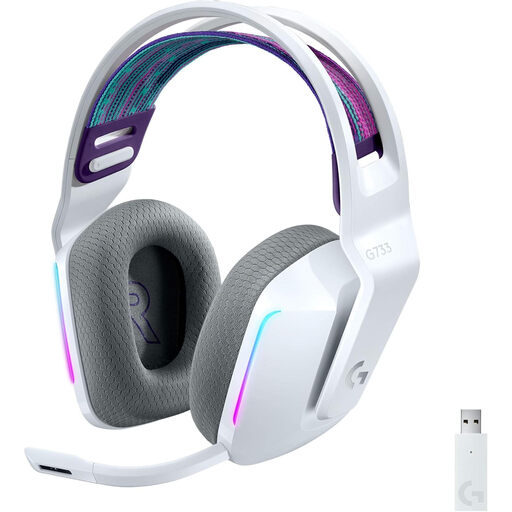
Logitech G G733 LIGHTSPEED wireless headset, white
Consider this model for wireless play at a desk or on a compatible console. Check the receiver mode for your device, particularly if you use a docked Nintendo Switch, and plan for charging.
View on Joybuy
 No image available
Edifier G2II USB wired headset, black
Consider this wired model for a compatible PC, Mac or PS4 desk setup. Its product title specifies 50 mm drivers; check the software requirements before counting on its advertised 7.1 surround feature. The listing excludes Xbox use.
View on Joybuy
 No image available
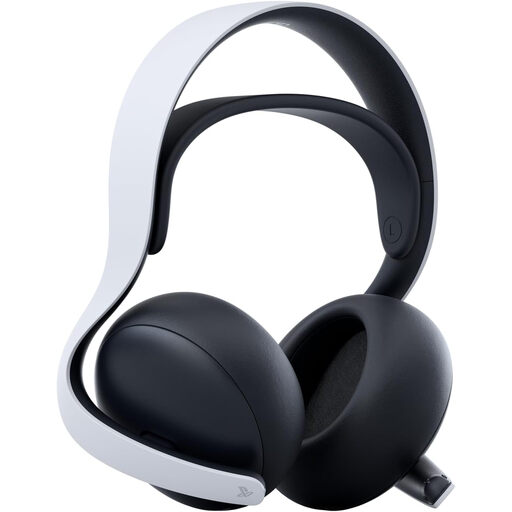
Sony PULSE Elite wireless headset, white
Consider this model if you want PlayStation gaming alongside phone audio. Check PlayStation Link and Bluetooth support for your exact devices, and account for charging during wireless use.
View on Joybuy
Common questions
Should I choose a wired or wireless headset for a student room?
Choose wired if you mainly play at a desk and want to avoid charging. Choose wireless if cable freedom or switching between game audio and a phone matters more, provided the headset’s connection modes work with your devices.
Will virtual 7.1 surround work on every platform?
No. Razer states that the BlackShark V2 X USB’s 7.1 surround feature is available only on Windows 10 64-bit. Check the operating-system and software conditions for the exact headset rather than assuming a surround feature follows it to a console or phone.
Will a USB gaming headset work with any console, phone or laptop?
Not necessarily: the connector and supported audio mode must match the host device. The Razer BlackShark V2 X USB uses USB Type-A, while SteelSeries describes a USB-C-dongle route for named Arctis Nova 5-compatible devices.
Does noise isolation make high-volume listening harmless?
No. The NHS identifies long-term loud-noise damage as a possible cause of gradual hearing loss. Keep listening levels comfortable, and seek NHS advice promptly if hearing worsens suddenly or over days or weeks.


