Commentary-first PC streamers
If you want to adjust your live microphone sound, check which controls work on your PC. Logitech G specifies noise reduction, compression and de-essing through G HUB for its PRO X Wired headset.


For commentary from a fixed PC position, consider a wired headset if its microphone controls work with your software. If routing a cable across a small desk is the bigger concern, a compact wireless receiver may suit you better, but you will need to accommodate charging. A 3.5 mm wired model avoids both charging and a wireless receiver, provided your device has the right connection.
If you want to adjust your live microphone sound, check which controls work on your PC. Logitech G specifies noise reduction, compression and de-essing through G HUB for its PRO X Wired headset.
If cable routing and switching to a phone matter, consider the space and ports your connection needs. SteelSeries describes a compact USB-C dongle and switching between 2.4 GHz and Bluetooth on the Arctis Nova 5.
If you wear a headset through extended play and narration, screen for fit as well as a positionable microphone. Razer lists a 240 g weight, memory-foam cushions and a bendable cardioid microphone for the BlackShark V2 X; those specifications cannot guarantee your fit.
Choose a connection that fits your desk and streaming device, then check whether the microphone controls you want work on that platform.
Consider it when: You stream from a fixed PC position and want adjustable microphone processing. Logitech G lists noise reduction, compression and de-essing for the PRO X Wired headset through G HUB.
Trade-off: A cable needs routing, and Logitech G says the cited advanced Blue VO!CE features require a PC and G HUB.
Consider it when: You stay at one desk and prefer a connection without headset charging or a wireless receiver.
Trade-off: You still need to route the cable and have a suitable 3.5 mm connection on your device or audio interface.
Consider it when: Removing the headset cable matters more than avoiding charging. SteelSeries describes a compact USB-C dongle and connection switching on the Arctis Nova 5.
Trade-off: Allow for a compatible receiver connection and charging; switching between game and Bluetooth connections does not establish simultaneous audio mixing.
| Concern | What to check | Who this matters to |
|---|---|---|
| Commentary clarity | Check boom positioning and whether microphone processing works on your streaming platform. | I need my voice to remain understandable over gameplay, so microphone placement and usable controls matter more to me than surround effects; around 36% of consumers put commentary clarity first. |
| Connections and desk space | Count usable ports and check whether a wireless model switches sources or can play them together. | With limited room for cables and accessories, I need a connection that suits my ports and the way I change devices; roughly 29% of consumers prioritise connection management. |
| Long-session comfort | Compare stated weight, pads and adjustability, while allowing for individual fit. | During longer sessions, I need a headset I can keep wearing without repeatedly shifting its microphone; around 21% of consumers make comfort their primary concern. |
| Positional game audio | Check whether any advertised surround processing works on your device. | I want to follow in-game cues while narrating, but need audio features that work on my setup; roughly 14% of consumers chiefly prioritise positional game audio. |
Software processing may depend on a particular operating system and application. Logitech G says the cited advanced Blue VO!CE features on its PRO X Wired headset work through G HUB on PC.
Before buying, match the exact model and its required software to the device you use for streaming.
A wireless headset removes the cable you wear, but still needs a connection to your gaming device and a place to charge. Some systems also use a base station.
Check your free ports and charging space before choosing between a compact-dongle model and a wired headset.
Weight and ear-pad materials help narrow the choice, but head shape, glasses and preferred clamping pressure affect how a headset feels.
Use the stated specifications to screen models, then check the retailer’s applicable return terms before opening or using the headset.
A reference point for PC commentators considering microphone software controls on the PRO X Wired model.
A reference point for compact wireless connection management, particularly the Arctis Nova 5.
A reference point for players comparing the wired BlackShark V2 X with wireless BlackShark options.
These wired and wireless models offer different ways to manage a headset at a small streaming desk. Choose by your device connections, cable and charging preferences, and the microphone arrangement you need.
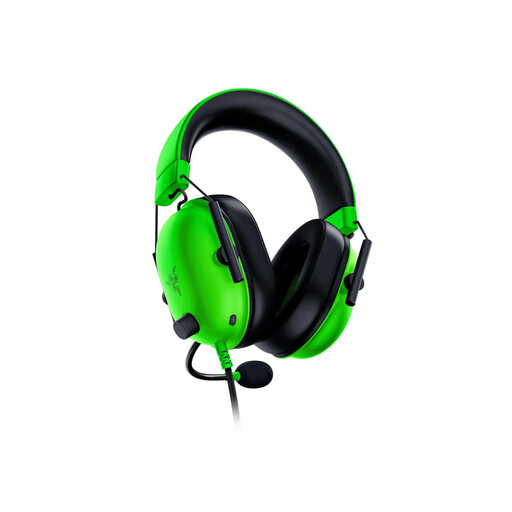 No image available
Consider this wired model if you want to avoid charging at a fixed desk. Check that your device has a suitable 3.5 mm audio connection.
 No image available
Another wired choice for commentary from one position. Check the connection your streaming device requires before choosing this variant.
 No image available
Consider this wireless model if keeping the headset cable off your desk matters. Make room for charging and check its connection requirements against your gaming device.
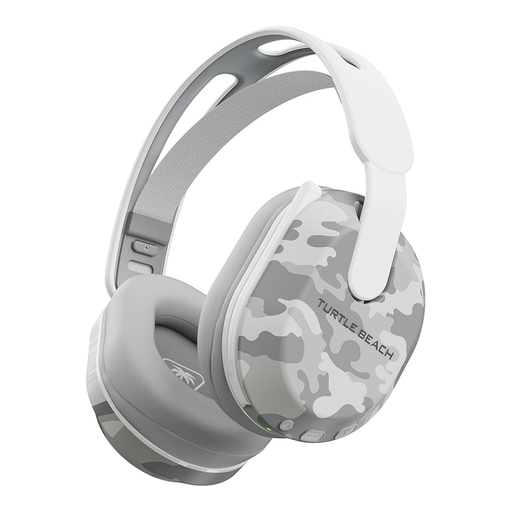 No image available
Consider this model if you want a wireless headset listed for PS5, PS4 and PC. Its title specifies Bluetooth and up to 40 hours of battery life; check how its connections switch if you also need phone audio.
 No image available
Consider this wired option if your desk setup has a suitable USB connection. The title lists PC, PS4 and Mac compatibility, a 50 mm driver and 7.1 surround; confirm where the surround feature works before relying on it.
Not necessarily: a headset may suit a one-device setup if its boom microphone meets your needs. If you want software voice controls, check platform support; Logitech G says the cited advanced Blue VO!CE features on its PRO X Wired headset require a PC and G HUB.
Wired avoids headset charging, while wireless removes the cable you wear but still needs a connection and charging space. Check your available ports and whether a model switches between game and Bluetooth audio or supports the simultaneous playback you require.
No; support depends on the exact headset and platform. Logitech G specifies PC use through G HUB for the cited PRO X Wired DTS feature, so check the model’s stated requirements before choosing it for another device.
Check an electrical recycling route rather than treating the old headset as ordinary rubbish. GOV.UK’s WEEE takeback guidance describes a free recycling route for customers buying new electrical equipment; ask the retailer about its takeback arrangements or check local electrical recycling options.