Choose a gaming headset that fits your platform, keeps squad callouts clear and remains comfortable through a long match; the dark room itself calls for no special headset feature. For PC play, a wired connection avoids charging, while SCAN UK’s gaming-headset guide favours dedicated 2.4 GHz wireless over Bluetooth. Choose isolation if household noise is distracting, or an open-back design if hearing your surroundings matters more.
Who needs which features?
Squad players who rely on callouts
Prioritise a microphone your teammates can understand, a mute control you can reach quickly and a connection suited to your device. HyperX, Logitech G and Razer describe gaming headsets with microphone features aimed at voice chat, but check the controls on the exact model.
Players following directional game cues
Look for a useful balance between game sound and teammate speech. Before choosing a headset for spatial audio, check whether the feature works with your game, platform and connection.
Long-session players in shared homes
Fit and the sounds you need to hear outside the game matter more than the room being dark. Compare ear cushions and charging routines, then decide whether isolation or awareness of your surroundings suits the room.
What should you check first?
Start with your exact gaming device and connection, then decide which need takes priority during squad survival matches.
| Concern | What to check | Who this matters to |
|---|
| Game cues and chat balance |
Check spatial-audio support for your game and platform, and whether game/chat controls work through your chosen connection. |
When dark game scenes make movement cues harder to follow, I want to hear teammates without losing track of game sound; around 31% of consumers put cue and chat balance first. |
| Squad callouts |
Check the microphone arrangement and whether mute controls and any voice-processing features work on your device. |
If teammates need to act on short callouts, I want my voice to be intelligible and easy to mute; roughly 25% of consumers make voice communication their primary concern. |
| Platform and connection |
Match the exact headset variant and its wired or wireless connection to your PC or console; confirm that voice chat works too. |
Moving between devices makes an incompatible connection especially frustrating; about 25% of consumers put platform fit ahead of other headset features. |
| Long-session fit and room sound |
Consider earcup fit and whether you need isolation or awareness of the room; for wireless models, check the charging routine. |
During a long match, I need a fit I can tolerate without losing track of people around me when that matters; around 19% of consumers prioritise comfort and room awareness. |
Buying pitfalls
-
Choosing wireless without checking the connection
Bluetooth is useful for some devices, but SCAN UK’s gaming-headset guide favours dedicated 2.4 GHz wireless for PC gaming. The word wireless alone does not tell you which mode a headset uses with your PC.
Compare wired and dedicated 2.4 GHz options for your PC setup, and check the headset’s supported connection modes before ordering.
-
Buying the wrong console variant
A headset’s wireless adapter or connection method may suit one platform but not another. Xbox Support states that Xbox One consoles do not connect directly to Bluetooth headsets; PlayStation’s wireless-headset instructions use a USB adapter.
Check the complete model name against your console generation, then confirm both audio and microphone support in the maker’s compatibility instructions.
-
Picking open-back earcups to block household noise
An open-back design lets surrounding sound in. Turtle Beach describes this as a feature of Atlas Air, but it works against isolation when conversation or other room noise is distracting.
Choose open-back when awareness of the room is important; otherwise, consider a closed-back or noise-cancelling design and check its fit.
-
Raising volume to overcome a poor fit
The World Health Organization says hearing risk increases with louder sound and longer exposure. Turning up a headset to compete with room noise is not a substitute for a suitable fit.
Keep volume moderate, take breaks and consider whether better-fitting earcups or greater isolation would reduce the need to turn it up.
Relevant brands to consider
SteelSeries
Consider the Arctis Nova Pro Wireless line if you want game/chat adjustment and several connection features.
- SteelSeries lists active noise cancellation, Transparency Mode and hot-swappable batteries for Arctis Nova Pro Wireless.
- Check the exact platform version; those features should not be assumed across all SteelSeries headsets.
HyperX
The Cloud III family offers wired and wireless routes for players considering over-ear fit and squad chat.
- HyperX specifies memory-foam cushioning and a detachable microphone for Cloud III Wireless.
- Cloud III versions differ, so confirm the connection and compatibility of the model you select.
Logitech G
PRO X Wireless is a PC-centred option for players interested in wireless voice-chat controls.
- Logitech G lists LIGHTSPEED wireless and Blue VO!CE microphone processing for PRO X Wireless.
- Blue VO!CE requires G HUB software; check feature availability on the device you use.
Razer
BlackShark V2 Pro is a line to examine if microphone design and isolation lead your choice.
- Razer identifies a HyperClear Super Wideband Mic on BlackShark V2 Pro.
- Razer’s descriptions of clarity and comfort are manufacturer claims, not a guarantee of fit or chat quality in every setup.
PlayStation
PULSE Elite is worth considering when PS5 is your main platform and PlayStation Link fits your setup.
- PlayStation lists a retractable microphone, simultaneous Bluetooth audio and support for 3D Audio in supported PS5 games.
- Check supported devices and connection methods rather than assuming the same features work on Xbox.
Turtle Beach
Atlas Air offers an open-back route for PC players who deliberately want to hear the room.
- Turtle Beach specifies open-back earcups plus 2.4 GHz wireless, Bluetooth and wired modes for Atlas Air.
- Its open-back construction also lets household noise in, making it a poor match when isolation is the priority.
Gaming headsets on Joybuy
These wired and wireless headsets offer different starting points for squad play. Match the stated connection and intended platform to your setup before choosing among them.
 No image available
ASUS ROG Pelta wireless gaming headset, black
Consider this wireless option if you want to avoid a cable during squad matches. Confirm its connection and software features work with your gaming platform.
View on Joybuy
 No image available
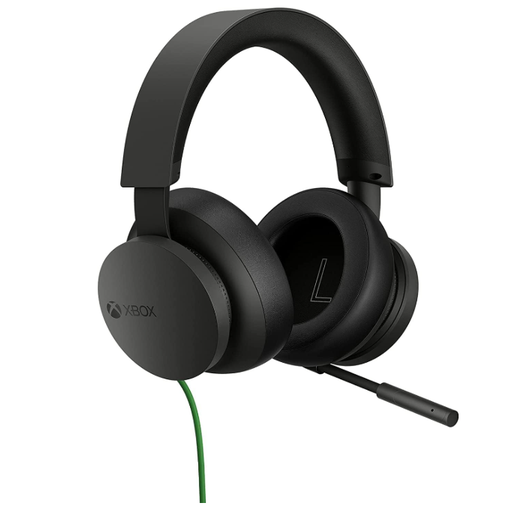
Official Xbox Stereo wired gaming headset, black
This wired Xbox headset is a route for squad play without battery charging. Check the connector and stated compatibility against your particular controller or device.
View on Joybuy
 No image available
Edifier G2II USB gaming headset, black
Consider this wired USB model for a PC or PS4 setup if its connection meets your chat needs. Its product title specifies 7.1 virtual surround, a noise-cancelling microphone, RGB lighting and 50 mm drivers; a surround label does not establish an advantage in a particular game. Check compatibility with your exact device.
View on Joybuy
 No image available
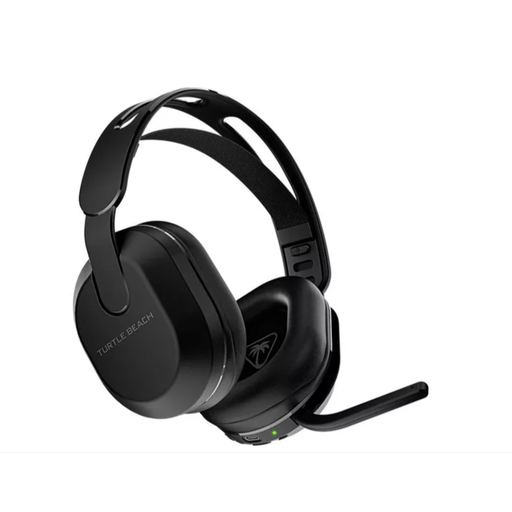
Turtle Beach Stealth 500 wireless headset, black
This wireless model is presented for PS5, PS4 and PC play. Check how it connects to your exact device and whether the microphone and any app-based controls work in your setup.
View on Joybuy
 No image available
LOGITECH ASTRO A10 Gen 2 wired headset, white
Consider this wired option if you prefer not to manage charging during long matches. Check the connector arrangement needed for your controller or computer before ordering.
View on Joybuy
Common questions
Should I use Bluetooth for competitive squad gaming?
For PC squad play, compare a wired connection or dedicated 2.4 GHz gaming mode before relying on Bluetooth. SCAN UK’s headset guide favours 2.4 GHz for PC gaming; Bluetooth can still be useful for a phone or secondary device if the headset supports that arrangement.
How do I check whether a headset works with PS5 or Xbox?
Match the full headset model and connection method to your exact console, including microphone support. PlayStation’s wireless-headset pairing instructions use a USB adapter, while Xbox Support states that Xbox One does not connect directly to Bluetooth headsets. Follow the maker’s compatibility instructions for the particular headset.
Will spatial audio guarantee that I hear opponents more clearly?
No. Directional presentation depends on the game, platform, connection and settings, so a surround label alone cannot establish how useful it will be in a match. Check support for your setup and adjust game/chat balance at a comfortable volume.
How can I keep volume comfortable during long matches?
Keep volume moderate and take breaks rather than turning it up to overcome room noise. The World Health Organization says hearing risk rises as sound level and listening duration increase; fit and appropriate isolation can also help you avoid competing with background sound.


