Choose a headset that supports your exact gaming platform and a suitable low-latency game connection, then prioritise the feature that matters most in your matches: locating cues, making clear callouts or staying comfortable through long sessions. Neither Bluetooth, spatial-audio wording nor driver size alone establishes how well a headset will work for tactical play; check the connection mode, microphone and fit before buying.
Who needs what from a headset?
Footstep-and-position players
If you rely on footsteps, reloads and other cues before seeing an opponent, focus on cue placement, a low-latency connection supported by your platform and a fit that stays consistent through a session. RTINGS identifies these as relevant gaming-headset considerations; a product feature list cannot tell you how accurately you will locate sounds in your own game.
Shot-callers and squad coordinators
Frequent callouts make microphone intelligibility, background-noise handling and an accessible mute control important alongside game audio. Check how the microphone works on your chosen device rather than judging voice chat by the headset’s speaker features.
Long-session, multi-platform players
Repeated matches or switching devices put more weight on fit, charging routine and the exact platform version. A headset’s listed compatibility and connection features may differ between console editions, so match the particular listing to the devices you use.
What should you check first?
For ranked tactical matches, confirm your platform and game connection before deciding which sound, communication or long-session concern would most change your choice.
| Concern |
What to check |
Who this matters to |
| Positional cues and delay |
Check the gaming connection supported on your platform and whether sound-profile controls are usable on it. Treat spatial-audio claims as features to assess, not proof of easier cue placement. |
If I depend on footsteps and reloads to react before visual contact, I need cues I can place without a distracting connection delay. Around 36% of consumers put cue location and low-latency game audio first. |
| Team communication |
Check the boom microphone, mute control and any stated noise-handling features; confirm that voice chat works through your intended connection. |
When I make frequent squad callouts, teammates need to understand me even if there is keyboard or household noise nearby. Roughly 29% of consumers make clear communication their primary concern. |
| Platform and connection fit |
Match the exact console or computer version, transmitter or connector, and supported chat functions. Do not assume Bluetooth provides the same functions as the gaming connection. |
If I move between devices, I need the particular headset version to carry game audio and chat on my main platform. About 21% of consumers prioritise that platform-and-connection fit. |
| Comfort and charging |
Consider cushion fit, including glasses if relevant, and check the conditions behind battery claims and how the headset charges. |
Through repeated ranked sessions, pressure or an inconvenient charging break could interrupt my play. Around 14% of consumers put long-session comfort and charging resilience first. |
Mistakes to avoid
-
Taking “multiplatform” to mean every console version works alike
Wireless connections and voice-chat support can depend on the specific model. Turtle Beach directs buyers to check compatibility by model for the Stealth 600 Gen 3.
Match the platform named on the exact listing to your device, then confirm both its game-audio connection and chat support.
-
Equating a headline audio feature with better tactical awareness
Bluetooth, spatial-audio wording or driver diameter alone does not establish accurate cue placement or intelligible callouts in your setup. RTINGS highlights connection latency, sound accuracy, microphone output and comfort as separate considerations.
Start with the supported game connection and microphone, then assess sound settings in the games you play if you have the opportunity.
-
Expecting the quoted battery life in every session
Manufacturer battery figures are stated under particular operating conditions; connection mode and enabled features can affect your charging routine.
Check how the quoted figure is measured and how the headset charges. If charging interruptions matter more than cable-free use, consider a wired connection.
-
Turning the volume up to overcome outside noise
Royal Free London NHS Foundation Trust warns that loud sound exposure can cause lasting hearing damage and that both listening level and duration matter.
Keep the volume at a comfortable level, take breaks and consider the headset’s physical isolation rather than continually raising the volume.
Brands to consider
Razer
The BlackShark V3 Pro is a wireless headset aimed at competitive play and frequent team communication.
- Razer states that this model offers wireless audio as fast as 10 ms and a detachable 12 mm full-band microphone.
- Those figures are Razer’s product claims, not a guarantee of better cue placement or callout quality in every setup.
SteelSeries
The Arctis Nova Pro line offers sound controls and options for players using more than one system.
- SteelSeries describes a 10-band EQ and two-system connection on its Nova Pro page.
- Check the edition for your platform; sound-control features do not, by themselves, establish how easily you will locate cues.
HyperX
The Cloud III S Wireless combines gaming and Bluetooth connections for players who value long sessions and device flexibility.
- HyperX lists 2.4 GHz wireless, Bluetooth, a detachable 10 mm microphone and up to 120 hours of gaming battery life for this model.
- HyperX lists PC, Mac, PS5, mobile and Switch compatibility for the Cloud III S Wireless; do not assume Xbox support or that the maximum battery figure applies in every mode.
Turtle Beach
The Stealth 600 Gen 3 offers wireless connection and sound-control features in platform-specific versions.
- Turtle Beach lists 2.4 GHz wireless, Bluetooth 5.2, 10-band EQ and an up-to-80-hour battery claim for this line.
- Full compatibility depends on the model, so choose the edition for your console or computer rather than relying on the line name.
Logitech G
The PRO X range includes headsets with adjustable sound settings and different connection options.
- Logitech G describes a 10-band parametric EQ, interchangeable cushion materials and a 70-hour battery claim for the PRO X3 LIGHTSPEED.
- Check the connection and software support for your platform before choosing this model for ranked play.
Joybuy headset choices
These choices include wireless headsets named for particular PC or console setups and a wired model for players who prefer not to manage headset charging. Check each listing against your exact device and preferred game connection.
 Image unavailable
ASUS ROG Pelta Wireless Gaming Headset, Black
For ranked play without a headset cable, check that this model’s gaming connection and microphone work on your device. Fit is worth assessing if you wear it through repeated matches.
View on Joybuy
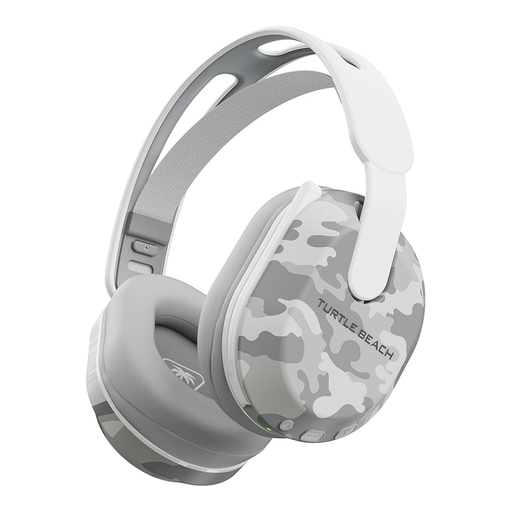 Image unavailable
Turtle Beach Stealth 500 Wireless Headset for PS5, PS4 and PC, Arctic Camo
For play on the named PlayStation consoles or PC, confirm which connection carries match audio and voice chat. The listing names Bluetooth and claims up to 40 hours of battery life; check the conditions behind that figure.
View on Joybuy
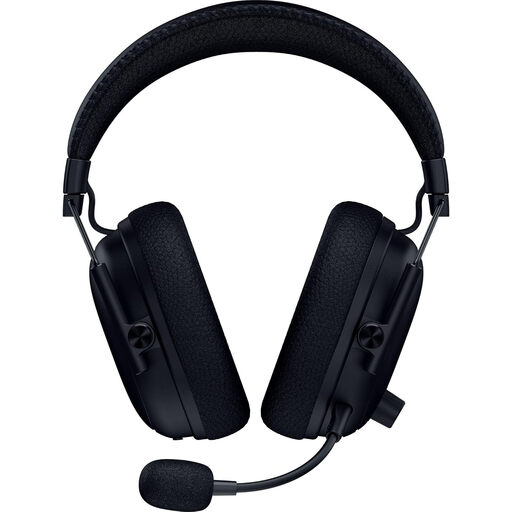 Image unavailable
Razer BlackShark V3 Pro Wireless ANC Headset, Black
For frequent ranked matches and team callouts, Razer describes a low-latency wireless connection and detachable microphone for the BlackShark V3 Pro. Confirm this listing’s supported platforms and connections, particularly if you also need to use the headset with a phone or a 3.5 mm cable.
View on Joybuy
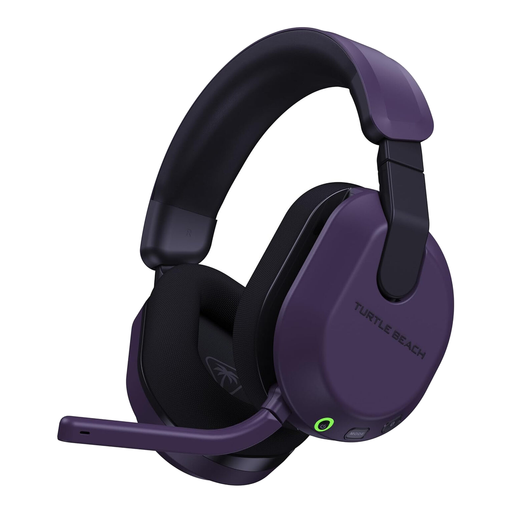 Image unavailable
Turtle Beach Stealth 600 Gen 3 Wireless Headset for Xbox and PC, Purple
This Xbox Series X|S, Xbox One and PC version is the one to examine if those are your gaming devices. Check the game-audio and chat connection for the exact console you use; do not assume this edition offers the same functions on PlayStation.
View on Joybuy
 Image unavailable
Logitech ASTRO A10 Gen 2 Wired Gaming Headset, White
A wired headset avoids a headset-battery charging routine. Before choosing it for ranked matches, confirm the connector, cable and voice-chat support on your controller or computer, and consider whether the fit suits longer sessions.
View on Joybuy
Frequently asked questions
Is Bluetooth alone a suitable connection for ranked tactical matches?
Choose the connection your exact headset specifies for gaming on your platform rather than assuming Bluetooth is its preferred match-audio mode. RTINGS identifies low-latency connectivity as a core gaming-headset consideration, while the HyperX and Turtle Beach wireless models discussed here list 2.4 GHz gaming connections alongside Bluetooth.
Why does the exact console version of a headset matter?
Different versions can support different wireless connections and chat functions. HyperX names PC, Mac, PS5, mobile and Switch for the Cloud III S Wireless, while Turtle Beach says Stealth 600 Gen 3 compatibility depends on the model; check the particular version against your console before ordering.
How should I manage headset volume during long sessions?
Keep the sound at a comfortable level and take listening breaks rather than raising the volume to mask background noise. Royal Free London NHS Foundation Trust advises limiting headphone volume and duration, including a break of at least five minutes each hour.
What can I do with an old gaming headset in the UK?
Ask your retailer about electrical-waste take-back or a suitable recycling route instead of putting the headset in ordinary household waste. GOV.UK explains that the UK waste electrical and electronic equipment regime supports recovery, reuse and recycling; the take-back route available to you depends on the retailer’s applicable arrangements.


