
24/7 全天候客户支持

免费退货

当日/次日达

品质保障

开启新人专享福利: 全场免邮 | 低至 2 折 | 免费试用 30 天 JoyPlus 会员
下载 Joybuy
Choosing the right gaming keyboard can feel like a daunting task. The market is filled with options, from whisper-quiet membrane models to highly responsive mechanical boards, each promising to elevate your gameplay. Whether you're a competitive esports player needing split-second response times or a casual gamer looking for a reliable and stylish upgrade for your PC, the sheer variety can be overwhelming.
This guide is designed to cut through the clutter. As the Joybuy Product Recommendation Officer, my role is to help you understand the key features that matter and highlight some excellent options available right now. We will explore what makes a great PC gaming keyboard and help you find a model that fits your needs, playstyle and budget.
Before we look at specific models, let's break down a few essential considerations. Understanding these will help you make a more informed decision.
The debate between mechanical and membrane keys is a classic one. A membrane gaming keyboard uses a rubber dome layer under the keys. They are generally quieter, often more affordable and have a softer, mushier feel. They are a solid choice for shared spaces or for those who prefer a less pronounced typing experience.
In contrast, a mechanical gaming keyboard uses individual physical switches under each key. This provides a more distinct tactile feedback, faster actuation and greater durability. These switches come in various types (linear, tactile, clicky), allowing you to choose the exact feel and sound you prefer. For many gamers, the precision and satisfying feedback of mechanical keys are non-negotiable.
Keyboard layouts have evolved beyond the standard full-size model. The right size for you depends on your desk space and gaming habits.
Technology in gaming peripherals is constantly advancing. Here are a few modern features to keep an eye on:
Here are a few standout models that cater to different types of gamers and budgets.

Why It Stands Out: The Redragon M68 is built for competitive performance. It features next-generation Hall Effect magnetic switches, which enable its two standout features: fully adjustable actuation (from a hair-trigger 0.2mm to a firm 4.0mm) and Rapid Trigger functionality. Combined with an 8000Hz polling rate, this keyboard is engineered to eliminate input delay, giving you a tangible edge in fast-paced titles. The solid anodised aluminium top plate also provides a premium, flex-free feel.
Pros:
Who is it for? This is an ideal choice for serious and competitive FPS players who participate in games like Valorant, CS2 and Apex Legends, where every millisecond counts.
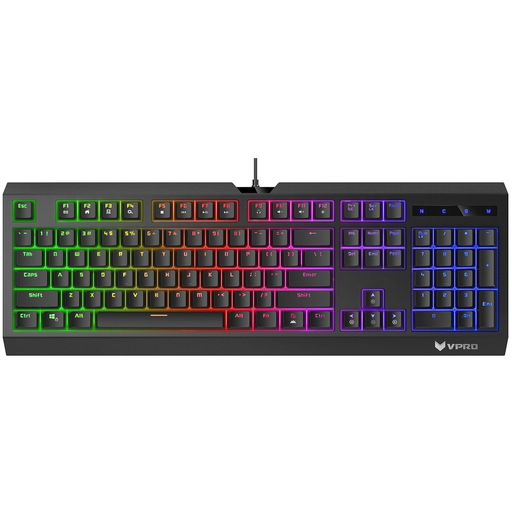
Why It Stands Out: The Rapoo V52S proves that you don't need a mechanical keyboard to have a great gaming experience. It offers a quiet and comfortable typing feel, making it perfect for mixed-use environments. Its spill-resistant design adds a layer of durability for peace of mind during intense gaming sessions or while working from home. It still packs essential gaming features like anti-ghosting to ensure your key presses are registered accurately during frantic gameplay and customisable RGB backlighting.
Pros:
Who is it for? The V52S is a great all-rounder for casual gamers, those who share their space or anyone looking for a reliable and stylish wired gaming keyboard for both work and play without the higher cost or noise of a mechanical model.
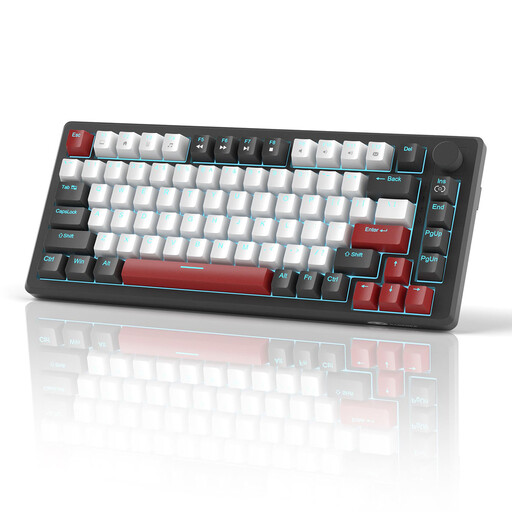
Why It Stands Out: The MageGee STAR75 strikes an excellent balance between form and function. Its 75% layout is a smart compromise, offering a compact footprint while retaining dedicated arrow keys and a function row. The standout feature is its 2-in-1 multifunctional knob, which can be used to control volume or backlight settings on the fly. It comes equipped with popular linear red switches for smooth, fast key presses and its double layer of sound-dampening foam creates a more pleasant, less hollow typing sound.
Pros:
Who is it for? This keyboard is for gamers and typists who want the benefits of a compact mechanical board without sacrificing the convenience of arrow keys and media controls. It's a fantastic mid-range option for a clean and functional desktop setup.
These three recommendations cover a wide range of needs, but the world of gaming keyboards is vast. If you're looking for a different switch type, a unique layout or simply want to see what else is available, there are many more models to explore.
To discover more great peripherals, browse our full collection. Find your next upgrade on our gaming keyboard for computer category page.
For many players, yes. Mechanical switches generally offer faster response times, greater durability and a more consistent feel, which can improve accuracy and performance. The ability to choose a switch type (e.g., linear for speed, tactile for feedback) allows for a more personalised experience. However, it ultimately comes down to personal preference and a high-quality membrane keyboard can still be very effective.
A rapid trigger keyboard uses magnetic switches to allow for instant key actuation and de-actuation. This means a key press registers the moment you press down and resets the moment you lift up, regardless of travel distance. This is highly beneficial for competitive FPS games that require rapid, repetitive movements like "jiggle-peeking" or counter-strafing. While not essential for all gamers, it provides a noticeable performance advantage for those at a high competitive level.
The polling rate determines how frequently the keyboard sends information to your PC. A higher polling rate means lower input lag. The industry standard for gaming is 1000Hz, which is extremely fast and sufficient for most players. Keyboards with 8000Hz polling rates offer a technically faster connection, reducing latency even further. While the difference may be imperceptible to many, it can provide a fractional edge in elite-level competitive scenarios.