Who this is for
No audience profiles to display.
What matters when choosing
Start with the keys you need to locate and use during play, then decide how much desk space you can give the keyboard. Lighting, switch feel and connection options matter most when they suit your actual room and setup.
| Concern |
What to check |
Who this matters to |
| Keys in a dark room |
Check lighting controls on the exact layout, including whether the backlight can be dimmed or turned off. |
If I play with the room lights low, I want to find my keys without keeping the keyboard brighter than I like. Around 36% of consumers put adjustable key lighting first. |
| Layout and shortcuts |
Compare your usual bindings with the number pad, navigation keys and physical key positions on the exact variant. |
When I manage a large map and use many shortcuts, I want the controls I rely on within easy reach; around 29% of consumers prioritise dedicated-key access. |
| Switches and desk setup |
Check the fitted switch type and whether the keyboard's height, tilt and any wrist rest suit your desk position. |
In a shared room or a long session, I care about key sound and feel as well as how the board sits on my desk. Around 21% of consumers place these considerations first. |
| Space and connections |
Check the board's footprint and whether its stated wired, Bluetooth or 2.4 GHz modes suit your devices. |
If desk width is limited or I switch between devices, I want a layout and connection options that fit that setup; around 14% of consumers make this their primary concern. |
Joybuy keyboard choices
These choices include a 96% UK-layout board, smaller wireless keyboards and 108-key options. Compare the stated UK or US layout with your shortcuts, then check the exact lighting and switch configuration for dark-room use.
 No image available
ASUS ROG Strix Scope II 96 Wireless — Black, UK Layout
Consider this if you want number and function keys but have less room for a conventional full-size board.
ASUS specifies a 96% layout with lighting controls for the ROG Strix Scope II 96 Wireless. Inspect the navigation-key positions and confirm the switches fitted to this Black, UK-layout variant.
Joybuy
 No image available
HyperX Alloy Rise 75 Wireless Keyboard — UK
Consider this wireless model if you are willing to check a smaller key arrangement against your city-building shortcuts.
Compare the exact key positions with the controls you use most, particularly if you rely on a number pad. Check how clearly the keys remain visible at your preferred lighting level.
Joybuy
 No image available
Ticktype DP104 — Gecha Gray, US Layout, Silent Tactile Switches
Consider this full-size option if you want a stated 108-key arrangement and prefer the listed silent tactile switch variant.
The product name specifies tri-mode wireless connection, hot-swappable switches and RGB lighting. Its layout is US, not UK; check the legends and brightness controls before choosing it for a dark-room desk.
Joybuy
 No image available
AULA F75 — 75%, US QWERTY Layout
Consider this smaller board if desk space matters more to you than a full-size key arrangement.
The product name specifies wired, Bluetooth and 2.4 GHz modes, RGB backlighting and PBT keycaps. Check the fitted switches, key positions and lighting adjustment on this US-layout variant.
Joybuy
 No image available
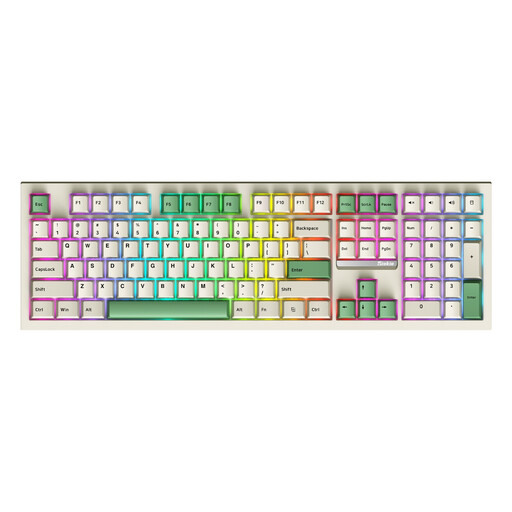
Siukie PL108W — 108 Keys, Beige
Consider this if a stated 108-key count and a choice of connection modes match your starting requirements.
The product name specifies detachable switches, three connection modes and RGB lighting. Inspect the exact number-pad and navigation-key positions, switch option and lighting controls before deciding whether it fits your setup.
Joybuy
Common questions
Is RGB lighting enough for gaming in a dark room?
No: RGB lighting alone does not tell you whether the keys will be readable at a brightness you like. Check the exact model's lighting controls and position your keyboard and screen comfortably; the Health and Safety Executive advises keeping the keyboard central and just below elbow height for display-screen work.
Should I choose full-size, 96% or TKL for city-building games?
Choose full-size if you want a conventional number pad and dedicated keys, 96% if you want number and function keys in less width, or TKL if desk space matters more than a dedicated number pad. Inspect the exact key positions: ASUS specifies retained number and function keys on the ROG Strix Scope II 96 Wireless, while Corsair's K70 range illustrates how layouts can differ within one product family.
Are clicky switches a good choice for long sessions?
They can suit you if you like audible, tactile feedback, but consider a quieter switch when you share the room. Razer describes its BlackWidow V4 Green switches as clicky and tactile and its Yellow switches as smooth and silent; check the switch fitted to the keyboard you are considering.
What should I do with an old keyboard?
Check your retailer's electrical take-back information or your local authority's electrical-waste service rather than putting the keyboard in general waste. GOV.UK's guidance on waste electrical and electronic equipment explains the UK framework for recovering, reusing and recycling electrical products.


