For turn-based tactics in a dark room, choose a keyboard whose lighting you can set to a calm, readable profile, then match its layout and switch feel to the commands you use. Dedicated controls can help with frequent shortcuts, while a compact board leaves more desk space; wireless placement also brings charging and connection management.
Who this suits
Dark-room command readers
If you play in low ambient light, readable key legends and controllable brightness matter more than an elaborate lighting effect. A subdued profile can help you locate the commands you use without drawing attention away from the game.
Deliberate shortcut planners
If you repeatedly use menus, camera controls or custom shortcuts, identifiable keys and a switch feel you like may matter more to you than speed-focused features. Check whether any programmable assignments you want are permitted in your game.
Space-conscious PC players
If your desk is narrow or shared, weigh a smaller keyboard against the dedicated keys you use. A detachable cable or wireless connection may also matter if you regularly move the board.
What to check when buying
Start with key visibility, then check command access and desk fit before deciding whether wireless placement is worth its upkeep. For a UK setup, inspect the exact key layout rather than assuming it from the retailer's location.
| Concern | What to check | Who this matters to |
|---|
| Readable lighting |
Check brightness adjustment and whether the exact model can save a subdued static or selected-key profile. |
I need to find command keys in a dark room without animated lighting pulling my attention from the game. Around 33% of consumers put readable, controllable lighting first. |
| Commands and key feel |
Check the selected switch variant and whether the controls you need can be assigned in your game. |
Repeated commands should feel deliberate, but I also need to consider noise if someone else shares the room. For around 25% of consumers, command access and switch feel are the primary concern. |
| Layout and desk fit |
Check numpad and navigation-key access, desk width, and whether the variant has UK ISO or US ANSI key placement. |
I want room for my mouse without losing keys I use for shortcuts or typing. Layout and desk fit come first for around 25% of consumers. |
| Connection |
Confirm the connection modes of the exact variant and how wireless use is powered or charged. |
Moving between devices or clearing a shared desk matters more to me than keeping a keyboard in one fixed position. Around 17% of consumers prioritise connection flexibility. |
Buying pitfalls
-
Choosing RGB for brightness alone
Animated lighting can distract from a slow tactical game, even when the keys are easy to see.
Check whether the exact keyboard offers brightness control and a static profile you can use at a comfortable level. Logitech G describes custom colour and effect controls for LIGHTSYNC, but available controls depend on the model.
-
Assuming a UK retailer listing means a UK layout
Joybuy lists the AULA F75 with a QWERTY US layout. Key placement and legends may therefore differ from those familiar to someone who uses UK ISO keyboards.
Inspect the selected variant's title and photographs for its physical layout before ordering.
-
Prioritising speed features over usable keys
Adjustable actuation or rapid-trigger features do not, by themselves, tell you whether a keyboard's lighting, noise or command layout suits turn-based play.
Check visibility, switch feel and access to your usual commands first; consider speed-focused features separately if you also need them for other games.
-
Treating wireless as the default choice
Wireless placement can help on a shared desk, while a wired connection can be simpler for a keyboard that stays put.
Choose the connection modes that fit where and how you play, and check the exact model's charging arrangements.
Wireless use also means keeping track of battery level and managing the chosen connection.
Brands to consider
Logitech G
Its cited range includes low-profile, wired and wireless gaming keyboards as well as tenkeyless designs.
- Logitech G describes LIGHTSYNC colour and effect controls through G HUB, dedicated G-keys on the G815 and multiple connection modes on the G915 X LIGHTSPEED.
- Those features differ by model; check the exact switch and key-layout variant rather than treating the range as interchangeable.
Razer
The cited BlackWidow V3 and V4 models offer mechanical-switch choices, with additional macro and media controls described for the V4.
- Razer describes lighting customisation and different switch options across these models, giving consumers choices to check for their preferred feedback.
- Clicky switches may disturb a shared room, and a keyboard with more dedicated controls needs more desk space.
SteelSeries
Its keyboard range spans several switch technologies and includes compact and tenkeyless options.
- SteelSeries lists membrane, mechanical, hybrid and adjustable-switch models, allowing consumers to compare different layouts and inputs.
- Adjustable actuation is not a substitute for checking lighting readability, key placement and noise for turn-based play.
Joybuy product choices
These keyboards offer a mix of compact, near-full-size, wired and wireless options for a dark-room setup. Check the selected variant's lighting controls, switch feel and physical key layout against the commands you use.
 No image available
HyperX Alloy Rise 75 Wireless Keyboard
Consider this 75% wireless keyboard if desk space and flexible placement matter. Check the exact key layout and whether its lighting controls offer the calm profile you want.
View on Joybuy
 No image available
ASUS ROG Strix Scope II 96 Wireless, Black, UK Layout
The stated 96% layout may appeal if you want a near-full-size arrangement in a smaller footprint. Its title specifies wireless use and a UK layout; check the selected switch variant and static lighting controls.
View on Joybuy
 No image available
Razer BlackWidow V4 X Minecraft Edition
Consider this mechanical gaming keyboard if you want to assess a dedicated gaming layout for frequent commands. Check this edition's switch noise, key layout and lighting controls against your room and shortcuts.
View on Joybuy
 No image available
AULA F75 75% Wireless Keyboard, QWERTY US Layout
The compact layout may suit a narrow desk if its key arrangement fits your shortcuts. Its title specifies wired, Bluetooth and 2.4G modes, RGB backlighting and PBT keycaps; check the lighting controls and whether the US layout suits your typing.
View on Joybuy
 No image available
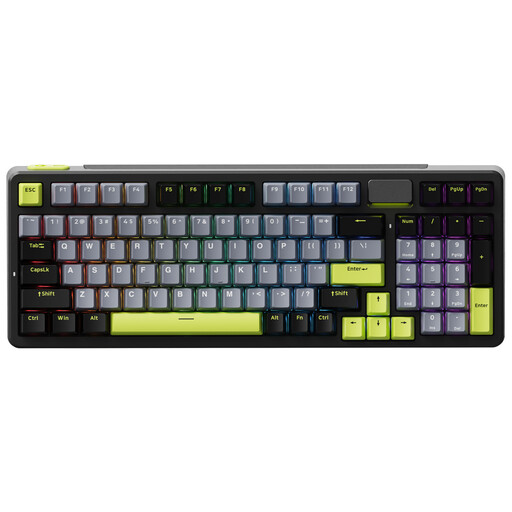
Rapoo V700DIY 96% Tri-Mode, QWERTY US Layout, Gasket Mount-BG
Consider this 96% mechanical keyboard if you want a near-full-size layout and a choice of connection methods. Its title specifies tri-mode use and a QWERTY US layout; check key placement and whether its lighting can be set to a subdued profile.
View on Joybuy
Frequently asked questions
Is RGB lighting worth having for turn-based tactics in a dark room?
Adjustable lighting is useful if it helps you read keys without distracting effects; RGB alone does not ensure that. Logitech G describes colour and effect controls for LIGHTSYNC, while Razer describes per-key lighting on the BlackWidow V4, so check the controls on the exact model you are considering.
Should I choose clicky or linear switches for tactical games?
Choose by the feedback you prefer and the noise your room can tolerate, not by game genre alone. Clicky switches give audible feedback, while Razer describes its Yellow linear switches as using sound dampeners; confirm which switch variant is in the keyboard you select.
Do I need a full-size keyboard for strategy games?
No, unless you rely on its numpad or other dedicated keys. A tenkeyless or 75% layout can leave more mouse room, but check where your navigation, function and frequently used command keys sit before choosing one.
What should I do if a keyboard becomes unusually hot?
Stop using it if it becomes unusually hot, emits smoke or develops an unusual smell. The Joybuy AULA WIN60HE listing gives that product-specific warning; follow the instructions for your own model and do not continue using a visibly damaged keyboard.


