Long-session explorers
If you spend long stretches moving through maps, dialogue and menus, start with a switch feel you like and direct access to your usual controls. A compact footprint or specialist input tuning need not take priority.


For exploration games, choose a layout that gives you comfortable access to the controls you use most: full-size or 96% if you want a number pad, or 75% if you want arrow and utility keys with more mouse room. Wireless modes and adjustable actuation are worth considering when you will use them beyond exploration games; whichever route you take, check the selected keyboard’s physical layout and switch feel.
If you spend long stretches moving through maps, dialogue and menus, start with a switch feel you like and direct access to your usual controls. A compact footprint or specialist input tuning need not take priority.
If mouse room is limited but you regularly use arrows and utility keys, compare 75% layouts with larger boards before giving up dedicated controls.
If you also play fast competitive games, adjustable actuation or configurable controls may be useful. Consider how much time you want to spend setting them up as well as how the keyboard feels in exploration games.
Start with the keys you need for movement, maps and menus, then weigh desk space, connection options and specialist controls against that layout choice.
| Concern | What to check | Who this matters to |
|---|---|---|
| Comfort and familiar controls | Check switch feel, acceptable noise and whether you need dedicated navigation keys or a number pad. | For long sessions spent moving between maps, menus and other PC tasks, I want familiar keys within easy reach. Around 40% of consumers put comfortable, direct controls first. |
| Mouse room | Compare the keys retained by 75% and 96% layouts; check whether you are comfortable using key layers. | With limited desk space, I want room to move my mouse without losing the arrows I use in menus. Around 30% of consumers make that balance their primary concern. |
| Connection and customisation | Check the selected model’s connection modes and whether its remapping or switch options suit your setup. | When I move between devices or change my controls, connection and configuration options matter most. Roughly 20% of consumers prioritise that flexibility. |
| Response tuning | Check the actuation controls and how they are adjusted, as well as the physical layout. | If I also play fast competitive games, I may want to tune when a key registers rather than keep one fixed setting. Around 10% of consumers put that adjustment first. |
UK ISO and US ANSI differ in physical key arrangement, including the Enter and left Shift keys. That distinction also matters if you plan to change keycaps.
Check the exact variant’s layout description and photos rather than relying on the shopping site’s location.
A 75% board omits the number pad, while still smaller layouts can put frequently used commands behind modifier keys.
Review your game bindings and everyday shortcuts. Choose a layout with a number pad if you rely on it, or check the available key layers before going smaller.
Adjustable actuation and Rapid Trigger are specialist settings, not requirements for playing exploration games. A sensitive setting may also take adjustment to suit your use.
Consider those controls if you also play games where you want to tune key response, and check how the selected model saves and changes its settings.
Availability can differ by colour and layout variant. The black ASUS ROG Strix Scope II 96 Wireless listing, for example, was marked out of stock when checked for this topic.
Check the selected variant’s current availability and delivery information before ordering.
Its G915 X LIGHTSPEED line is a reference point for buyers considering a slim keyboard with several connection modes.
The Huntsman V3 Pro line is relevant if you also want to adjust actuation for other kinds of games.
The Q1 HE offers a 75% route for buyers interested in a UK ISO option and adjustable magnetic-switch actuation.
The UK K65 Plus Wireless provides a 75% layout for buyers who want arrows and utility keys without a number pad.
The ROG Strix Scope II 96 Wireless is a reference point for a UK-layout 96% keyboard that retains a number pad.
These keyboards cover different approaches to exploration-game controls: 96% models with a number pad, smaller 75% layouts, and a 60% model for those willing to use alternate key functions. Compare each selected variant’s physical layout before ordering.
 No image available
Consider this 96% model if you want a number pad for shortcuts alongside exploration-game controls.
The Joybuy description lists 2.4 GHz, Bluetooth and wired modes, plus hot-swappable switches. Confirm the supplied switch option and current availability.
 No image available
Consider this 75% wireless model if a smaller keyboard is your priority but you still need to assess access to your usual game controls.
Check the selected variant’s physical layout if UK ISO key placement or keycap compatibility matters to you.
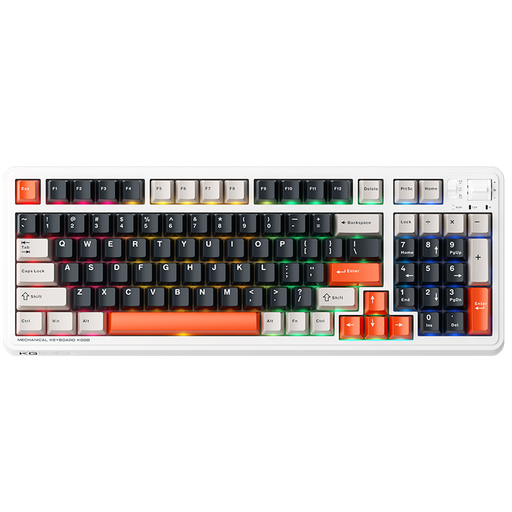 No image available
Consider this 96% model if you want a layout with more keys than a 75% board and are comfortable with its stated US QWERTY variant.
The product name specifies tri-mode connectivity and hot-swappable switches. The US layout may not suit you if UK ISO key placement is important.
 No image available
Consider this smaller layout when desk space is a priority, provided its key arrangement works for your game bindings.
The product name lists Bluetooth, 2.4 GHz and wired modes, plus hot-swappable switches. Check the available arrow and navigation keys, and note the stated US QWERTY layout if you need UK ISO.
 No image available
Consider this 60% model only if its small footprint matters enough to use alternate functions for controls you normally expect as dedicated keys.
Check the selected variant’s physical layout and how you will access arrows and navigation commands during play.
Choose full-size or 96% if you use a number pad and want more direct controls; choose 75% if mouse room matters but you still want a layout with arrow and utility keys. Before choosing 60%, check whether you are happy using alternate functions for missing dedicated keys.
No: treat them as optional controls rather than a requirement for exploration games. They are more relevant to your choice if you also play fast competitive games and intend to adjust key sensitivity.
The site’s location does not tell you which physical keyboard variant you have selected. UK ISO and US ANSI differ in key arrangement and keycap compatibility, so check the variant description and photos if those details matter to you.
Check which of 2.4 GHz wireless, Bluetooth and wired use the exact variant offers, then confirm its supplied accessories and charging arrangements. If you plan to remap keys, check the configuration requirements too.