For long exploration-game sessions, choose a keyboard whose position, layout and key feel suit your desk and the controls you use, rather than prioritising sensitive input settings alone. A compact or wireless board can suit a flexible setup, while a full-size layout may suit players who rely on a number pad or dedicated controls; neither format makes an awkward desk position comfortable. Check the exact layout and switch variant before ordering.
Who these choices suit
Comfort-first long-session players
If you play for extended periods, start with where the keyboard sits in relation to your elbows and the rest of your desk. The Health and Safety Executive advises placing a keyboard centrally and just below elbow height in its workstation guidance; the NHS identifies repeated activity and poor posture as factors associated with repetitive strain injury.
Players making room on the desk
If mouse space or moving between devices matters, consider which keys you can give up before choosing a compact or wireless board. A 75% or tenkeyless layout changes the available dedicated keys, while wireless use adds a charging routine.
Players who want to adjust key feel
If switch feel or sound is a priority, hot-swappable keyboards offer a way to change compatible switches. Adjustable magnetic-switch models offer another kind of control, but require attention to sensitivity settings; neither feature is automatically more comfortable for a long session.
What matters when choosing
Start with your seated keyboard position, then decide which keys and connection modes you need. Treat switch tuning as a separate choice if key feel or input sensitivity matters to you.
| Concern | What to check | Who this matters to |
|---|
| Comfort and desk position |
Check keyboard height against your seated elbow position and whether the board can sit centrally; consider its tilt and any palm rest. |
During a long session, I want the controls within reach without sitting awkwardly or twisting towards the keyboard. Around 42% of consumers put workstation fit first. |
| Layout and connection |
Check the keys retained by the layout, the physical UK or US variant, and whether the listed wired or wireless modes suit your devices. |
If I need more mouse room or move between desk positions, I want a smaller footprint without losing keys I regularly use. About 33% of consumers make layout and setup flexibility their primary concern. |
| Key feel and controls |
Check the fitted switch, compatible hot-swap options or adjustable-actuation range, and the controls you use in menus and play. |
I would rather spend time choosing a predictable key feel than pay for sensitivity settings I may not use. Roughly 25% of consumers prioritise feel and control customisation. |
Common buying pitfalls
-
Expecting a low-profile board or wrist rest to fix the whole setup
Keyboard position also depends on your chair, desk and mouse placement. The Health and Safety Executive advises a central keyboard position just below elbow height, while the NHS associates poor posture and repeated activity with repetitive strain injury.
Check your seated elbow height and available desk depth before choosing a keyboard. If discomfort persists or worsens, seek appropriate medical advice rather than relying on another accessory.
-
Choosing a keyboard family without checking its variant
The same family can have different physical layouts and fitted switches. Razer offers separate regional layouts for its BlackWidow V4 Low-Profile HyperSpeed, so a familiar model name does not identify the selected key arrangement.
Before checkout, confirm the selected layout, switch type, connection modes and included accessories on the product listing.
-
Choosing very sensitive actuation by default
Short actuation can make unintended presses a concern during relaxed play. For its K70 PRO TKL, Corsair recommends 0.3–3.6 mm for optimal accuracy and warns that settings outside that range can affect sensitivity and consistency.
If you choose adjustable magnetic switches, begin within Corsair's recommended range for that model and change settings gradually to find what works for your inputs.
-
Assuming a compact layout retains every familiar key
A 75% board can retain arrow keys and a function row without retaining every dedicated key of a full-size board; a tenkeyless layout omits the number pad.
List the keys you use for maps, inventory, screenshots, media and voice chat, then compare that list with the exact keyboard layout.
Brands to consider
Logitech G
Its G915 X LIGHTSPEED is relevant if you want a slim keyboard with wireless and wired connection choices.
- Logitech G lists a 23 mm chassis, 1.3 mm switch actuation, LIGHTSPEED, Bluetooth and wired operation for the G915 X LIGHTSPEED.
- Check the selected layout and switches; those specifications belong to this model, not every Logitech G keyboard.
Razer
Its BlackWidow V4 range includes a compact hot-swappable board and a separate low-profile wireless model.
- Razer lists 3- or 5-pin hot-swap support for the BlackWidow V4 75%, which retains arrow keys and a function row.
- For the BlackWidow V4 Low-Profile HyperSpeed, check the selected regional layout and switch option rather than relying on the family name.
Corsair
Its K70 models provide different choices for players seeking full-size controls or adjustable magnetic-switch actuation.
- Corsair lists a UK layout, dedicated media controls and a detachable wrist rest for the K70 PRO RGB UK configuration; its K70 PRO TKL has adjustable actuation.
- Corsair recommends 0.3–3.6 mm actuation on the K70 PRO TKL for optimal accuracy and warns that settings outside that range can affect consistency.
Joybuy keyboards for different layouts
These keyboards cover compact 75% and 96% layouts as well as a full-size option. Compare the keys you need, the stated regional layout and your preferred desk arrangement before choosing.
 No image available
ASUS ROG Strix Scope II 96 Wireless, Black, UK layout
Consider this 96% layout if you want a number pad in an arrangement smaller than a conventional full-size board. The title specifies a UK layout; confirm the fitted switch option and that the keyboard and any wrist support suit your desk position.
View on Joybuy
 No image available
AULA F75 75% Wireless, QWERTY US layout
Consider the 75% format if desk space matters more than retaining every dedicated key. Its title specifies wired, Bluetooth and 2.4 GHz modes and a QWERTY US layout; check that the key arrangement suits your use in the UK.
View on Joybuy
 No image available
Ticktype DP104, 108-key Gecha Gray, Silent Tactile Switches
Consider this full-size board if you use a number pad and have room beside your mouse. The title specifies hot-swappable switches, an 8000 mAh battery and a US layout; battery capacity alone does not tell you how long it will run between charges.
View on Joybuy
 No image available
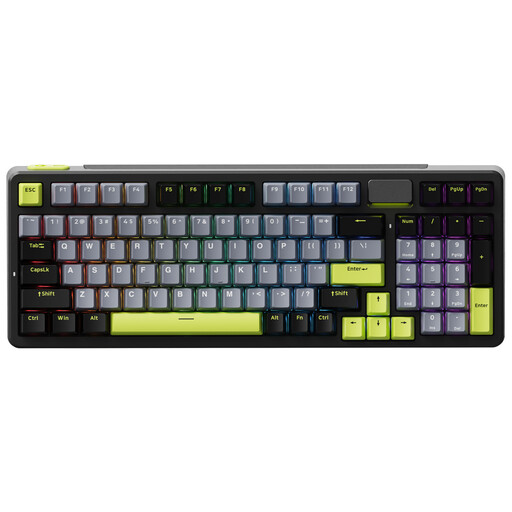
Rapoo V700DIY 96%, QWERTY US layout, Gasket Mount-BG
Consider a 96% arrangement if you want to keep number-pad use while limiting keyboard width. The title specifies a QWERTY US layout and tri-mode operation; check the fitted switch and the charging routine if either affects your choice.
View on Joybuy
 No image available
HyperX Alloy Rise 75 Wireless Keyboard UK
Consider this compact wireless model if you want a 75% keyboard while keeping the controls important to your games. Check the selected physical UK layout and fitted switches before ordering; the title alone does not establish their configuration.
View on Joybuy
Questions about long-session gaming keyboards
Will a low-profile keyboard prevent discomfort during long sessions?
No: its height may suit a particular desk arrangement, but the whole workstation still matters. The Health and Safety Executive advises keeping the keyboard central and just below elbow height; the NHS associates repeated activity and poor posture with repetitive strain injury.
Which switch feel should I choose for exploration games?
Choose the feel and sound you can live with over a long session rather than assuming clicky, tactile or linear switches are universally preferable. If you want to change switches later, check the board's hot-swap compatibility and the switches fitted to the exact variant.
Do exploration games require very short actuation settings?
Very short settings are not a default requirement for exploration play; they are a choice for players who deliberately want sensitive inputs. For the K70 PRO TKL, Corsair recommends 0.3–3.6 mm for optimal accuracy and warns that settings outside this range can affect sensitivity and consistency.
Does UK workplace keyboard guidance apply to personal gaming?
The Health and Safety Executive's display screen equipment assessment requirement concerns work, not a requirement to buy a particular keyboard for personal gaming. In its guidance for employers and workers, the HSE says employers must assess workstations where workers use display screen equipment daily as part of normal work, continuously for an hour or more.


