Players keeping their shortcuts
If you want room to move the mouse beside a large display but still use function keys and familiar game or PC shortcuts, a tenkeyless layout is worth considering.


A UK-layout tenkeyless keyboard is a useful starting point if you want more mouse room while keeping function keys and familiar shortcuts. Consider adjustable actuation when movement drills are a priority and you intend to tune the keys; consider wireless and low-profile designs when changing devices or desk positions matters more.
If you want room to move the mouse beside a large display but still use function keys and familiar game or PC shortcuts, a tenkeyless layout is worth considering.
If learning the map involves repeated directional-movement drills, adjustable actuation may be useful to evaluate—provided you want to spend time tuning it.
If you change devices or move the keyboard around a large display, compare connection modes and keyboard height alongside the layout.
Settle the keys and mouse space you need before comparing movement-input features. Then decide whether the keyboard will stay at one PC or needs to move between devices.
| Concern | What to check | Who this matters to |
|---|---|---|
| Shortcuts and mouse room | Check the exact UK layout and whether the keys you use for the map, communication and everyday shortcuts are directly available. | If I need more mouse room without relearning my shortcuts, I want to know which keys remain easy to reach. Around 40% of consumers put shortcut access and desk space first. |
| Movement-key tuning | Check whether actuation can be adjusted and whether the particular game permits the input features you plan to use. | When I practise repeated movement inputs, I may want to tune how the keys respond rather than use one fixed setting. Around 30% of consumers put movement-input tuning first. |
| Connection and keyboard height | Confirm the connection modes and dimensions of the exact model; choose a switch feel and height you expect to find comfortable. | If I switch devices or reposition the keyboard, a fixed cable setup may be inconvenient. Connection or low-profile fit is the primary concern for around 30% of consumers. |
A smaller footprint can change how you reach function, navigation or other keys. CORSAIR describes its K70 CORE TKL as retaining function keys and shortcuts; do not assume the same arrangement on a 60% model.
List the map, push-to-talk, inventory and PC controls you use, then check their positions on the exact keyboard layout.
Razer lists adjustable actuation for the Huntsman V3 Pro Tenkeyless 8KHz, but the adjustment matters chiefly if you will try different settings for your movement keys.
If movement tuning is not part of your practice, prioritise the layout, connection and switch feel you want to use every day.
Keyboard variants can differ. A regional shop page or product photograph alone may not identify the exact key arrangement selected at checkout.
Confirm the model’s layout designation and any variant selector before ordering.
GOV.UK advises marketplace shoppers to check seller information, product details, relevant instructions or warnings, and recognised safety markings where applicable.
Compare the seller and precise model in the listing, then check the supplied connection accessories and return terms before ordering.
A reference for movement-focused tenkeyless models with adjustable inputs.
A reference for a conventional wired UK-layout tenkeyless option.
A reference for a low-profile tenkeyless keyboard with several connection modes.
These keyboards offer different compact-layout approaches to mouse space, shortcuts and movement practice. Compare the exact key arrangement before choosing: the selection includes 75%, 96%, 87-key and 60% models, not just tenkeyless boards.
 No image available
Consider its 75% wireless format if you want a smaller keyboard beside the mouse. Check the exact UK key arrangement and access to your usual shortcuts before buying.
 No image available
Consider the 96% layout if keeping a number pad matters alongside a more compact arrangement. It is not tenkeyless, so check its dimensions against your available mouse space.
 No image available
Its 87-key format is worth checking if you want a compact desk setup without moving straight to 60%. Confirm the exact UK layout and how you reach the shortcuts you use.
 No image available
Consider this 60% model if mouse space and movement-focused practice take priority over direct access to every shortcut. Check its key arrangement, exact UK layout and the current rules of your game before using enhanced input features.
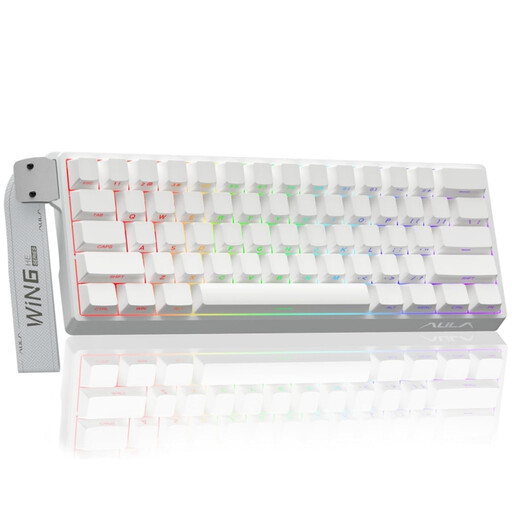 No image available
Consider its 60% wired format if you prioritise mouse room and intend to adjust movement-key settings. The product title lists adjustable actuation, Rapid Trigger and 8,000 Hz polling; check shortcut access, the exact UK layout and your game’s current input rules rather than treating those specifications as a gameplay guarantee.
Choose tenkeyless if you want more mouse room while keeping function keys readily available. A 60% board takes up less desk space, but check how you will reach the map, communication and PC shortcuts you rely on.
No: those features are chiefly worth considering if your practice includes repeated movement inputs and you want to tune key behaviour. Check the particular game’s current rules before enabling enhanced input modes.
A wired keyboard is a straightforward choice when it stays at one PC. If you change devices or desk positions, check the exact model’s supported wireless and wired modes before choosing it for that flexibility.
Check the seller, exact keyboard variant and layout, product details, and relevant instructions or warnings. GOV.UK also advises marketplace shoppers to look for recognised safety markings where applicable.