Players who rely on shortcuts
If you regularly use party commands, menus or desktop shortcuts, decide whether you want separate macro controls or are comfortable assigning functions to existing keys.


Choose around how you want to reach your commands: dedicated macro controls give frequently used shortcuts separate physical keys, while programmable standard keys can suit a smaller board. Before buying, check the selected layout, how remapping works with your games, which keys a compact design omits and whether its switch feel suits longer sessions.
If you regularly use party commands, menus or desktop shortcuts, decide whether you want separate macro controls or are comfortable assigning functions to existing keys.
If the keyboard doubles as your board for chat and everyday typing, the selected key layout and switch feel matter alongside its gaming controls. Check the exact UK-layout variant rather than relying on a product-family name.
A TKL or 75% board may appeal if you want more room for your mouse. Check the omitted keys before choosing a compact layout, particularly if you use the keyboard for tasks beyond gaming.
Start with the commands and keys you use, then choose a layout and connection method that fit the rest of your desk setup.
| Concern | Buying check | Who this matters to |
|---|---|---|
| Commands and remapping | Check for separate macro controls or the key assignments you need; confirm that your game accepts the intended bindings. | If I use party commands repeatedly, I want to reach them without losing track of my keys. Roughly 38% of consumers put command access first. |
| UK layout and key feel | Confirm the selected UK-layout variant and consider switch feel, noise and travel; check switch compatibility before planning changes. | When I switch between a game, chat and everyday typing, familiar key placement and a feel I like matter most. For around 37% of consumers, that is the primary concern. |
| Desk fit and connections | Check omitted keys, available desk space and the exact wired or wireless modes offered by the model. | If my mouse space is tight or I move between devices, the board's footprint and connections shape my choice. About 25% of consumers prioritise that fit. |
A keyboard family can have several regional variants, changing the positions of keys you use for typing or shortcuts.
Confirm the selected UK-layout variant in the product options before ordering; do not rely on gallery images alone.
Separate macro controls take up board space. If you need only a few custom assignments, programming standard keys may leave more room on your desk.
List the commands you want within reach, then decide whether they need their own physical controls or can share existing keys.
TKL and 75% layouts omit keys, while a low-profile design changes the board's height and key feel. Neither choice establishes what will suit your posture or typing habits.
Compare the layout diagram with your game bindings, measure your desk space and consider your usual seating position.
Hot-swap support depends on the exact keyboard and compatible switches; it does not mean every switch type will fit.
Check the stated socket and pin compatibility before choosing replacement switches.
Worth considering if you are comparing separate macro controls with a compact board that allows switch changes.
Relevant if you prefer programmable keys on a low-profile TKL board rather than a separate macro column.
Relevant if UK-ISO key placement, a TKL layout and a choice of connection methods are priorities.
These keyboards cover compact layouts and condensed boards that retain a number pad. Compare their stated layouts with the keys you use in tactical role-playing games, then check any shortcut software against your intended bindings.
 No image available
Consider this smaller board if you want to assign shortcuts to existing keys rather than make room for separate macro controls.
The title specifies a US layout, tri-mode wireless connectivity, hot-swappable construction, VIA compatibility and an 8000 mAh battery. Check that its layout and your intended game bindings suit you.
 No image available
This 75% model is an option if you want a smaller board and plan to configure key assignments.
The product name identifies a wireless keyboard and labels it UK; confirm the exact selected key layout. If shortcuts matter to you, check the NGENUITY assignment options and your game's binding rules.
 No image available
Consider its condensed 96% arrangement if you want to keep a number pad for tasks alongside gaming.
The product name specifies wireless operation and a UK layout. If custom game commands are essential, confirm the available remapping controls before choosing it.
 No image available
This 60% board suits a desk where space matters, provided its secondary key functions work for your game and everyday typing.
Check the selected layout and whether its recorded macros can be used with the bindings you intend.
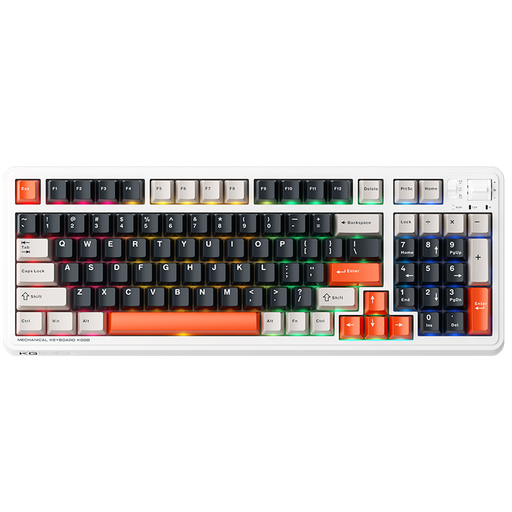 No image available
Its 96% arrangement is worth considering if you want a number pad in a condensed layout.
The name specifies a US QWERTY layout, tri-mode connectivity and hot-swappable construction. Check whether the US key placement suits you and confirm the remapping options if game shortcuts are a priority.
No: separate macro keys are a choice for players who want frequently used commands on their own physical controls. Programmable standard keys can suit a smaller board if its software provides the assignments you need and the game accepts those bindings.
Yes. Select the exact UK-layout variant you want, since a product family may include several regional layouts. Check the chosen configuration rather than relying on gallery images.
It can give you a way to change switches if the replacement type fits the exact board. Razer states that the BlackWidow V4 75% accepts 3- or 5-pin switches; check compatibility for the model and switches you actually select.