Choose a keyboard whose keys you can read at a comfortable brightness, then decide how much desk space you can give up for a familiar layout and extra controls. For tower defence, dedicated macro keys are worth considering if you will assign shortcuts; a wireless RGB model also means checking battery life with the lighting you intend to use.
Who this choice matters to
The right keyboard depends on whether low-light visibility, frequent shortcuts or the space and sound of your setup is the limiting factor.
Dark-room strategy players
If you play with little ambient light, look for key legends and controls you can locate without turning the backlight up uncomfortably high. Compare brightness adjustment and lighting zones rather than assuming every RGB keyboard illuminates individual keys.
Shortcut-heavy tower defence players
If you regularly use assigned commands, configurable keys may be useful. Check whether you need dedicated macro keys or can remap ordinary keys, and whether the required software supports your setup.
Space- and noise-conscious gamers
A smaller desk or shared room makes keyboard width and switch sound important. A compact layout can free mouse space, but check where it places the navigation keys you use; choose switch feel with your room’s noise tolerance in mind.
What to check before choosing
Settle visibility and physical layout before paying attention to optional shortcuts or connection modes: neither helps much if you cannot find the keys you need comfortably.
| Concern |
What to check |
Who this matters to |
| Readable lighting |
Check whether the backlight is zoned or per-key, and whether brightness and key legends remain usable at your preferred setting. |
When I play with the room lights low, I want to locate commands without an uncomfortably bright keyboard. Around 40% of consumers put readable lighting first. |
| Layout and desk fit |
Check the actual arrow, navigation and numpad arrangement, plus whether the physical legends are UK or US QWERTY. |
If I use navigation or number keys often, I need them within reach without crowding my mouse space. Roughly 30% of consumers prioritise layout and desk fit. |
| Switch feel and noise |
Check the exact switch variant and its stated feel; consider whether an audible click suits a shared room. |
For longer sessions or play near other people, I want keys that feel comfortable without unwanted noise. About 20% of consumers put switch comfort and sound first. |
| Shortcuts and connection |
Check macro or remapping support and, for wireless models, the connection options and battery-life conditions with lighting enabled. |
If I customise repeated commands or want fewer cables, those controls and connection choices matter most to me. Around 10% of consumers make this their primary concern. |
Buying mistakes to avoid
-
Assuming RGB means individually lit keys
RGB describes colour lighting, not necessarily per-key control. CORSAIR specifies ten lighting zones for the K55 CORE RGB, while Razer specifies per-key lighting for the BlackWidow V4.
If you want particular tower-defence controls to stand out, check for an explicit per-key setting or a stated number of lighting zones.
-
Assuming a UK-facing listing has a UK key layout
Joybuy listings can identify keyboards as US QWERTY. That distinction matters if you expect familiar UK legends and a particular physical key arrangement.
Check the exact variant’s layout description and photographs before ordering.
-
Choosing wireless RGB without checking charging needs
RTINGS.com notes that wireless keyboard battery life varies with the connection type and use of backlighting. A runtime figure may therefore be less useful unless its lighting conditions match yours.
If the keyboard will stay at one desk, consider whether wired use is simpler. Otherwise, check the wireless model’s battery claim at a suitable lighting setting.
Brands to consider
These model lines illustrate different lighting, switch and shortcut choices; check the exact keyboard rather than treating a feature as common to every model from a brand.
CORSAIR
CORSAIR’s K55 CORE RGB and K70 CORE RGB offer different approaches to an illuminated desk keyboard.
- CORSAIR specifies ten-zone RGB and dedicated media controls for the K55 CORE RGB; the K70 CORE RGB is a mechanical model with MLX Red linear switches. CORSAIR also says its iCUE software can control lighting and configure macros and key assignments.
- If highlighting individual keys matters, confirm the lighting implementation on the exact model: ten-zone lighting is not per-key lighting.
Logitech G
Logitech G’s G815 is a low-profile mechanical option for a wired desk setup.
- Logitech G lists LIGHTSYNC RGB, dedicated G-keys and clicky, tactile or linear GL switch variants for the G815.
- Select the exact switch variant you want, and allow for its wired connection and desk footprint.
Razer
Razer’s BlackWidow V4 is relevant if you expect to use dedicated macros and individual lighting controls.
- Razer specifies per-key Chroma RGB, six dedicated macro keys and a choice of Green or Yellow switch versions for the BlackWidow V4.
- Check whether the macro column fits your desk and whether the selected switch version suits your preferred sound and feel.
Joybuy keyboards for different setups
These keyboards cover compact and full-size layouts, wired and wireless choices, and UK- or US-labelled variants. For dark-room play, check each model’s legend visibility and usable brightness alongside the layout you need.
 No image available
HyperX Alloy Rise 75 Wireless Keyboard UK
Consider this UK-labelled wireless model if you want to leave more room beside your keyboard for mouse movement.
Check that its key arrangement retains your preferred tower-defence controls, and compare battery life at the RGB setting you plan to use. Assess the legends and lowest comfortable brightness for dark-room play.
View on Joybuy
 No image available
Ticktype DP104 Gecha Gray, Silent Tactile, US layout
This is an option for someone who wants a full-size keyboard and is comfortable using US key legends.
The named variant has 108 keys, tri-mode wireless connectivity, RGB lighting and Silent Tactile switches. Check how the legends look at your preferred brightness, and do not rely on the switch name alone to judge whether its sound suits your room.
View on Joybuy
 No image available
Razer Huntsman V3 Pro Mini 60% Analog Optical Keyboard
Consider this 60% model if freeing desk space matters more than having every control on a dedicated key.
Check how you would access arrows and other commands on its compact layout, and confirm the exact physical key arrangement before ordering. For low-light use, assess the lighting controls and key legends rather than relying on the keyboard’s gaming designation.
View on Joybuy
 No image available
ASUS ROG Strix Scope II 96 Wireless, UK layout
This UK-layout wireless model is worth considering if you want to retain a numpad while keeping the keyboard’s footprint in mind.
Confirm the switch variant before ordering. If RGB will stay on while you play, compare battery-life conditions with your intended lighting setting and check that the legends remain readable at a comfortable brightness.
View on Joybuy
 No image available
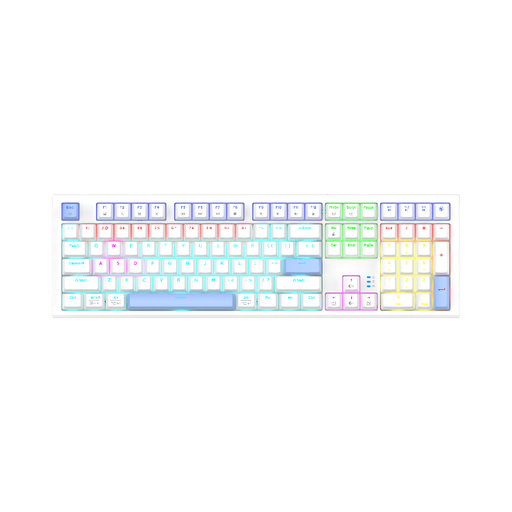
ochama J104 white wired mechanical keyboard, US QWERTY
Consider this full-size board if you want wired use without managing a keyboard battery and can work with US QWERTY legends.
Its name specifies 104 keys, RGB lighting and a USB-A connection. Check the lighting at a comfortable level and whether the described clicky feel would be acceptable in your room.
View on Joybuy
Common questions
Do I need per-key RGB to play in a dark room?
No: if you simply need to see the keyboard, a controllable backlight may be enough. Per-key RGB matters more when you want to distinguish particular controls by their lighting; check the exact model, since RGB can also be divided into zones.
Should I choose wired, Bluetooth or 2.4 GHz wireless?
Choose wired if avoiding charging is your priority. For wireless gaming, RTINGS.com says a 2.4 GHz connection typically offers lower latency than Bluetooth; check the model’s connection options and battery-life conditions if you intend to keep its backlight on.
Does a keyboard sold on a UK-facing site have UK QWERTY keys?
Not necessarily: Joybuy listings also identify US QWERTY keyboards. If familiar UK legends and key shapes matter to you, confirm the layout of the exact variant in its description and photographs.
What should I do with an old keyboard?
Use an appropriate electronics collection or retailer take-back route where available rather than putting it in ordinary residual waste. UK government guidance on waste electrical and electronic equipment addresses recovery, reuse and recycling of electrical products and their components.


