Choose a full-size wired keyboard if you want a palm rest and repeatable controls at a fixed desk; a compact wireless or low-profile model makes more sense when mouse space or switching devices matters more. Check the selected layout, key feel and wireless battery conditions before buying, and do not rely on a wrist rest instead of changing position and taking breaks.
Who is this for?
Long-session comfort-first players
If the aquarium stays open for hours but you press keys only occasionally, keyboard height, key feel, noise and room to position your hands may matter more to you than competitive-gaming specifications. Check whether a palm rest suits your desk setup, and plan changes of position during the session.
Routine-and-shortcut managers
If you regularly use feeding, maintenance, menu or media controls, consider reachable shortcuts or remapping. Check that the game permits the actions you intend to assign and that you are willing to set up any required keyboard software.
Small-desk or multi-device players
If your keyboard shares space with a mouse or other devices, a smaller layout or wireless connection may appeal. Weigh the space gained against losing a numeric keypad, managing charging and checking compatibility with each device you use.
What matters when choosing?
For a long virtual-aquarium session, decide whether hand positioning, recurring controls or desk space is your main priority. Each points to a different set of keyboard checks.
Full-size wired
Choose it when: A fixed desk, a palm rest and easy access to repeated commands matter most.
Trade-off: A full-width board takes more desk space, while the cited wired models need a cable.
Compact wireless
Choose it when: Mouse room and a smaller keyboard matter more than a numeric keypad.
Trade-off: You need to account for charging and check battery claims against your lighting settings.
Low-profile multi-device
Choose it when: A slimmer board and moving between compatible devices are your priorities.
Trade-off: A low-profile design is a key-feel preference, not a guarantee of long-session comfort.
| Concern |
What to check |
Who this matters to |
| Comfort during long sessions |
Try the key height and feel where possible; check whether a palm rest is included and fits your desk position. |
If I leave the aquarium running for hours, I want occasional inputs to feel comfortable without adding distracting key noise. Around 40% of consumers put comfort, hand support or quieter operation first. |
| Recurring controls |
Check the available macro keys or remapping options and whether your game permits the intended shortcuts. |
When I revisit the same aquarium menus, I want familiar controls within reach rather than more keys than I will use. For around 30% of consumers, shortcut and control access is the primary concern. |
| Space and connections |
Compare the layout with your mouse-space and numeric-keypad needs; check connection modes and battery conditions. |
If my desk is shared with other devices, I need room to move the mouse or a convenient way to switch connections. Desk space or connectivity comes first for around 30% of consumers. |
Buying pitfalls
-
Treating a wrist rest as the whole long-session solution
A rest can provide a place for your hands between inputs, but it cannot make an unsuitable desk position comfortable by itself. For employee display-screen-equipment use, the Health and Safety Executive recommends short, frequent breaks rather than occasional longer ones.
Check keyboard height and key feel alongside the rest, and make room for movement or a change of activity during a long session.
-
Assuming a UK-facing listing has a UK layout
Razer offers selectable layouts on a UK-facing BlackWidow listing, while Corsair identifies a separate UK-layout K70 CORE variant. The storefront alone does not tell you which layout you have selected.
Check the variation selector and order summary, especially if you also use the keyboard for typing.
An unsuitable layout may mean arranging a replacement or adapting to different key positions.
-
Reading a wireless endurance figure without its conditions
Corsair states that the K70 CORE TKL Wireless can run for up to 890 hours on one charge with RGB lighting off; that figure does not describe every lighting setup.
Compare battery claims using the settings you expect to use, and decide whether a cable while charging would suit your desk.
Charging or temporary cable use remains part of a wireless setup.
-
Choosing macro controls before checking the game
Programmable keys can help with permitted shortcuts, but configuration takes effort and the game's rules may restrict automated actions.
List the commands you actually repeat, check how the keyboard assigns them and use ordinary single-action shortcuts where automation is restricted.
Brands to consider
Logitech G
The G915 X LIGHTSPEED is a reference point for shoppers considering a slim keyboard with several connection methods.
- Logitech G lists LIGHTSPEED wireless, Bluetooth and wired connectivity, alongside low-profile switches and remapping through KEYCONTROL.
- Its low-profile design does not establish that it will feel comfortable for everyone; assess the exact model's key feel and hand position.
Razer
The BlackWidow V4 illustrates a full-size approach for players who want dedicated controls and a supplied wrist rest.
- Razer lists six dedicated macro keys, media controls and a magnetic wrist rest for the BlackWidow V4, with Green and Yellow switch options.
- Check the exact BlackWidow model, switch and layout: features and included accessories should not be assumed across the range.
Corsair
The K70 CORE range provides distinct full-size and tenkeyless options for different desk-space needs.
- Corsair lists a detachable palm rest for the UK K70 CORE RGB, while the K70 CORE TKL Wireless offers Bluetooth and SLIPSTREAM wireless connections.
- The full-size and TKL versions differ in footprint and keypad availability; wireless endurance claims depend on settings.
Joybuy keyboard options
These keyboards offer different ways to equip a long-session desk: compact wireless layouts, a UK-layout wireless option and a wired model with a wrist rest. Compare each listing's exact layout and configuration against the controls and hand position you need.
 Image unavailable
ASUS ROG Strix Scope II 96 Wireless, UK Layout
Consider this UK-layout wireless model if you want a smaller desk footprint without choosing a US-layout keyboard.
Check the selected switch option before ordering. If battery endurance matters, compare the stated conditions with the lighting and connection you intend to use.
View on Joybuy
 Image unavailable
AULA F99 Tri-Mode, US Layout, Light Blue/Reaper Switch
This US-layout option is worth considering if a wireless keyboard suits your desk and you are comfortable with its key arrangement.
The title lists wired, Bluetooth and 2.4G modes. Confirm the selected switch variant on the listing before buying, and check the box contents if you want a wrist rest.
View on Joybuy
 Image unavailable
AULA F75 75% Tri-Mode Gaming Keyboard, US Layout
The 75% layout is an option if keyboard footprint matters more to you than a full-width arrangement; check that its US layout suits your typing.
The title lists wired, Bluetooth and 2.4G connections, RGB lighting and PBT keycaps. Check the box contents if a wrist rest is important to your setup.
View on Joybuy
 Image unavailable
HyperX Alloy Rise 75 Wireless Keyboard, UK
Consider this UK-version wireless keyboard if you want a 75-series layout rather than a full-size board.
Check its lighting-dependent battery conditions for your intended use, and confirm the box contents if hand support matters.
View on Joybuy
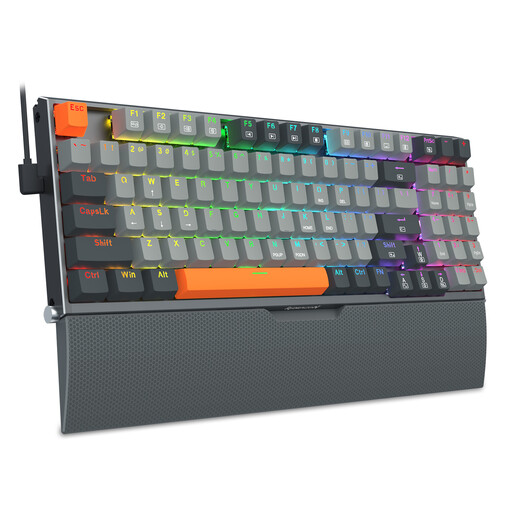 Image unavailable
Redragon 94-Key Wired Mechanical Keyboard with Wrist Rest
This wired model suits a fixed desk if you want the wrist rest named in its listing and do not need wireless switching.
The title also lists a phone stand. Check the keyboard layout and selected switch feel before ordering, particularly if you type for long periods.
View on Joybuy
Frequently asked questions
Should I check the keyboard layout on a UK-facing listing?
Yes. A UK-facing page can offer more than one layout: Razer shows selectable layouts on a BlackWidow listing, while Corsair names a UK-layout K70 CORE variant. Check the selected option and order summary rather than relying on the product photo.
Will a wireless keyboard reach its advertised battery life with RGB lighting on?
Not necessarily. Corsair's claim of up to 890 hours for the K70 CORE TKL Wireless specifies RGB lighting off. Check the exact model's lighting and connection conditions against how you plan to use it.
Does a wrist rest remove the need for breaks during a long session?
No. Choose a rest for how it fits your keyboard and desk, not as a substitute for moving or changing activity. The Health and Safety Executive advises short, frequent breaks for employees using display screen equipment; that employment guidance is not a fixed timetable for personal gaming.
What should I do with an old keyboard?
Use an electrical-equipment collection or take-back route rather than putting it in ordinary residual waste. Government guidance covers the recovery and recycling of waste electrical equipment; check your retailer's take-back arrangements or an available local collection option.


