What matters when choosing
Start with the keys your game uses and the space available beside your mouse. Consider programmable controls or adjustable sensitivity after those basic layout decisions.
| Concern |
What to check |
Who this matters to |
| Shortcut access |
Check the game’s available bindings and whether the exact keyboard offers the remapping or programmable keys you intend to use. |
When I frequently switch tools and manage objects, I want commands within easy reach rather than repeated key combinations; around 40% of consumers put shortcut access first. |
| Desk space and number pad |
Measure the space beside your mouse and check whether you use number-pad commands in the game or elsewhere. |
If broad mouse movements help me position objects, I would favour a narrower board even if it means giving up the number pad; about 30% of consumers prioritise desk space. |
| Adjustable key response |
Check the exact model’s actuation settings and whether you can save or change a comfortable configuration for each game. |
When I alternate between careful building and faster games, I want to change key sensitivity without making menu inputs awkward; roughly 30% of consumers put tunable response first. |
Joybuy product choices for different layouts
These keyboards offer compact, 87-key, 96% and 108-key options for balancing mouse room against key access. Compare each layout with your game’s bindings; do not assume that a connection mode or gaming-keyboard label includes the remapping features you want.
 No image available
ASUS ROG Strix Scope II 96 Wireless, White, UK Layout
Consider this 96% layout if you want to compare a more compact arrangement with wider boards while retaining readily accessible keys. The listed variant is wireless, white and UK layout; check its exact key positions and whether its controls support the commands you plan to use.
View on Joybuy
 No image available
AULA F75 75% Wireless Keyboard, US QWERTY
The 75% layout is worth considering when space beside the mouse matters more than a full-size key arrangement. The title lists wired, Bluetooth and 2.4G connections and specifies US QWERTY; check that its key legends and positions suit your typing and game bindings.
View on Joybuy
 No image available
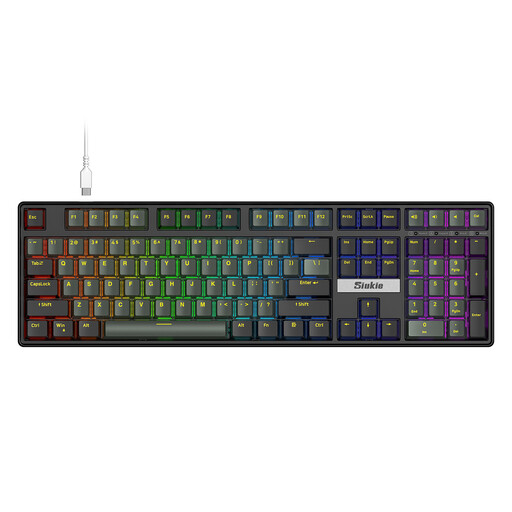
Siukie CR108 108-Key Wired Mechanical Keyboard
This 108-key option suits consumers who prefer more keys immediately available and a wired connection. Check the physical key legends and positions against the layout you use, particularly if you rely on familiar shortcut locations.
View on Joybuy
 No image available
Siukie PL87W 87-Key 3-Mode Mechanical Keyboard
Consider this 87-key option if you want a narrower board beside the mouse and can do without a dedicated number pad. Its listed three-mode design offers connection choice; confirm the key legends and any shortcut features you need for your game.
View on Joybuy
 No image available
Siukie PL108W 108-Key 3-Mode Mechanical Keyboard, Black
This 108-key model is another option if immediate access to more keys matters more than a narrow desk footprint. Its title specifies three connection modes and a black finish; check the physical layout and the controls you need before choosing it for repeated garden-building commands.
View on Joybuy
Common questions
Should I choose full-size or TKL for a virtual-garden game?
Choose a layout with a dedicated number pad if you use those keys regularly; choose TKL if mouse room matters more. Check your game’s bindings and your other keyboard tasks before giving up the number-pad section.
Will keyboard macros help with garden-building commands?
Macros can help with repeated commands only when the game’s controls and rules permit the intended use. Logitech G says the G915 X LIGHTSPEED can assign complex macros to nine G keys, but that hardware feature does not establish what a particular game allows.
Do I need adjustable actuation for garden design?
No, adjustable actuation is an optional consideration if you also use the keyboard for faster-paced games. SteelSeries and Razer list adjustable ranges on specific models; for careful placement and menus, begin with a setting that does not make accidental presses more likely.
How should I clean a gaming keyboard?
Follow the instructions for your exact model. Logitech Support recommends regular cleaning for its keyboards and warns against bleach, acetone, strong solvents and abrasive products; do not assume those products are suitable for another keyboard either without checking its instructions.


