Choose the layout around the keys you use and the mouse room you need: a tenkeyless (TKL) board keeps dedicated arrows and navigation keys without a number pad, while a full-size board keeps the number pad for bindings and number entry. For long building sessions, check the exact UK layout, switch feel, keyboard height and wireless runtime under your intended lighting settings; no single keyboard feature can settle whether the whole desk setup feels comfortable.
Who is this for?
Long-session sandbox builders
If you spend extended periods placing blocks, navigating and managing inventories, consider the keyboard alongside your mouse position and the rest of your desk. The Health and Safety Executive links fatigue and upper-limb problems with overuse or improper use of display-screen equipment; that guidance does not establish that a particular keyboard prevents injury.
Players who need mouse room
If broad mouse movements matter more to you than a number pad, a TKL layout is worth considering. Corsair describes TKL boards as retaining dedicated arrows and navigation keys while removing the number pad.
Players who want to customise key feel
If you expect to change your shortcuts or switches over time, check the exact model’s remapping options and switch compatibility. Keychron lists QMK/VIA customisation for its Q6 Max, while Razer describes replaceable switches on its BlackWidow V4 75%.
What matters when choosing?
Start with the keys your game and other tasks require, then assess how the board’s height, switches and connection options fit the same desk.
| Concern |
What to check |
Who this matters to |
| Comfort and desk setup |
Check front height and where your hands can rest; assess keyboard, mouse and chair positions together. |
During a long building session, I want a keyboard position that works with my desk rather than relying on a wrist rest alone. Around 36% of consumers put comfortable positioning first. |
| Layout and mouse room |
Check number-pad and navigation-key needs, available mouse space and the exact UK-ISO designation if required. |
I use the mouse extensively but still need quick access to my usual building and navigation keys. For around 29% of consumers, that balance is the primary concern. |
| Switch feel and noise |
Identify the fitted switch and, if you want to change it, confirm hot-swap compatibility and what the package includes. |
Repeated inputs make key feel and sound important to me, especially if I share the room. Roughly 21% of consumers prioritise feel, noise or later switch changes. |
| Connection and charging |
Check the exact variant’s connection modes and compare battery ratings at the lighting settings you plan to use. |
I want flexible placement or to switch devices without charging interrupting a session. That is the leading need for approximately 14% of consumers. |
Buying mistakes to avoid
-
Assuming a UK-facing listing means UK-ISO keys
Keyboard families can have different regional configurations, so the seller’s location does not settle the layout of a particular variant.
Check the stated layout and product code before ordering. Look for an explicit UK-ISO designation if you need that key arrangement.
-
Reading the highest battery figure as RGB-on runtime
Rated runtime can change substantially with lighting settings. Corsair’s K70 CORE TKL Wireless manual, for example, lists different conditions for its battery figures.
Compare figures under like-for-like wireless and lighting conditions, and check whether the keyboard operates wired while charging.
-
Choosing a compact board without checking its keys
A smaller board can leave more mouse room, but removing a number pad or condensing navigation keys may disrupt familiar bindings.
List the keys you regularly use in the game and on the desktop. A TKL layout retains dedicated arrows and navigation keys, while the exact arrangement of a 75% board needs checking model by model.
-
Expecting one keyboard feature to fix discomfort
A low front edge or wrist rest cannot by itself account for chair height, mouse position and time spent at the desk. Health and Safety Executive guidance considers the wider workstation and work routine.
Assess the keyboard with your desk and mouse setup, leaving room to rest your hands when not keying and making time for changes of activity.
Relevant keyboard brands
Logitech G
Its G915 X LIGHTSPEED is a slim wireless option for players comparing keyboard height and connection modes.
- Logitech G lists a 23 mm height and LIGHTSPEED wireless, Bluetooth and wired operation for this model.
- Try or check its low-profile key feel rather than assuming it will suit you because you like conventional-height mechanical switches.
Razer
Its BlackWidow range includes full-size, compact hot-swappable and low-profile designs with different selection priorities.
- Razer lists six dedicated macro keys on the BlackWidow V4 and replaceable switches on the BlackWidow V4 75%.
- Check the V4 75% package: Razer’s barebones version excludes switches, keycaps and a wrist rest.
Keychron
Its Q6 Max UK-ISO configuration is relevant if you want a full-size regional layout and configurable connections.
- Keychron lists 2.4 GHz, Bluetooth 5.1 and Type-C wired connections, alongside QMK/VIA customisation, for the Q6 Max UK-ISO.
- Its full-size footprint needs more desk width than a TKL layout, so check the space left for your mouse.
Corsair
Its TKL options are relevant if you want dedicated navigation keys without a number pad.
- Corsair lists 2.4 GHz, Bluetooth and wired connections for the K70 CORE TKL Wireless UK model.
- Its rated battery life depends on RGB settings; use a figure that matches your intended lighting rather than the highest stated runtime.
Joybuy keyboards to consider
These gaming keyboards cover different compact layouts and connection choices. Compare each one with the keys you use for building, the mouse space on your desk and the exact regional variant you need.
 No image available
ASUS ROG Strix Scope II 96 Wireless, UK Layout
Consider the 96% layout if you want to retain a number pad while assessing how much desk width your mouse needs.
The title specifies UK Layout; confirm the exact key arrangement and fitted switch variant. For wireless sessions, check runtime under your intended lighting settings.
View on Joybuy
 No image available
HyperX Alloy Rise 75 Wireless, UK
The 75% format is worth considering if you want a compact board but still rely on frequently used building shortcuts.
Confirm its exact UK key arrangement, battery rating at your preferred RGB brightness and whether its front height suits your desk.
View on Joybuy
 No image available
ASUS ROG Falchion Ace HFX 65 Analog, UK Layout
Consider this 65% board if leaving room for mouse movement matters more than having a full-size key arrangement.
Check where your regular shortcuts sit on its compact layout and whether a wired setup suits your desk. The title identifies an analog keyboard and a UK Layout variant.
View on Joybuy
 No image available
AULA S75 Pro 75% Wireless, Star Vektor Switch
This compact option may suit you if switch changes and connection choice matter alongside mouse room.
Its title lists tri-mode operation and hot-swappable Star Vektor switches. Check the exact key arrangement and regional layout before relying on particular shortcuts or UK-ISO keys.
View on Joybuy
 No image available
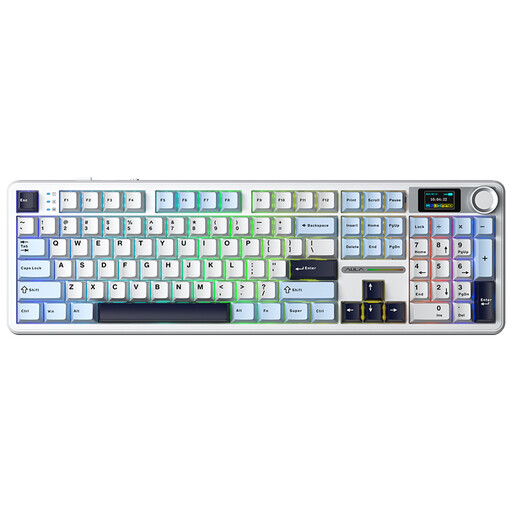
AULA F108 Pro Wireless, Reaper Linear Switch, Light Blue
Consider this model if connection options and the stated linear switch variant are priorities, but establish its physical layout before judging mouse room or shortcut access.
Its title lists Bluetooth, 2.4G and USB-C modes with hot-swappable Reaper Linear switches. Check the regional keys and battery conditions for your intended setup.
View on Joybuy
Frequently asked questions
Should I choose TKL, 75% or full size for sandbox building?
Choose TKL if mouse room matters and you still want dedicated arrows and navigation keys; choose full size if you regularly use a number pad. A 75% board can take up less space, but check its exact navigation-key placement against your bindings.
How do linear, tactile and clicky switches differ?
They offer different feel and sound rather than a universal quality ranking: linear switches have smooth travel, tactile switches add a bump, and clicky switches add audible feedback. Check the fitted switch on the exact variant, particularly if you play in a shared room; for a hot-swappable board, confirm compatible replacement switches too.
How should I read wireless battery claims when I use RGB?
Use a battery figure measured under lighting and connection conditions close to your own. Corsair’s manual lists up to 39 hours for the K70 CORE TKL Wireless with per-key RGB effects at 100% brightness; check the conditions for any other figure before comparing models.
How can I arrange my desk for a long building session?
Assess the keyboard, mouse, chair and space for resting your hands together rather than treating a keyboard feature as a complete solution. Health and Safety Executive display-screen guidance advises keeping wrists straight when keying, avoiding finger overstretching and taking breaks or changes of activity.


