
24/7 Customer Support

Free returns

Same-day & Next-day Delivery

Quality Guaranteed

Unlock Your Welcome Offers: FREE Delivery | Up to 80% OFF | Free 30-day JoyPlus trial
Download the APP
Choosing gaming keyboards and mice involves more than comparing RGB effects or the largest DPI number on a product page. The right combination should suit your games, desk space, grip, connection preferences and everyday use. For UK buyers, keyboard layout and device compatibility also matter: a product described as compact may use a US layout, while some software features may require Windows.
This guide from the Joybuy Product Recommendation Officer focuses on practical specifications, common marketing traps and suitable options for different types of player.
An 8000Hz polling rate means the device can report its position or input more frequently than a 1000Hz model. However, the difference depends on your game, monitor refresh rate, computer performance and software support. A high polling rate does not automatically improve aim or make an ordinary setup feel eight times better.
Check whether the advertised rate applies in wired mode, wireless mode or both, and whether your PC can run it consistently.
A 60% gaming keyboard usually removes the function row, arrow keys and navigation cluster. A 65% model commonly restores arrow keys, while a 75% gaming keyboard generally keeps the function row in a compressed layout. Before buying, check:
A small footprint creates more room for mouse movement, but it can also introduce a learning curve.
RGB lighting, programmable buttons and advanced software can be useful, but only when the associated application supports your operating system and preferred games. Some features may require a Windows driver, while onboard memory varies between products.
Similarly, a wireless gaming mouse may offer greater desk flexibility, but you should confirm battery capacity, charging method, receiver placement and whether wired operation remains available while charging.
A mechanical gaming keyboard uses individual switches beneath each key. Linear switches provide a smooth press, tactile switches offer a noticeable bump, and clicky switches produce more audible feedback. A membrane keyboard typically feels quieter and softer, and can be suitable for mixed home-and-office use.
A magnetic switch keyboard, also called a Hall Effect keyboard, detects key movement magnetically rather than relying on a conventional physical contact mechanism. This enables adjustable actuation and features such as rapid trigger, which can reset a key as soon as it moves upwards. These functions are particularly relevant to FPS players who use rapid directional changes, although they require software configuration and may not be necessary for casual play.
Choose the smallest layout that still supports your normal tasks:
For UK buyers, confirm the listing states UK layout if you require the familiar ISO Enter key and British key legends.
A lightweight gaming mouse can make broad, fast movements easier, but weight is only one part of comfort. Shape, button position and grip support are equally important. An ergonomic gaming mouse is often shaped for a particular hand, while a symmetrical model may suit left- or right-handed users more easily.
DPI describes sensitivity, not accuracy by itself. A mouse with adjustable DPI, programmable buttons and a stable optical sensor gives you more control, but the useful range depends on your game and sensitivity settings. Use a dedicated mouse pad where possible; reflective or glass surfaces can cause tracking inconsistencies on some optical sensors.
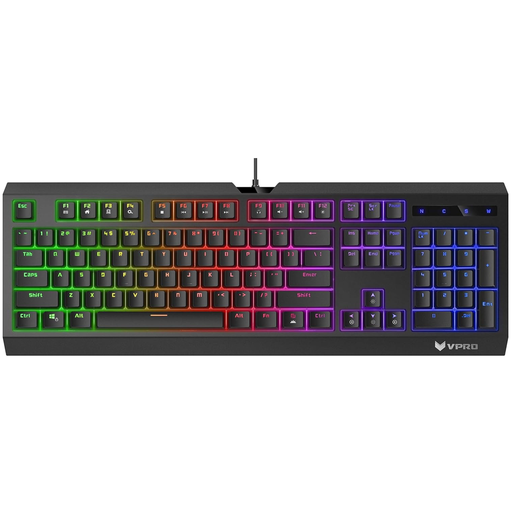
Why This Fits Their Persona: A practical starting point for UK gamers who share a desk between gaming, study and everyday computing and prefer a full-size layout.
Its USB plug-and-play connection and full-size design avoid the complexity of software-dependent layouts or missing number keys.
Quiet membrane switches, anti-ghosting keys, multiple RGB modes and a spill-resistant design.
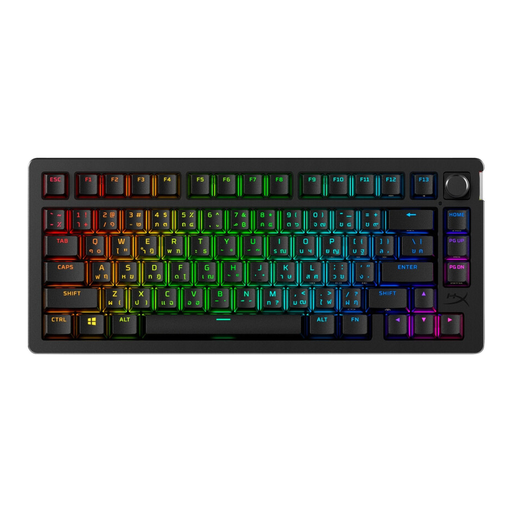
Why This Fits Their Persona: A 75% option for gamers, streamers and home-office users who want dedicated arrow and function keys without a full-size footprint.
The UK model is clearly identified, and dual 2.4GHz and Bluetooth connectivity offers flexibility beyond a single wireless mode.
Hot-swappable linear switches, per-key RGB, up to 10 onboard profiles and stated battery life of up to 80 hours with RGB enabled.
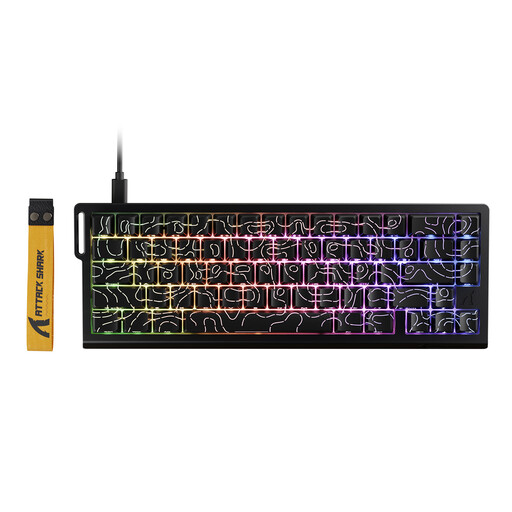
Why This Fits Their Persona: Its compact 66-key format is suited to players who need extra mouse space for low-sensitivity FPS movements and want adjustable key response.
The specification states the actuation range, wired USB-C connection and 8000Hz polling rate, making the key performance details easier to verify.
Hall Effect magnetic switches, adjustable 0.1–3.4mm actuation, Rapid Trigger, hot-swap support and onboard memory.
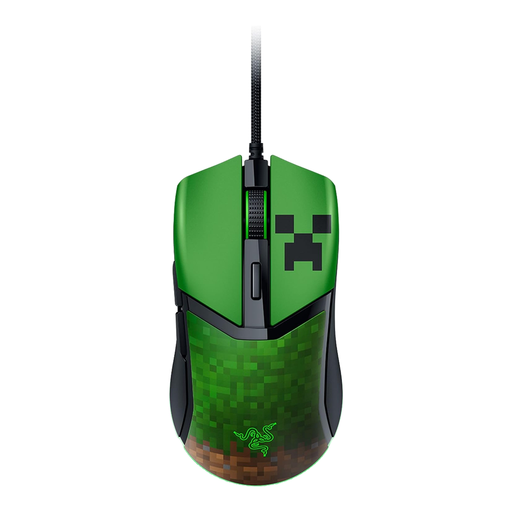
Why This Fits Their Persona: A themed wired gaming mouse for Minecraft players who also want a symmetrical shape and low weight for general PC gaming.
The wired USB connection avoids battery management, while the listed 58g weight and symmetrical form make the physical design clear before purchase.
Adjustable DPI in 50-DPI increments, programmable controls, PTFE feet and RGB lighting with Minecraft-themed effects.
For cable-free desks, compare the receiver arrangement rather than relying only on the phrase “low latency”. The AJAZZ AJ159 APEX combines 2.4GHz, Bluetooth and USB-C modes, with a stated 56g weight and an 8000Hz polling rate in wireless mode. Its magnetic charging dock may suit users who want a dedicated charging location.
If long battery operation matters, the MACHENIKE L9X1 offers wired, 2.4GHz and Bluetooth connectivity, a listed 49g weight, 700mAh battery and dual 8000Hz polling in wired and 2.4GHz modes. Always check the product page for the latest availability and specifications before ordering.
Yes, but consider noise, layout and lighting controls. Linear mechanical or membrane switches are generally more discreet than clicky switches. A 75% or full-size keyboard may also be more convenient for documents and spreadsheets than a 60% model.
It can be relevant to competitive players with a high-refresh-rate monitor and a computer capable of handling the additional reports. For casual gaming, office work or older systems, a lower polling rate may provide a more straightforward balance of performance and power use.
Lifespan depends on switch design, usage, cleaning and handling. Check the manufacturer’s stated click or keystroke rating, but treat it as a specification rather than a guarantee of a particular service period. Keep liquids away, use suitable surfaces and avoid modifying internal components.
We have compiled a complete, real-time list of products that fully satisfy these strict selection criteria and UK safety regulations.