Bright-room control readers
If you rely on recognising keys at a glance under strong room lighting, assess the printed legends, their contrast and the layout itself. RGB features alone cannot tell you how readable those keys will be in daylight.


For space-exploration games in a bright room, choose a keyboard whose physical key legends and layout you can read comfortably before making RGB lighting the deciding feature. A full-size board or dedicated macro keys may suit a command-heavy setup, while a smaller layout leaves more mouse room; wireless placement adds charging and connection choices. Manufacturer lighting specifications do not establish which keyboard will be easiest to read in your room.
If you rely on recognising keys at a glance under strong room lighting, assess the printed legends, their contrast and the layout itself. RGB features alone cannot tell you how readable those keys will be in daylight.
If you keep navigation, map, camera or communication commands close at hand, consider whether you use a number pad or would make use of programmable shortcuts. Check that the larger layout fits your desk.
If keyboard width restricts mouse movement, a layout without a number pad may be worth considering. Connection options matter separately if you also want to move the keyboard around your desk.
Start with readable legends and the layout you need, then weigh extra command keys against mouse room and connection flexibility.
| Concern | What to check | Who this matters to |
|---|---|---|
| Reading keys in bright light | Inspect physical legend contrast in lighting like your room, and confirm the selected layout. Do not treat RGB brightness wording as a daylight-readability test. | When room light makes illuminated effects less useful as a cue, I need to recognise controls from their physical markings. About 50% of consumers put bright-room key recognition first. |
| Access to game commands | Decide whether your bindings call for a number pad, dedicated macro keys or remapping. | If I use many navigation and interface shortcuts, I want the commands I rely on within easy reach. Roughly 30% of consumers prioritise command access and customisation. |
| Mouse room and placement | Compare keyboard width and connection modes; account for charging if choosing wireless use. | With limited desk space, I would rather leave room for mouse movement and place the keyboard where it suits me. Around 20% of consumers make footprint and placement their main concern. |
CORSAIR describes per-key RGB on the K70 CORE TKL, while Keychron describes improved illuminated-letter visibility in dim light on a different keyboard. Neither statement establishes how those keys will look in your bright room.
Check the physical legends and their contrast. If possible, assess the selected keyboard in lighting similar to where you play.
A tenkeyless layout removes the number pad. That matters if you assign commands to it, even when the narrower keyboard would leave more mouse room.
List the bindings you use regularly before deciding whether desk space or additional keys matter more.
Layout options can differ within a keyboard range, changing key positions and printed legends.
Confirm the layout of the exact variant you select before ordering.
Wireless placement can be convenient, but it also brings connection-mode and charging decisions.
Choose wireless for the placement flexibility you will use; if a fixed wired setup suits you, check the available wired option instead.
The UK-layout K70 CORE TKL is a wired tenkeyless option for players considering per-key lighting and a smaller footprint.
The G515 LIGHTSPEED TKL offers a smaller, low-profile route for players who want a choice of connection modes.
Two distinct models illustrate a choice between adjustable input behaviour and dedicated command keys.
These keyboards offer different ways to balance a smaller footprint, number-pad access and connection options for a bright-room gaming setup. For any model, check the physical legends under your lighting; pay particular attention to the stated layout where UK key positions matter to you.
 No image available
Consider this UK-labelled 75% keyboard if you want a smaller wireless layout. Check that its physical key legends remain clear in your room, and account for charging when using it wirelessly.
 No image available
The UK-labelled 96% format is worth considering if you want a layout between a tenkeyless and a conventional full-size board. Confirm that the selected keycaps and legends suit your room lighting, and consider the charging needs of wireless use.
 No image available
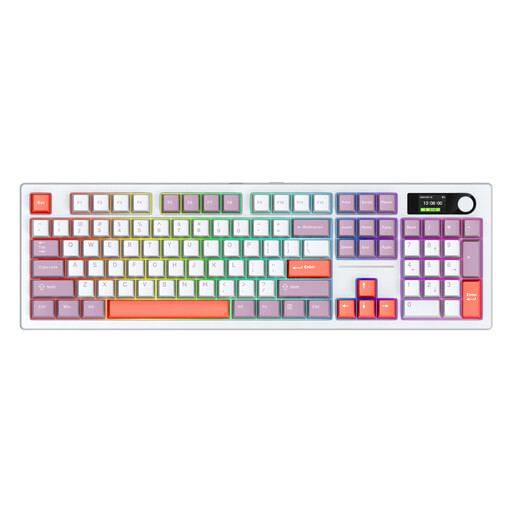
The 104-key format may appeal if you want more keys immediately available for game commands. Its title also specifies a detachable switch, 3MODE operation and RGB; confirm the selected key layout and assess the legends in your lighting before buying.
 No image available
This 75% option suits consideration where a compact layout and a choice of wired, Bluetooth or 2.4G connection matter. The title specifies RGB backlighting and PBT keycaps, but also a US QWERTY layout: check that its key positions suit you and that the legends are readable in your room.
 No image available
Consider the 108-key format if additional keys matter more to you than a narrower board. The title specifies a detachable switch and 3MODE operation; confirm the selected layout and physical legend contrast, as RGB alone does not settle bright-room readability.
No: per-key RGB describes the lighting feature, not how clearly you will see the legends under strong ambient light. Inspect the physical markings and contrast in lighting similar to your room rather than relying on an RGB description.
Choose a UK-layout variant if you want familiar UK key positions and legends. Check the exact variant before ordering: a product range can include different layouts, and the AULA F75 listed above is explicitly labelled US QWERTY.
Choose by the commands you use and the desk space you need: a full-size layout keeps a number pad available, while tenkeyless removes it to leave more horizontal room. Dedicated macro keys are another option if you use programmable shortcuts; neither layout is inherently better for the genre.
Check that you can identify the product and seller, and that the supplied connection, power information and instructions suit your intended setup. GOV.UK describes requirements for electrical equipment placed on the Great Britain market; a listing alone does not establish whether a particular keyboard meets them.