Choose a Bluetooth-capable wireless keyboard if an occupied USB port or a permanent cable is the main problem, provided your device supports Bluetooth and you have a practical way to recharge the keyboard. If physical cards share the table, compare compact layouts by the keys you still need: a 75% or tenkeyless board leaves more room, while a 96% board retains a denser, near-full arrangement.
Who is this for?
Players short of connection space
If several devices already occupy your desk, a keyboard that need not stay plugged in may simplify the setup. Check whether the constraint is a mains socket, a USB port or the route a cable would take: each points to a different connection choice.
Players sharing a table with physical cards
A laptop, cards and a playmat can leave little room for a keyboard. A compact layout is worth considering, as long as its arrow, navigation and shortcut keys remain convenient for the games and other tasks you use.
Players using one keyboard for several games
If card-game shortcuts are only part of your use, a receiver connection or programmable controls may matter too. Decide which features you will actually use before giving them priority over connection mode and layout.
What matters when choosing?
Count free mains sockets and USB ports separately before choosing a connection mode. Then check how much table space the keyboard can occupy without making your usual keys awkward to reach.
| Concern |
What to check |
Who this matters to |
| Connection flexibility |
Identify whether a mains socket, USB port or cable path is constrained; check Bluetooth compatibility and the keyboard’s connection and charging options. |
If my USB ports are occupied, I want to play without leaving a keyboard cable or receiver connected. Around 45% of consumers put that connection need first. |
| Table space |
Compare the board’s dimensions and the placement of arrows, navigation keys and any number pad you use. |
With cards and a playmat beside my computer, I need room to play but still want easy access to familiar keys. Roughly 33% of consumers prioritise that balance. |
| Mixed-game controls |
Check whether you will use remapping, dedicated controls or adjustable switches, and whether preferred settings require compatible software. |
If I also play games that use more demanding keyboard controls, I may value customisation beyond my card-game shortcuts. About 22% of consumers make those controls their primary concern. |
Mistakes to avoid
-
Treating mains sockets and USB ports as the same shortage
A wireless keyboard can remove a cable during play, but it still needs charging. A 2.4 GHz receiver also occupies a USB port, whereas Bluetooth does not need a dedicated receiver.
Count each available connection separately, then choose a mode your computer supports and a charging arrangement you can accommodate.
-
Choosing a compact layout by size alone
Saving table space is less useful if a key you regularly use becomes difficult to reach or disappears from the layout.
Check the exact key arrangement, including arrows, navigation keys, function keys and any number pad you need.
-
Prioritising gaming extras over the setup problem
Adjustable switches and extensive controls do not themselves clear table space or remove the need to charge a wireless keyboard.
Settle connection mode, layout and key arrangement first; consider customisation if it serves another game or a shortcut you use.
-
Assuming a product page means an item is ready to order
A product listing can remain visible when a particular variant is unavailable.
Check current availability and the exact colour and key layout before placing an order.
Brands to consider for this setup
Logitech G
The G915 X TKL Wireless is a tenkeyless option for players considering a smaller board with more than one connection mode.
- Logitech G lists tri-mode connectivity, GL mechanical switches and KEYCONTROL for this model.
- Check whether its tenkeyless key arrangement covers the number-pad and navigation tasks you use elsewhere.
Razer
The BlackWidow V4 Low-Profile HyperSpeed is relevant if a lower-front keyboard and switching between Bluetooth devices appeal to you.
- Razer states that this model can switch between three Bluetooth devices and lists an 18.5 mm front height.
- Check whether its dedicated controls suit your actual shortcuts rather than choosing them solely for card-game play.
ASUS ROG
The ROG Strix Scope II 96 Wireless offers a compact, near-full layout for players who still want a denser set of keys.
- ASUS lists tri-mode connectivity and hot-swappable ROG NX switches for the model.
- A 96% arrangement needs more table width than a smaller layout. PCMag UK also noted that the model’s software can be complicated to navigate.
Joybuy keyboards for these setups
These wireless keyboards cover compact 75% layouts and denser 96% layouts. Compare their stated key arrangements and connection options against the space and ports you have; a wireless choice still needs a workable charging plan.
 No image available
ASUS ROG Strix Scope II 96 Wireless, White, UK Layout
Consider this model if you want wireless use but still need a dense, near-full key arrangement alongside card games.
Its title identifies a 96% layout and this white UK-layout variant. ASUS lists tri-mode connectivity for the model; check which mode fits your available ports and how you will charge this variant.
View on Joybuy
 No image available
HyperX Alloy Rise 75 Wireless Keyboard UK
The 75% layout is worth considering when cards and accessories need more of the table than a near-full keyboard would leave.
Check the exact key arrangement, supported wireless modes and charging method against your computer and available connections.
View on Joybuy
 No image available
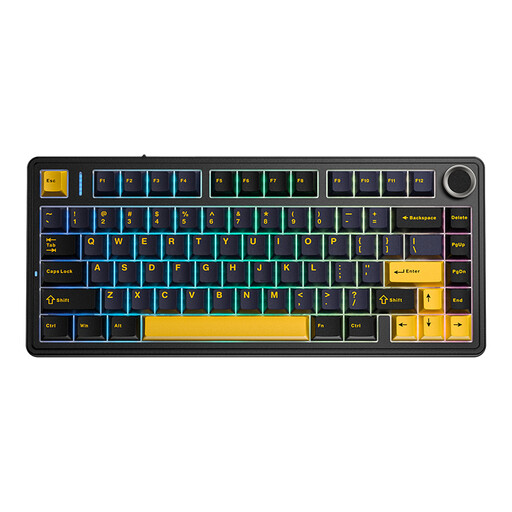
AULA S75 Pro 75% Wireless Keyboard, Star Vektor Switch
This is another 75% option for a table shared with physical cards, particularly if you also want configurable mechanical switches.
The product name specifies tri-mode connectivity, a TFT display, a knob and hot-swappable Star Vektor switches. Confirm the exact key layout, connection modes and charging arrangement before choosing it.
View on Joybuy
 No image available
AULA F75 75% Wireless Keyboard, US QWERTY
Its 75% layout suits a space-conscious setup if the US QWERTY key arrangement also works for your typing and game shortcuts.
The name lists Bluetooth, 2.4 GHz and wired modes, along with PBT keycaps. Bluetooth use needs a compatible device; the 2.4 GHz mode uses a receiver, while wired use needs a cable and port.
View on Joybuy
 No image available
AULA F99 Wireless Keyboard, Light Blue, Reaper Switch, US QWERTY
Consider its denser layout if retaining number keys matters more to you than having the smallest keyboard on the table.
The product name identifies Bluetooth, 2.4 GHz and wired modes, plus this light blue Reaper Switch variant. Confirm the US QWERTY arrangement suits you and leave room for charging and any receiver you plan to use.
View on Joybuy
Common questions
Will a wireless keyboard solve a shortage of plug sockets?
It can remove a keyboard cable during play, but it will not remove the need to charge the keyboard. If the shortage is actually USB ports, Bluetooth can avoid a dedicated receiver; check that your computer supports it and that you have a practical charging location.
Should I use Bluetooth or a 2.4 GHz receiver for card games?
Choose Bluetooth when keeping a USB port free is the priority and your device is compatible. A 2.4 GHz-capable model may suit you if you also want its receiver mode for other games, provided you can spare the port it uses.
Which layout works when physical cards share the table?
Start by comparing 75% and tenkeyless layouts if table clearance is your priority. Consider a 96% board if you need a denser, near-full arrangement, and check the actual arrow, navigation and function-key positions before ordering.
Do online card games require adjustable switches?
Adjustable switches are not a core requirement for choosing a keyboard for card-game shortcuts. They are more relevant if you also use games or controls that benefit from adjustment; assess connection mode, layout and the keys you regularly press first.


