A wireless tenkeyless (TKL) keyboard is a sensible starting point for co-operative shooters at a cramped desk: it makes room for mouse movement while keeping a physical function row and removing a permanent desk cable. A compact wired keyboard avoids charging if its USB cable is not in the way; choose a 60% layout only if shortcut layers suit your controls, or a full-size board if dedicated keys matter more than mouse room. Wireless use still requires occasional USB charging, and a dedicated 2.4 GHz receiver may occupy a computer port rather than a household plug socket.
Who should consider each layout?
Players at a cramped or shared desk
If mouse room matters but you use function keys during co-op play, a TKL layout is worth considering. Corsair’s K70 CORE TKL WIRELESS and Logitech G’s G915 X TKL are examples to compare; check the exact keys and dimensions before choosing.
Players who want fewer desk cables
A wireless keyboard removes the cable during play, not the need for charging. Compare battery ratings under the lighting and power settings you intend to use: Corsair and Razer specify conditions that can affect their models’ stated runtime.
Players switching between devices
Bluetooth may help when a keyboard serves a gaming PC and another device, while a dedicated receiver remains an option on some models. Razer specifies dongle sharing for compatible Razer mice; do not assume it works with a mouse from another range.
What matters when choosing?
Settle the space-versus-physical-keys decision first, then check whether a permanent USB cable, a wireless receiver or occasional charging fits your setup.
| Concern |
What to check |
Who this matters to |
| Mouse room and keys |
Compare 60%, TKL and full-size layouts against the function, navigation and number-pad keys you use. |
I need space for mouse movement, but my game and chat bindings must remain easy to reach. Roughly 36% of consumers put desk space first. |
| Cables and charging |
Check USB charging access and the conditions attached to battery ratings, especially lighting settings. |
A cable across the desk gets in my way, yet I do not want charging to interrupt play. Around 29% of consumers place charging convenience first. |
| Ports and devices |
Check Bluetooth switching, receiver requirements and any exact mouse-and-dongle compatibility. |
I use more than one device or have few spare USB ports, so connection flexibility matters most to roughly 21% of consumers. |
| Switches and controls |
Check switch type, remapping requirements and model-specific hot-swap compatibility. |
I care most about how the keys feel and whether I can adapt my controls; about 14% of consumers put that need first. |
Buying pitfalls
-
Expecting wireless to solve a wall-socket shortage
A gaming keyboard generally connects to or charges from a computer’s USB connection, so the immediate questions are desk cables, available USB ports and charging access.
Check the keyboard’s charging connector, supplied cable and whether it can be used while charging before choosing wireless for this reason.
-
Choosing 60% before checking your bindings
A 60% layout saves space by moving some commands away from dedicated physical keys. That can matter for maps, voice chat, screenshots and other controls used during a session.
List the keys you actually use, then compare their access on a 60% board with a TKL board that retains a function row.
-
Reading a maximum battery rating as everyday runtime
Manufacturer ratings can depend on settings. Corsair separately specifies a rating with RGB off for the K70 CORE TKL WIRELESS, while Razer says its BlackWidow V4 Tenkeyless HyperSpeed power-saving mode reduces polling rate and disables lighting.
Check the settings behind the stated figure and decide whether those settings suit how you play.
-
Assuming any mouse can share a keyboard receiver
Razer’s dongle-sharing feature for the BlackWidow V4 Tenkeyless HyperSpeed applies to compatible Razer mice, not every wireless mouse.
Confirm the exact keyboard, mouse and receiver compatibility before counting on a spare USB port.
Relevant brands to consider
Corsair
Corsair offers both the K70 CORE TKL WIRELESS and the smaller K70 PRO MINI WIRELESS 60% for these layout choices.
- Corsair specifies SLIPSTREAM wireless and Bluetooth for the K70 CORE TKL WIRELESS. Its K70 PRO MINI WIRELESS has USB-C wired use and charging.
- The 60% model calls for more reliance on shortcuts. Check the operating conditions behind any manufacturer battery rating before comparing charging needs.
Razer
The BlackWidow V4 Tenkeyless HyperSpeed is relevant if Bluetooth switching, compatible-mouse dongle sharing or switch changes affect your decision.
- Razer specifies 2.4 GHz wireless, switching among three Bluetooth devices and hot-swap support for 3- or 5-pin switches on this model.
- Dongle sharing requires a compatible Razer mouse. Razer says power-saving mode reduces polling rate, turns off lighting and pauses Synapse connectivity.
Logitech G
The G915 X range offers full-size and TKL choices for players weighing extra dedicated controls against desk width.
- Logitech G lists LIGHTSPEED wireless, Bluetooth and wired connection options for the G915 X; it specifies nine G keys on the full-size model.
- Those extra G keys are a full-size-model feature. Check the TKL model’s physical controls if mouse room takes priority.
Joybuy product choices
These compact wireless keyboards cover different layout choices for a desk where mouse room, USB access and charging matter. Compare each model’s physical keys and connection details rather than treating a smaller layout as an automatic improvement.
 No image available
ASUS ROG Strix Scope II 96 Wireless, White, UK Layout
Consider the 96% layout if you want a more compact board while retaining a number pad. Check its dimensions against your mouse space and confirm the UK key legends suit you.
Wireless gaming keyboard; white variant; UK layout.
Joybuy
 No image available
AULA F99, Light Blue, Reaper Switch, US Layout
This 96% option suits a player who wants number keys alongside wireless connection choices. Check whether its US QWERTY layout and charging arrangements fit your setup.
Tri-mode wired, Bluetooth and 2.4G connections; Reaper Switch variant.
Joybuy
 No image available
AULA F75 75% Wireless Gaming Keyboard, US Layout
Consider this 75% layout when desk clearance matters but a 60% board would move too many controls onto shortcuts. Check its physical keys against your bindings and whether US QWERTY suits you.
Wired, Bluetooth and 2.4G modes; RGB backlighting and PBT keycaps.
Joybuy
 No image available
Siukie PL87W 87-Key 3MODE Mechanical Keyboard
The 87-key layout is worth checking if you want a TKL-style physical key set without a full-size board. Confirm the key legends, connection modes and charging arrangements for your devices.
Detachable switches and RGB lighting.
Joybuy
 No image available
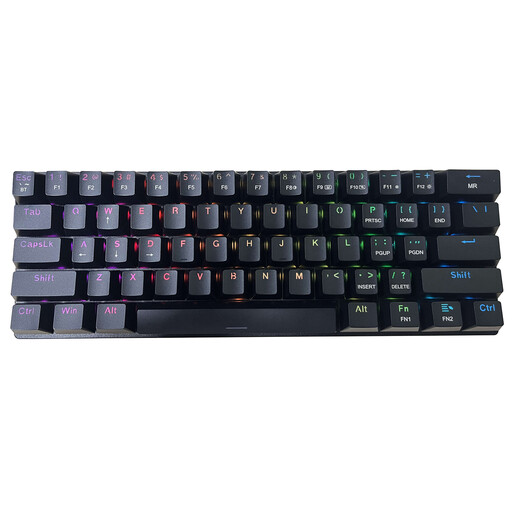
Free Gift Mouse ET 60% Tri-Mode Keyboard, Blue Switch, US Layout
The 60% layout prioritises mouse space; check how you would use game, chat and system commands without a physical function row or navigation cluster. Confirm that US QWERTY and the charging arrangement suit you.
61 keys; rechargeable wireless design; clicky Blue switch and RGB backlighting.
Joybuy
Common questions
Will a wireless gaming keyboard free up a household plug socket?
Not usually: the relevant connection is generally a computer USB port rather than a dedicated mains outlet. Wireless play can remove a permanent desk cable, but charging still needs USB access; Corsair specifies USB-C wired use and charging for its K70 PRO MINI WIRELESS.
Should I use Bluetooth or a 2.4 GHz receiver for co-op shooters?
Choose the dedicated receiver when the exact keyboard manufacturer specifies it as the gaming-oriented connection; choose Bluetooth when device switching or keeping a receiver out of a USB port matters more. Razer lists both options for the BlackWidow V4 Tenkeyless HyperSpeed, including switching among three Bluetooth devices.
Is a 60% keyboard too small for co-op shooters?
A 60% keyboard can work if shortcut layers leave your game and voice-chat controls convenient to use. If you rely on a physical function row or readily accessible navigation keys, compare a TKL layout before giving up those keys for extra mouse room.
How should I dispose of an old wireless keyboard in the UK?
Keep unwanted electrical equipment and batteries out of household rubbish, as GOV.UK advises. Check an appropriate electrical-waste collection route and its instructions for a keyboard with a built-in battery.


