For point-and-click adventures in a dark room, start with controllable key lighting and a layout that leaves room for your mouse. A 75% or tenkeyless keyboard is a sensible choice if it keeps the arrows, function keys and shortcuts you use; consider a larger board with dedicated macro keys only if those controls justify its desk space. Check the exact key layout, switch noise and lighting controls before choosing a model.
Who this setup suits
Dark-room shortcut users
If you need to find game commands without turning on the room lights, adjustable illumination and readable key legends matter more than lighting effects alone. Logitech G and Razer describe configurable lighting on specific gaming keyboards, but you should assess the controls and legends on the model you choose.
Mouse-space-conscious adventure players
If most of your play happens with a mouse, a narrower keyboard can free up desk space while keeping useful keys within reach. CORSAIR describes its 75% layout as retaining the arrow cluster and function row; check the exact keyboard layout against your own shortcuts.
Long-session, shared-space players
If you play for extended periods or share a room, consider switch sound and the arrangement of your keyboard and mouse. Model-specific sound dampening is worth checking, while the Health and Safety Executive advises positioning a keyboard just below elbow height and keeping the mouse in line with the elbow for display-screen work.
What matters when choosing
For mouse-led adventures, decide which need takes priority in your setup, then check the precise layout and controls of the keyboard you are considering.
| Concern |
What to check |
Who this matters to |
| Key visibility |
Adjustable backlighting and whether the key legends remain readable at your preferred brightness. |
When the room is dark, I want to find occasional shortcuts without switching on another light. Around 36% of consumers put key visibility first. |
| Mouse space and shortcuts |
The photographed key layout, especially the arrow cluster, function row and any navigation keys you use. |
I need room to move my mouse, but I still use keyboard commands for menus and everyday tasks. For around 29% of consumers, preserving those keys while saving space is the main concern. |
| Comfort and key noise |
The exact switch variant and keyboard height; assess any sound-dampening feature alongside your desk setup. |
During longer evening sessions, I want a setup that feels manageable without making key presses disruptive to others. That is the primary need for around 21% of consumers. |
| Custom controls |
Remapping options, software compatibility and the position of any dedicated macro keys. |
I regularly use commands that would be easier to reach on mapped or dedicated keys. Around 14% of consumers would prioritise that control over the other concerns here. |
Buying pitfalls
-
Choosing the smallest layout without checking your shortcuts
A smaller board may move familiar arrows, function keys or navigation commands to key combinations. CORSAIR describes 75% layouts as a way to retain arrows and the function row in a reduced footprint.
List the keys your games and other PC tasks use, then compare that list with a photograph of the exact layout before ordering.
-
Assuming RGB makes every key easy to read
Configurable lighting does not, by itself, tell you whether the legends, brightness range and default settings will work in your room.
Check lighting controls and photographs of the exact key layout, and review the seller’s applicable return terms before relying on the keyboard for dark-room use.
-
Expecting every mechanical switch to sound alike
Sound-dampening features and switch options differ by model. Logitech G and CORSAIR describe dampening on specific keyboards, while Razer offers different switch choices for the BlackWidow V4.
Choose the stated switch variant deliberately, particularly if you play while others are nearby.
-
Looking only at the warranty if a keyboard is faulty
A manufacturer warranty has its own terms and does not replace statutory remedies for goods that fail to meet legal requirements. The UK Consumer Rights Act 2015 sets out remedies that apply in different circumstances.
Keep your order record and details of the fault, and contact the seller. Citizens Advice recommends considering your legal rights as well as any warranty or guarantee.
Relevant brands to consider
These examples illustrate different keyboard features; each point applies to the named model or product line, not every keyboard from the brand.
Logitech G
The G515 TKL is a reference point if you want a low-profile, tenkeyless layout with configurable lighting and key remapping.
- Logitech G specifies a 22 mm-high design, low-profile GL switches, sound dampening, KEYCONTROL remapping and LIGHTSYNC RGB for the G515 TKL.
- Its tenkeyless layout omits the numeric keypad, so check whether any of your usual commands depend on it.
CORSAIR
The K65 PLUS illustrates a 75% option for keeping arrows and function keys while reducing keyboard width.
- CORSAIR lists sound dampening, wireless connectivity and a programmable dial for its K65 PLUS Mac-and-PC Frost White UK model.
- Check the exact variant’s switches, lighting behaviour and operating-system compatibility rather than applying those details to every K65 PLUS listing.
Razer
The BlackWidow V4 is relevant if dedicated command keys matter more to you than keeping the keyboard compact.
- Razer lists six dedicated macro keys, per-key RGB, a multifunction roller and a magnetic cushioned wrist rest for the BlackWidow V4.
- Choose between the listed Green and Yellow switch variants with your preferred feel and sound in mind; extra controls are useful only if you will use them.
Joybuy keyboard choices
These keyboards include compact 75% and 60% designs alongside a full-size option. For dark-room adventures, weigh each layout’s shortcut access and mouse space against the lighting and connection details stated for that particular model.
 No image available
AULA F75 75% Wireless Keyboard, US Layout
Consider this compact layout if you want more room for mouse-led play. The title specifies RGB backlighting, PBT keycaps and wired, Bluetooth and 2.4G connection modes.
It has a QWERTY US layout. Check the exact shortcut keys and whether the lighting controls and legends suit your dark room.
View on Joybuy
 No image available
GravaStar Mercury K1 Lite 75%, Chinese Retail Version, US Layout
This is another compact option for a mouse-led desk setup. Its title specifies RGB backlighting and Bluetooth 5.0, 2.4G and USB-C connection modes.
The listed variant is a Chinese retail version with a QWERTY US layout. Check its exact keys, lighting controls and suitability for your UK setup before choosing it.
View on Joybuy
 No image available
Ticktype EVO75 Tri-Mode Keyboard, US Layout, Anodized Basalt Grey
Consider the EVO75 if a compact keyboard with configurable keys appeals to you. Its title specifies VIA compatibility, RGB lighting, hot-swappable switches and an aluminium construction.
The listed layout is US. Check whether its shortcut arrangement, supplied switches and lighting settings fit your room and games.
View on Joybuy
 No image available
Razer Huntsman V3 Pro Mini 60% Analog Optical Keyboard
The 60% format is worth considering if desk space is tight and you are comfortable using key combinations for some commands.
This model uses modifier-based arrow access rather than a dedicated arrow cluster. Check the exact key layout and the lighting and legend visibility before relying on it for dark-room shortcuts.
View on Joybuy
 No image available
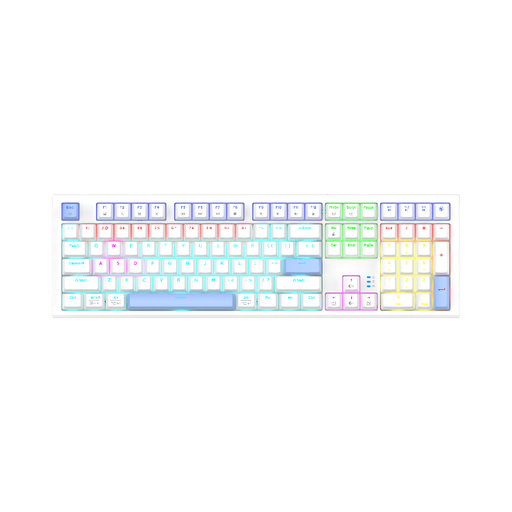
ochama J104 Full-Size Wired Keyboard, US Layout, White
Choose a full-size layout if you use the additional keys and have enough room beside the board for your mouse. The title specifies a QWERTY US layout and a wired USB-A connection.
Check the keyboard’s footprint and whether its lighting and key legends meet your dark-room needs. Its described clicky feel may also matter in a shared room.
View on Joybuy
Common questions
What lighting should I look for when playing in a dark room?
Look for lighting you can adjust and key legends you can read at the brightness you prefer. Logitech G lists configurable LIGHTSYNC RGB for the G515 TKL, while Razer lists per-key Chroma RGB for the BlackWidow V4; check the controls and software requirements of the exact model you plan to buy.
Is a 75% keyboard big enough for point-and-click adventures?
A 75% layout can work well if it retains the keys you use while leaving more space for your mouse. CORSAIR describes 75% boards as retaining arrows and the function row, but check the specific product’s navigation keys and remember that this layout normally omits a numeric keypad.
Will a wrist rest or low-profile keyboard prevent discomfort?
Neither feature is a substitute for arranging your desk to suit you. For display-screen work, the Health and Safety Executive advises keeping the keyboard just below elbow height and the mouse in line with the elbow; consider a wrist rest as one part of that setup rather than a guarantee of comfort.
What if a keyboard develops a fault after purchase in the UK?
Contact the seller and keep your order record and details of the fault. The UK Consumer Rights Act 2015 provides different remedies when goods do not meet statutory requirements, depending on the circumstances; Citizens Advice notes that a warranty or guarantee does not replace those legal rights.


