Players finding keys in the dark
If movement or push-to-talk keys are hard to locate without room lighting, individually controllable illumination is worth checking. CORSAIR and Razer both list per-key lighting on relevant models.


Choose lighting that helps you find your actual game and push-to-talk keys, then decide how much desk space and how many dedicated controls you need. A tenkeyless keyboard leaves more mouse room but has no number pad; a full-size model can offer separate controls but takes more space. For practice near other people, check the exact switch variant and sound before buying.
If movement or push-to-talk keys are hard to locate without room lighting, individually controllable illumination is worth checking. CORSAIR and Razer both list per-key lighting on relevant models.
Separate keys or remapping may help if you use shortcuts alongside movement keys. Logitech G describes remapping on the G915 X LIGHTSPEED TKL, while Razer lists dedicated macro controls on BlackWidow V4 models; check whether your intended bindings are allowed by the game or event.
If key noise could disturb someone nearby or be picked up by a microphone, compare the exact switch option and keyboard construction. CORSAIR specifies sound damping for the K70 CORE TKL, while Razer offers differently described switch options for the BlackWidow V4 Pro.
For team-communication practice in a dark room, decide how you will find and reach your controls before choosing between a compact layout, extra dedicated keys and connection flexibility.
Consider it: If mouse room matters and you still use physical function keys. CORSAIR lists per-key RGB on its UK-layout K70 CORE TKL.
Trade-off: A tenkeyless layout omits the number pad; CORSAIR’s sound-damping specification is not a measure of noise in your room.
Consider it: If separate controls matter more than maximum mouse space. Razer lists eight dedicated macro keys and a Command Dial on the BlackWidow V4 Pro.
Trade-off: A full-size board occupies more desk space, and the switch option changes the sound and feel you should assess.
Consider it: If you want a slimmer board and the option to connect to another device. Logitech G lists tri-mode connectivity for the G915 X LIGHTSPEED TKL.
Trade-off: You will need to manage charging and confirm that the exact layout and switch suit you.
| Concern | What to check | Who this matters to |
|---|---|---|
| Finding keys in the dark | Check whether the exact model offers per-key lighting rather than general backlighting, and how its lighting is controlled. | If I practise without a room light, I want to distinguish my movement and push-to-talk keys at a glance. Around 31% of consumers put finding individual controls first. |
| Reachable communication controls | Check the position of extra keys or remapping options, and whether your game or event permits the intended binding. | When I need shortcuts during play, I want them within reach without disrupting movement. For around 31% of consumers, accessible controls are the primary concern. |
| Sound in a shared space | Confirm the supplied switch variant and compare its sound where possible; a damping specification is not a room-noise measurement. | If other people are nearby, I do not want audible clicks to interrupt practice. Keeping switch sound in mind comes first for around 23% of consumers. |
| Layout and connection | Check whether you need a number pad, then confirm the precise wired, 2.4 GHz or Bluetooth modes offered. | I may need more mouse room or a connection to another device, but I cannot give up keys my bindings use. Around 15% of consumers prioritise layout or connection flexibility. |
General backlighting may illuminate the keyboard without letting you distinguish a particular push-to-talk key. CORSAIR and Razer explicitly list per-key lighting on some models.
Check whether the exact listing specifies per-key RGB, lighting zones or general backlighting, and how you would change its settings.
A clicky switch can be a poor fit when audible key presses matter to people in the room or to your voice-chat setup. Switch options within one keyboard family can differ.
Confirm the switch named for the exact variant and listen to a comparable switch if you can; do not treat a damping claim as a measured comparison.
A tenkeyless layout removes the number pad, which matters if your game bindings or other tasks rely on it.
Check the physical keys you use for play, voice chat and work before choosing the smaller layout.
Physical layout and switch options can change within a keyboard family; an English-language product title alone does not establish UK key legends.
Compare the full model, switch, physical layout and included items on the product-detail page before ordering.
The UK-layout K70 CORE TKL is relevant if you want a wired, compact board with individually lit keys.
The G915 X LIGHTSPEED TKL is relevant if a low-profile layout, remapping and multiple connection modes suit your setup.
BlackWidow V4 models are relevant when separate macro or media controls matter to your practice setup.
These keyboards offer different ways to balance dark-room visibility, accessible controls, desk space and shared-room use. Check the lighting controls, physical layout and switch of the particular variant against the needs that matter most to you.
 No image available
Consider the 60% layout if desk space matters, but check that its physical keys and shortcuts accommodate your communication bindings.
The product name identifies an analog optical keyboard. Check its lighting controls, physical layout and sound for your particular setup before ordering.
 No image available
The compact layout and connection choices may suit a desk shared with other devices, provided its US key layout works for your typing and bindings.
The product name specifies wired, Bluetooth and 2.4G modes, RGB backlighting and PBT keycaps. Check whether the lighting lets you identify individual communication keys.
 No image available
Consider this model if you want a UK-layout keyboard and are assessing whether a 96% format fits your desk and bindings.
Check the supplied switch variant, lighting controls and sound before choosing it for dark-room practice near others.
 No image available
The named silent tactile switch variant is worth considering when audible clicks are a concern, though you should assess its sound for your room.
The product name specifies a full-size 108-key layout, tri-mode connectivity, RGB and an 8000mAh battery. Check that the US physical layout and larger footprint suit your setup.
 No image available
Consider this 104-key model if you need a larger physical layout, but confirm that its key arrangement suits your communication bindings.
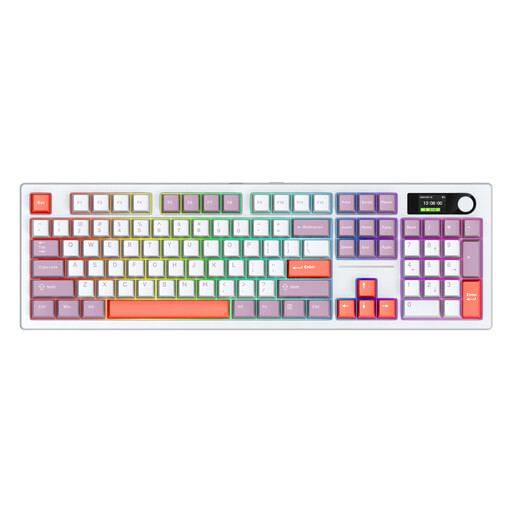
The product name specifies RGB, three connection modes and a colour display. Check the individual-key lighting controls, physical layout and switch before buying for dark-room or shared-space use.
No: if you need to pick out a specific push-to-talk key, check for individual-key lighting and a binding you can reach comfortably. CORSAIR specifies per-key RGB on the K70 CORE TKL, while Razer lists per-key lighting on the BlackWidow V4.
Choose the switch by the sound and feel you can accept in your room, rather than by the keyboard family name. Razer describes the BlackWidow V4 Pro Green option as clicky, Orange as quiet and Yellow as silent; those descriptions are not directly comparable room-noise measurements.
Check the exact product variant and its physical key layout, not just the language of the listing. CORSAIR identifies its K70 CORE TKL UK variant as CH-911911E-UK, and Razer offers a UK Layout option for the BlackWidow V4 Pro.
A faulty keyboard and a change-of-mind return are separate matters. Citizens Advice explains that faulty goods may qualify for a refund, repair or replacement and that eligible online purchases generally have a 14-day cooling-off period; check the advice applicable to your UK nation, any exceptions and the seller’s return process. A manufacturer warranty adds to, rather than replaces, legal rights.