What to prioritise
For learning controls in a dark room, check whether you can read the legends and reach your usual keys before deciding whether adjustable switch settings are useful to you.
| Concern |
What to check |
Who this matters to |
| Readable keys in low light |
Inspect photos of the exact variant for illuminated legends and check whether brightness can be adjusted; RGB around the keys alone may not make the lettering clear. |
When I am learning controls in a dark room, I need to recognise a key without searching across the whole board. Around 42% of consumers would put that need first. |
| Key access and mouse space |
Decide whether you need a number pad or dedicated navigation keys, then check the physical layout and key positions on the exact listing. |
I want room for broad mouse movements, but I still need to reach familiar map and communication keys. For roughly 33% of consumers, that balance would be the primary concern. |
| Movement-input control |
Compare adjustable-actuation and rapid-trigger settings only if you plan to tune them; begin at a less sensitive setting while learning the keys. |
Once I know where my controls are, I want to adjust repeated movement inputs without making accidental presses harder to manage. About 25% of consumers would prioritise that control. |
Joybuy keyboard options
These keyboards offer different ways to balance lighting, familiar key access and desk space while learning multiplayer-map controls. Check legend visibility and the physical layout of the exact variant; none of these product titles establishes adjustable actuation or rapid-trigger controls.
 No image available
HyperX Alloy Rise 75 Wireless Keyboard UK
Consider this 75% keyboard if you want a smaller footprint while learning your controls. Its title identifies a wireless UK variant; check the exact physical key arrangement and whether its backlighting makes the legends readable to you.
View on Joybuy
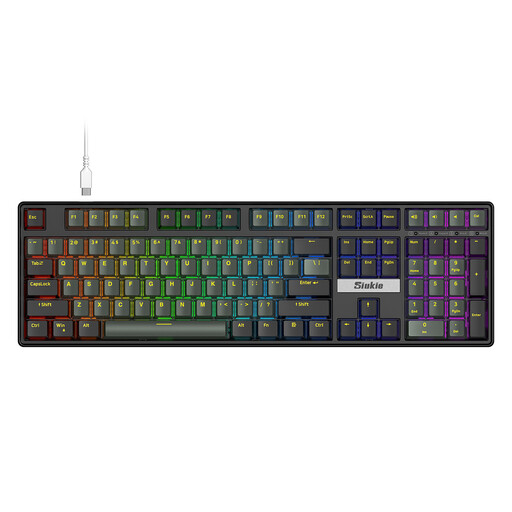 No image available
Siukie CR108 108-key wired mechanical keyboard
Consider the 108-key arrangement if keeping a number pad matters more than freeing mouse space. The title specifies wired operation and detachable switches; confirm the physical layout and whether you can read its legends under the backlighting.
View on Joybuy
 No image available
Siukie PL87W 87-key 3MODE RGB mechanical keyboard
The 87-key format is an option if you want a narrower keyboard while keeping a tenkeyless-style arrangement. The title specifies 3MODE connectivity and RGB; check the physical key positions, brightness controls and legend readability on the exact variant.
View on Joybuy
 No image available
AULA F75 75% wireless gaming keyboard, US QWERTY
Its 75% layout may suit you if mouse space is important and US QWERTY key positions are familiar. The title lists wired, Bluetooth and 2.4G modes and RGB backlighting; confirm that the legends are readable in your lighting conditions before choosing this US-layout variant.
View on Joybuy
 No image available
ASUS ROG Strix Scope II 96 Wireless, UK Layout
Consider its 96% arrangement if you want to retain a broad set of keys rather than switch to tenkeyless. The title identifies a wireless UK-layout variant; check whether its lighting makes the key legends clear enough for learning controls in the dark.
View on Joybuy
Common questions
What lighting should I use while learning controls in a dark room?
Start with steady, moderate lighting that lets you read the key legends. If your keyboard supports per-key settings, highlight only the controls you are learning; SteelSeries describes per-key RGB customisation on the Apex Pro TKL Gen 3, but the useful setting is the one you can read comfortably.
Do I need rapid trigger to learn a multiplayer map?
No: readable keys and a familiar layout address the immediate task more directly. Rapid trigger and adjustable actuation are options if you also want to tune repeated movement inputs; start with a less sensitive setting if you choose an adjustable board.
Can I cancel an online keyboard order if the layout does not suit me?
For applicable UK distance sales, GOV.UK says customers can tell the seller they wish to cancel within 14 days of receiving the item. Check the seller’s return process and any applicable conditions before ordering; remedies for faulty or misdescribed goods are separate from a change-of-mind cancellation.
What should I do with an old gaming keyboard?
Recycle it as an electrical item rather than putting it in household waste. Recycle Now points to recycling centres, electrical-item collection points and participating retailers; check your local collection instructions.


