A shortage of wall sockets does not, by itself, make a wireless keyboard the better choice: a wired board connects to a computer USB port, while wireless use brings charging into the routine and may require a USB receiver. For historical war games, choose a layout around the commands you actually use: tenkeyless (TKL) gives the mouse more room if you can do without a numpad; full-size or 96% layouts retain number keys, and dedicated macro keys matter only if you plan to assign them.
Who these choices suit
Fixed-desk players who want to avoid charging
If you play at one computer for long sessions, a wired connection keeps keyboard charging off your list of tasks. Check that the computer has a compatible free USB port before choosing a board for this setup.
Players who rely on visible command keys
If your historical war-game controls use numpad bindings or many personalised shortcuts, compare the keys you can reach directly. Razer specifies six dedicated programmable macro keys on the BlackWidow V4 X, but they are useful only if you will assign them.
Space-conscious players who still need a numpad
A 96% layout is worth examining when a traditional full-size board takes up too much desk room but losing number keys would disrupt your controls. ASUS says its ROG Strix Scope II 96 Wireless retains function and number keys.
What to check when buying
Separate the wall-socket question from computer-port availability, then check your game bindings before deciding how compact the keyboard can be.
Wired TKL
Choose when: You play at a fixed desk, have a suitable computer USB port and want mouse room without giving up the function row.
Trade-off: TKL removes the numpad, so check any bindings that depend on it.
Full-size with macro keys
Choose when: You want a numpad and intend to assign recurring commands to dedicated keys.
Trade-off: The larger layout takes more desk space, and unused macro keys add little to your command setup.
96% with multiple connection modes
Choose when: You want number and function keys in a narrower layout and value a choice of wired or wireless connection.
Trade-off: Wireless use still needs charging; Bluetooth requires host support, while 2.4 GHz operation uses a receiver.
| Concern | What to check | Who this matters to |
|---|
| Charging and connections |
Count free computer USB ports separately from wall sockets; for wireless use, check Bluetooth support or receiver needs. |
I play at one PC and would rather leave the keyboard connected than remember to charge it. Around 33% of consumers put avoiding charging and connection management first. |
| Direct command access |
Compare your numpad bindings and recurring shortcuts with the exact key layout and programmable keys. |
I use enough commands that reaching them without layers matters more than having a smaller board. For around 27% of consumers, dedicated command access is the primary need. |
| Desk space |
Compare TKL, 96% and full-size layouts against the key groups you need to retain. |
My mouse needs more room, but I do not want a layout that disrupts my usual controls. Roughly 20% of consumers prioritise the keyboard's footprint. |
| Key feel and sound |
Confirm the switch variant and key layout in the particular listing; consider the retailer's return terms if you cannot try the switches. |
During a long session, the feel and sound of repeated key presses matter to me more than a different connection mode. Around 20% of consumers put those preferences first. |
Buying pitfalls
-
Assuming fewer wall sockets means you need wireless
A wired keyboard connects to the computer, whereas wireless operation requires charging and, in 2.4 GHz mode, a receiver.
Count wall sockets, free USB ports and available Bluetooth connections separately before choosing.
-
Choosing a compact board before checking your keybinds
TKL removes the numpad, while a 60% layout removes more directly accessible key groups. Extra mouse room may not compensate if your controls rely on those keys.
Review your current bindings, then decide whether TKL is sufficient or a 96% or full-size layout suits them better.
-
Buying macro keys without commands to assign
Dedicated keys are useful when they serve shortcuts you actually configure; their presence alone does not improve every historical war-game setup.
Identify recurring commands you would assign before choosing a macro-focused keyboard.
-
Assuming switch variants feel and sound alike
Razer describes its Green switch option as tactile and clicky and its Yellow option as smoother and quieter-oriented. The exact variant matters if you share a room or have a strong feel preference.
Check the switch named in the particular keyboard listing rather than relying on the model family alone.
Relevant brands to consider
Corsair
Its K70 CORE lines offer wired TKL and full-size layouts to compare for a fixed desk.
- Corsair specifies a detachable USB Type-C-to-Type-A cable, onboard profiles and macro customisation for the K70 CORE TKL.
- The TKL layout omits the numpad; the full-size K70 CORE occupies more desk area.
Razer
The BlackWidow V4 X is relevant if you want dedicated macro access and a choice of switch feel.
- Razer specifies six programmable macro keys on the BlackWidow V4 X.
- Check the exact Green or Yellow switch variant; a larger, macro-focused layout may not suit a cramped desk.
ASUS ROG
The ROG Strix Scope II 96 Wireless offers a compact layout that retains function and number keys, according to ASUS.
- ASUS lists Bluetooth, 2.4 GHz wireless and wired USB connection modes for this model.
- Wireless use requires charging; 2.4 GHz use also needs a receiver, while Bluetooth depends on the computer's support.
Joybuy product choices
These keyboards offer different ways to balance desk space and access to game commands, from compact 60% layouts to a full-size board and a 96% wireless model. Check each layout, connection and key legend against your own computer and bindings.
 No image available
ASUS ROG Strix Scope II 96 Wireless, black, UK layout
Consider this 96% model if you want function and number keys in a compact arrangement and a choice of connection modes. ASUS specifies Bluetooth, 2.4 GHz wireless and wired USB for the Scope II 96 Wireless; wireless use requires charging, and 2.4 GHz uses a receiver. Confirm the switch variant in the listing before choosing.
Joybuy
 No image available
Razer Huntsman V3 Pro Mini 60% Analog Optical
Consider its 60% layout if mouse room matters more to you than direct access to a numpad and function row. Check your historical war-game bindings and the connector needed for your computer before buying.
Joybuy
 No image available
AULA WIN60HE 60% Wired, Black/Graywood Magnetic Switch
This wired 60% option suits a fixed desk if you can accommodate its compact key layout. Its title specifies magnetic switches and adjustable actuation; check that your game bindings work without directly accessible function, navigation and numpad keys, and confirm the connector fits an available computer port.
Joybuy
 No image available
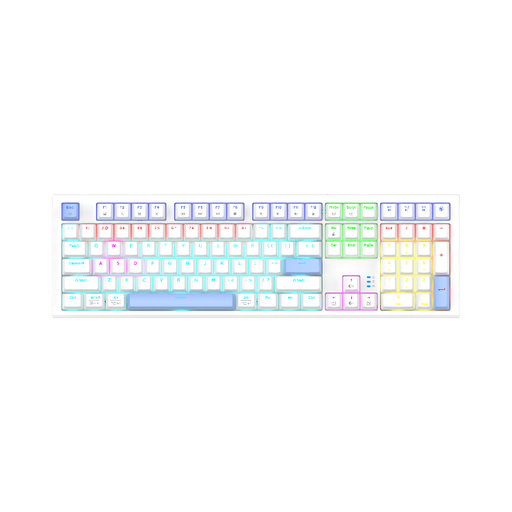
ochama J104 Full-Size Wired, US QWERTY, white
Choose a full-size layout if keeping directly accessible keys matters more than saving desk space. This model's title specifies a USB-A connection and US QWERTY layout; check that you have a free USB-A port and that the key legends suit you.
Joybuy
 No image available
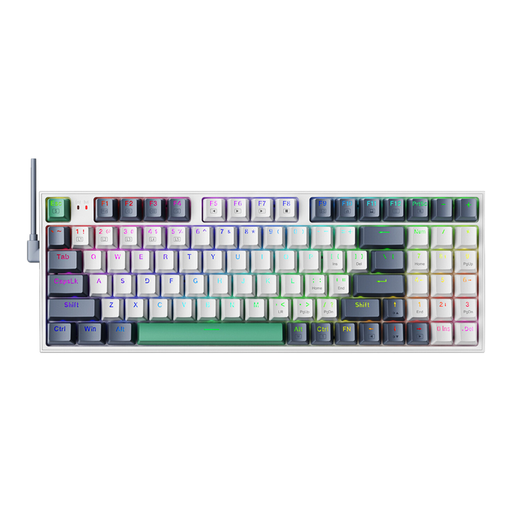
MACHENIKE K500-B94 90% Wired, Red Switch, US QWERTY
Consider this wired 90% board if you want a compact arrangement but prefer to assess something other than a 60% layout. Compare its actual key arrangement with your game bindings, check that the US QWERTY legends suit you and confirm the connector matches a free computer port.
Joybuy
Frequently asked questions
Does a wired gaming keyboard need its own wall socket?
A wired keyboard normally connects to a computer USB port rather than its own wall socket. Corsair documents a USB Type-C-to-Type-A cable for the K70 CORE TKL; check your computer's free ports and where the cable will run.
Can a wireless keyboard leave a USB port free?
Bluetooth can avoid a separate USB receiver if your computer supports it, while 2.4 GHz wireless uses a receiver. Wireless operation still requires you to charge the keyboard.
Is TKL too compact for historical war games?
Not if your bindings work without a numpad: TKL retains the function row while removing the number pad. If numpad commands are important to your setup, compare full-size and 96% layouts instead.


