
24/7 Customer Support

Free returns

Same-day & Next-day Delivery

Quality Guaranteed

Unlock Your Welcome Offers: FREE Delivery | Up to 80% OFF | Free 30-day JoyPlus trial
Download the APP
Shopping for gaming keyboards, laptops and accessories can quickly become confusing. Product listings often emphasise impressive-sounding specifications while leaving out the details that affect daily use: layout, connector compatibility, upgrade limits, screen performance and physical size.
A sensible purchase starts with matching the specification to your setup rather than paying for features you will not use.
A keyboard advertised with rapid trigger or RT precision of 0.001mm may offer adjustable actuation features, but that does not automatically make every game feel faster. Software support, switch calibration, key stability and your own settings also matter.
Similarly, a 144Hz gaming laptop can display up to 144 frames per second, but actual frame rates depend on the game, graphics settings and GPU workload.
A compact keyboard may suit a smaller UK desk, but removing navigation keys or a number pad can affect productivity. A 75% mechanical keyboard generally retains the function row and arrow keys in a smaller footprint, while a 68-key gaming keyboard prioritises compactness and may require more use of function-layer shortcuts.
Always check the exact layout image, dimensions and whether the keyboard uses a UK arrangement.
USB-C describes the shape of a connector, not necessarily the same functions across devices. Check whether a laptop port supports data, charging or display output. For headphones, confirm that your phone, tablet, laptop or console accepts the required Type-C connection and whether an adapter is needed.
For graphics cards, also check the case clearance, slot type, power supply and available display ports before ordering.
A magnetic switch gaming keyboard detects key movement using magnetic sensing rather than a conventional mechanical contact. This can support adjustable actuation and rapid trigger functions, but buyers should check the available software, connection type and compatibility with their operating system.
An aluminium gaming keyboard can provide a rigid chassis and a more substantial feel, although it may weigh more than a plastic model. For UK gaming desks, compare:
The Lenovo LOQ configuration below combines an AMD Ryzen 7 170 processor, 16GB DDR5 memory, a 1TB PCIe 4.0 NVMe SSD and an RTX 5050 laptop GPU with 8GB GDDR7 memory. Its 15.6-inch Full HD IPS screen has a 144Hz refresh rate, 300-nit brightness and 100% sRGB colour coverage.
However, the specification also states 16GB maximum memory for this exact configuration. This is important for students, streamers and creators who may expect to upgrade later. Review the storage and memory arrangement before purchase, particularly if you plan to run games, recording software and browsers together.
Gaming headphones with sound card features may be useful for streaming, karaoke or monitoring, but buyers should confirm how the built-in sound card works with their device. Type-C headphones are convenient for compatible ports, while Bluetooth functionality may operate differently from the wired mode.
A low-profile GT 710 graphics card with 2GB DDR3 memory may be relevant for basic display output or older office systems. Its 19W TDP is a useful compatibility detail, but it should not be selected for demanding modern gaming without checking performance requirements.
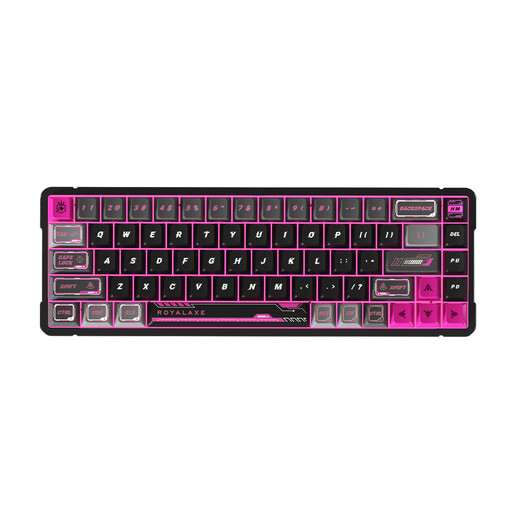
Why This Fits Their Persona: Its 68-key compact format can suit a first gaming setup, shared desk or smaller bedroom workspace where every centimetre matters.
The listed 68-key format makes the space-saving design clear, reducing the risk of buying a compact keyboard without understanding its layout.
Magnetic switches, 0.001mm RT precision listed and a full aluminium alloy frame.
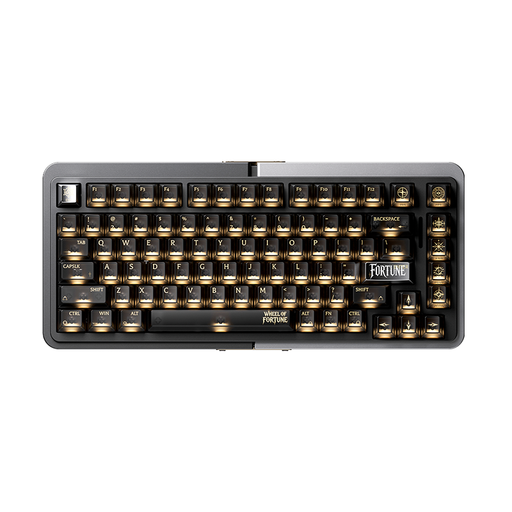
Why This Fits Their Persona: It suits PC enthusiasts who want a compact layout with a more substantial chassis for a dedicated desk setup.
The product listing identifies the 75% layout, Type-C interface and aluminium alloy frame, so key construction and connectivity details are visible before purchase.
75% layout, Type-C connection and stated 0.001mm RT precision.

Why This Fits Their Persona: It is suited to users combining gaming with study, creative workloads, streaming or everyday multitasking.
The specification states the 144Hz display, 65W GPU TGP, 16GB maximum memory and 2.30kg weight, helping buyers assess practical limitations.
RTX 5050 laptop graphics with 8GB GDDR7 memory, 1TB SSD and a UK keyboard with numeric keypad.
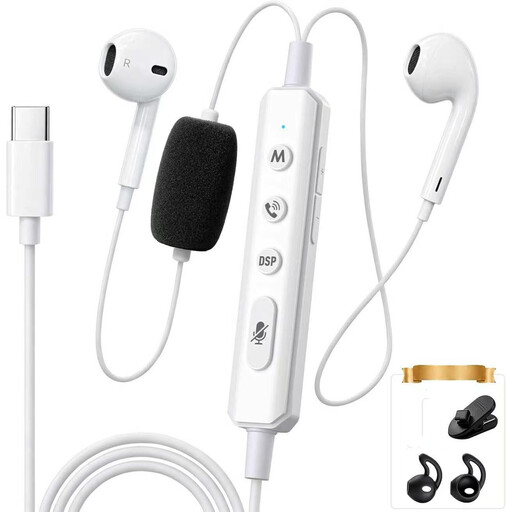
Why This Fits Their Persona: A practical option for users seeking one wired audio accessory for gaming, calls, recording or casual karaoke.
The Type-C interface, 1.2-metre cable and device compatibility are listed, making it easier to check fit before ordering.
Built-in sound card for real-time monitoring and Type-C wired connectivity.
Families can add the UNO Elite Formula 1 Starter Pack, which follows familiar UNO rules and is listed for children aged seven and over. The packaging carries a small-parts choking warning, so adult supervision and age guidance should be followed.
For cat owners, the Enabot ROLA Mini cat toy wand accessory is designed specifically for the ROLA Mini robot. It should not be treated as a universal toy attachment, and the small parts require supervision.
For bedroom or dressing-table storage, a jewellery box organiser with multiple tiers, velvet lining and a built-in mirror can separate rings, necklaces, watches and bracelets. Check the listed dimensions carefully, as tall organisers may need more vertical clearance than a standard drawer.
They can be, provided you are comfortable with the layout and switch response. Adjustable actuation may be useful for gaming, but set a less sensitive actuation point if accidental key presses affect writing or study work.
No. The display can refresh at up to 144Hz, but frame rate depends on the game, resolution, graphics settings, thermal conditions and laptop GPU. Use the specification as a screen capability, not a guaranteed gaming result.
Lifespan depends on usage, storage, cleaning and moving parts. Wired accessories with replaceable or standard cables may be easier to maintain. Keep electronics dry, avoid pulling cables at an angle and inspect pet toys for damage before each use.