Choose Bluetooth if you want to avoid both a dedicated wall socket and a permanently occupied USB port; choose a keyboard with a 2.4 GHz option if your gaming PC has a spare port for its receiver. A 75% layout can free up desk space, but check the keys you use, the selected keyboard layout and how you will charge it before ordering.
Who this setup suits
Gamers with crowded sockets and ports
If your PC, display and other equipment already occupy the available sockets, a rechargeable wireless keyboard avoids adding a dedicated keyboard plug during use. Check whether your computer has Bluetooth or a spare USB port for a 2.4 GHz receiver, and plan where you will charge the keyboard.
Players making room on the desk
If you want more space beside the keyboard and rarely use a numeric keypad, a compact layout may suit your deck-building setup. Check the position of the function, arrow and shortcut keys you use before moving away from a full-size board.
Players switching between devices
If you alternate between a gaming PC and another device, check how many Bluetooth connections the exact model supports and how you switch between them. If you also want remapped controls, check the model’s settings and software compatibility separately.
What to check when buying
For a desk with limited sockets, settle the connection and charging plan first; then choose a layout that leaves room for play without removing keys you rely on.
| Concern |
Buying checks |
Who this matters to |
| Connection and charging |
Check for Bluetooth, 2.4 GHz and wired modes on the exact model. Confirm that your computer supports your chosen mode and that you have a way to charge the keyboard. |
When sockets and USB ports are scarce, I want to play without leaving another cable or receiver connected all the time. Around 36% of consumers put connection and charging flexibility first. |
| Desk space and keys |
Compare the keyboard’s dimensions and key arrangement; check whether you need a numeric keypad, function row or dedicated arrow keys. |
I need room beside my keyboard, but I still want the keys I use for navigation and shortcuts. Desk footprint is the primary concern for around 29% of consumers. |
| Device switching |
Check the supported Bluetooth device count and switching method on the exact model. |
If I move between my gaming PC and another device, I want to switch without rearranging peripherals. Around 21% of consumers make multi-device use their first concern. |
| Key customisation |
Check whether the model offers the particular remapping, adjustable actuation or compatible hot-swappable switches you want. |
I care about changing key feel or controls, even if those features do not solve my socket shortage. Customisation comes first for around 14% of consumers. |
Buying pitfalls
-
Assuming wireless means no ports or charging
A 2.4 GHz receiver normally occupies a USB port, while a rechargeable keyboard still needs charging. Bluetooth and a wired fallback are separate features.
Count your free USB ports, confirm whether the gaming device supports Bluetooth and decide where the charging cable can reach.
-
Assuming a UK listing has a UK keyboard layout
The Joybuy listing for the AULA F75 identifies a QWERTY US layout. That distinction matters for everyday typing and familiar shortcuts as well as gaming.
Check the selected variant’s physical layout, key legends and model code before ordering.
-
Choosing switch features before solving the desk problem
Adjustable actuation and hot-swappable switches are features of particular models; neither tells you whether the keyboard has Bluetooth, fits your desk or can be charged conveniently.
Set your connection, charging and layout requirements first, then decide whether switch customisation matters to you.
-
Relying on a return headline alone
A retailer’s return offer has its own conditions and is separate from remedies for faulty or misdescribed goods. The return terms that matter are those applying to your seller and order.
Check the selected variant, seller and return terms at checkout, and keep a record of the order details.
Brands to consider
Logitech G
A reference point if you want a low-profile wireless keyboard with a wired option.
- Logitech G specifies LIGHTSPEED wireless, Bluetooth, a wired data-cable connection and programmable G-keys for the G915 X LIGHTSPEED.
- Check the layout and configuration of the variant you intend to order; these features are specific to the cited model.
SteelSeries
Relevant if you want a tenkeyless wireless layout and adjustable key actuation.
- SteelSeries specifies 2.4 GHz and Bluetooth connections and 0.1 mm to 4.0 mm adjustable actuation for the Apex Pro TKL Wireless Gen 3.
- Confirm the regional layout of the exact variant. Adjustable actuation does not replace a connection or charging plan.
Razer
Relevant if you want a 75% wireless board and intend to use switch customisation.
- Razer specifies Bluetooth 5.1, 2.4 GHz wireless, a detachable Type-C cable and hot-swappable sockets compatible with 3- or 5-pin switches for the BlackWidow V4 Pro 75%.
- Check the selected layout and whether those model-specific configuration features are useful for your setup.
Keychron
Relevant if Bluetooth device switching and a compact layout matter more to you than a numeric keypad.
- Keychron specifies a 75% layout, Bluetooth connections for up to three devices and a wired option for the K2.
- Check the exact K2 variant: connection modes and layouts should not be assumed to match across models.
AULA
Relevant if you are considering a 75% keyboard with wired, Bluetooth and 2.4 GHz modes.
- The Joybuy AULA F75 listing describes a 75% tri-mode keyboard.
- That F75 listing specifies a QWERTY US layout, so confirm that the selected variant suits your typing habits.
Joybuy keyboards for this setup
These keyboards offer compact or wireless connection options for a desk with limited sockets. Compare their stated layouts and modes against your available USB ports, Bluetooth devices and charging arrangement.
 No image available
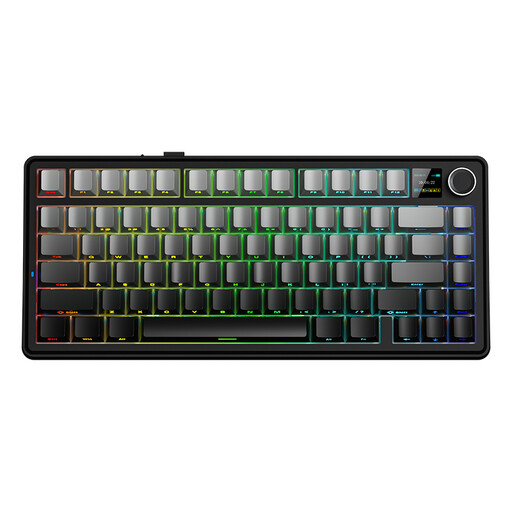
AULA F75 MAX 75%, Gradient Grey side-engraved keycaps, Reaper switches
Consider this 75% board if you want Bluetooth without a receiver and a 2.4 GHz option when a USB port is free.
The title specifies wired, Bluetooth and 2.4 GHz modes and a QWERTY US layout. Check that the layout suits you and confirm the charging arrangements for the selected variant.
View on Joybuy
 No image available
AULA F99, Light Blue, Reaper switches
Consider this model if you want to choose between Bluetooth and a 2.4 GHz receiver rather than commit to one wireless mode.
Its title specifies wired, Bluetooth and 2.4 GHz modes and a QWERTY US layout. Check its dimensions against your desk space and confirm that its key arrangement suits you.
View on Joybuy
 No image available
AULA F75 75% wireless gaming keyboard, QWERTY US
This 75% option suits a desk where you want a smaller board and a choice of wireless connections.
The title specifies wired, Bluetooth and 2.4 GHz modes, RGB backlighting and PBT keycaps. Its QWERTY US layout may differ from the layout you normally use; confirm the selected variant and charging expectations.
View on Joybuy
 No image available
Lofree OE907 65%, Jellyfish switches, free gift mouse listing
Consider this smaller keyboard if your gaming device has Bluetooth and you want to avoid occupying a USB port with a receiver.
The title specifies a 68-key layout, Bluetooth 5.1, a wired mode and QWERTY US keys. Check that its key arrangement works for your shortcuts, and confirm the gift and charging details on the selected listing.
View on Joybuy
 No image available
MACHENIKE KG87 80%, Pink, Latte switches
Consider this 80% board if you want a compact keyboard with more than one connection option.
The title identifies it as tri-mode with a QWERTY US layout and gasket mount. Confirm the modes, charging arrangements and key positions of the selected variant before ordering.
View on Joybuy
Common questions
Will a wireless keyboard help if I have few plug sockets?
Yes, it can avoid a dedicated keyboard wall socket during use, but a rechargeable model still needs charging. Bluetooth also avoids a USB receiver if your gaming device supports it; a 2.4 GHz mode normally needs a spare USB port.
Is a 75% keyboard practical for deck-building games?
A 75% keyboard is worth considering if you want more desk space and do not need a dedicated numeric keypad. Check the function, arrow and shortcut keys on the exact model rather than assuming every compact layout arranges them alike.
Can I assume a keyboard sold on a UK site has a UK layout?
No. The Joybuy listing for the AULA F75 specifies QWERTY US, so check the physical layout and key legends of the selected variant before ordering.
What should I check about returns on an online keyboard order?
Check both the seller’s policy for your exact order and the separate rules that apply if the keyboard is faulty or misdescribed. GOV.UK states that customers can notify a seller within 14 days of receiving an item that they want to cancel a distance purchase; conditions and exceptions can apply. A retailer’s voluntary return offer does not replace statutory remedies.


