Limited wall sockets do not, by themselves, make a wireless keyboard necessary: a wired keyboard can use a free PC USB port without needing its own wall socket. If you prefer fewer permanent desk cables, consider a rechargeable keyboard with wireless and wired modes, then choose a layout around the keys you use: 96% retains a number pad, TKL removes it, and 60% relies more on shortcuts.
Who these choices suit
Gamers with limited socket access
If you want fewer permanent desk cables, compare wireless connection modes and the conditions behind each stated battery maximum. ASUS ROG, Corsair and Razer describe wireless models that can also be used with a cable when needed.
Settlement builders with compact desks
If mouse room matters but you still use dedicated PC keys, compare TKL with 96%. The cited ASUS ROG 96% model retains function and number keys; TKL models from Corsair and Logitech G omit the number pad.
Players who want to change switch feel
If changing switches matters alongside wireless use, check socket compatibility on the exact model. Razer describes 3- and 5-pin hot-swap compatibility for its BlackWidow V4 Tenkeyless HyperSpeed; layout and charging needs still matter.
What matters when choosing
Check whether a free PC USB port already solves the socket problem. If you still want wireless, settle on the keys you need before comparing battery claims made under different lighting settings.
| Concern | What to check | Who this matters to |
|---|
| Charging and connections |
Compare stated runtime under your intended lighting setting; check Bluetooth support, receiver needs and wired charging. |
If charging interruptions would disrupt play, flexible ways to connect and charge take priority. Around 36% of consumers put this need first. |
| Desk space and keys |
Compare 96% number-pad access, TKL without a number pad, and the shortcut layer on 60% boards. |
When mouse space is tight, I still want direct access to the keys I use in menus and other PC tasks; roughly 29% of consumers prioritise that balance. |
| Switch feel |
Check the supplied switch type and whether the exact keyboard accepts replacement switches. |
During long building sessions, I care most about how the keys feel and whether I can change them later. About 21% of consumers place switch feel first. |
| Battery upkeep |
If a PC USB port is free, consider whether a permanently wired connection is simpler for you. |
If I would rather keep a cable on the desk than charge another device, wired use is the priority; around 14% of consumers put avoiding battery upkeep first. |
Buying pitfalls
-
Assuming wireless means no charging
A rechargeable keyboard still needs power. Corsair quotes up to 32 hours with RGB lighting and up to 200 hours without it for the K70 PRO MINI Wireless, illustrating why the stated setting matters.
Check where you would charge the keyboard and compare runtime figures under the lighting conditions you intend to use.
-
Choosing the smallest layout without checking its keys
A 60% board takes less desk space, but commands available on dedicated keys in larger layouts may require shortcuts.
Check the keys you use for your game and everyday PC tasks before choosing between 60%, TKL and 96%.
-
Treating an “up to” battery figure as expected runtime
Manufacturer maximums can depend on lighting and connection settings. Corsair specifies that the K70 CORE TKL Wireless figure of up to 890 hours is with RGB off.
Compare figures with their stated conditions and plan for more frequent charging if your preferred settings differ.
-
Putting an unwanted rechargeable keyboard in household rubbish
GOV.UK advises against putting unwanted batteries and electrical products in household rubbish.
Use an appropriate electrical-waste collection route, following the relevant battery guidance if the battery can be removed.
Relevant brands to consider
ASUS ROG
Its Strix Scope II 96 Wireless is relevant if you want wireless options without giving up function or number keys.
- ASUS ROG specifies a 96% layout, Bluetooth, 2.4 GHz wireless and wired USB for this model.
- Its stated battery maximum depends on use conditions; check the lighting setting before comparing runtimes.
Corsair
The cited models offer a choice between a TKL layout and a smaller 60% layout.
- Corsair specifies Bluetooth and 2.4 GHz wireless for both the K70 CORE TKL Wireless and K70 PRO MINI Wireless.
- TKL omits the number pad; the 60% model uses shortcuts for some commands, and its stated battery maxima differ substantially with RGB on and off.
Razer
The BlackWidow V4 Tenkeyless HyperSpeed is relevant if switch changes and multi-device Bluetooth use matter.
- Razer specifies 3- or 5-pin hot-swap compatibility and Bluetooth switching between three devices.
- Its TKL layout does not include a number pad.
Logitech G
The G915 X LIGHTSPEED TKL is a lower-profile option for buyers considering a TKL layout.
- Logitech G specifies 2.4 GHz wireless, Bluetooth and wired modes, low-profile GL switches and a 22.6 mm height.
- The TKL layout leaves out the number pad; check runtime under your intended settings before deciding how often you may need to charge.
Joybuy keyboard choices
These keyboards cover several ways to keep a settlement-building desk usable with limited sockets, from compact wireless layouts to a 108-key model with three stated modes. Choose by key layout first, then check how the exact model connects and charges.
 No image available
ASUS ROG Strix Scope II 96 Wireless, White, UK layout
Consider this 96% model if you want more mouse room while retaining function and number keys. ASUS ROG specifies Bluetooth, 2.4 GHz wireless and wired USB for the model; its battery maximum is stated with RGB off, so check the setting you plan to use.
View on Joybuy
 No image available
AULA S75 Pro 75% Wireless, Star Vektor switches
The 75% layout is worth considering when desk space matters more than a number pad. The product name specifies a wireless, tri-mode design, Star Vektor switches, a TFT display and a knob; check charging arrangements and runtime for your preferred settings.
View on Joybuy
 No image available
MACHENIKE KG87 80% Tri-Mode, US QWERTY, Latte Switch-Pink
This 80% model suits a desk where you want a smaller keyboard without choosing a 60% layout. Its listed variant has a US QWERTY layout and Latte Switch-Pink; check that the key legends suit you and compare battery conditions before choosing wireless use.
View on Joybuy
 No image available
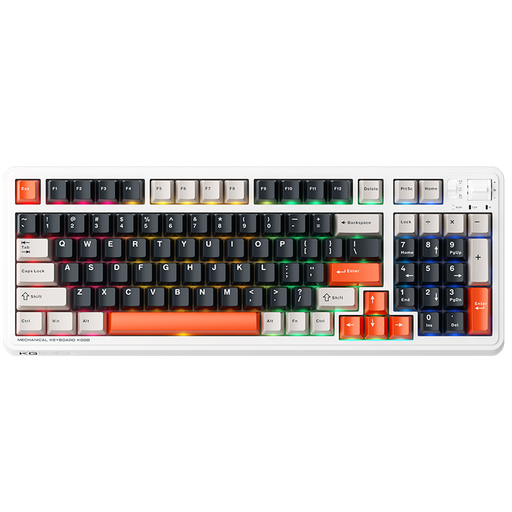
MACHENIKE KG98 96% Tri-Mode, US QWERTY, Black White Orange
Consider the 96% layout if you want a compact arrangement without giving up a number pad. This listed variant specifies tri-mode operation and US QWERTY; confirm the key legends suit you and check runtime under your intended lighting setting.
View on Joybuy
 No image available
Siukie PL108W 108-Key 3MODE RGB, Black
This 108-key model is a choice to examine if dedicated keys matter more than a compact footprint. Check which of its three stated modes work with your PC, as well as its key legends and runtime under your preferred lighting setting.
View on Joybuy
Frequently asked questions
Will a wireless keyboard solve the limited-socket problem completely?
No. A rechargeable wireless keyboard still needs occasional USB charging, although it need not keep a cable across the desk while you play. Check whether a PC USB port or another suitable charging point is available, and compare battery figures under the lighting setting you intend to use.
Should I use Bluetooth or 2.4 GHz wireless?
Choose according to your available connections: Bluetooth requires a compatible PC, while a keyboard's 2.4 GHz mode typically uses its supplied USB receiver and therefore needs a free port. Check the exact model's connection options before deciding which mode fits your desk.
How should I dispose of a rechargeable keyboard in the UK?
Use an appropriate electrical-waste collection route rather than household rubbish. GOV.UK advises that unwanted electrical products and batteries should not go in household rubbish; follow the relevant collection guidance for a keyboard with an integral or removable battery.
What if my new keyboard develops a fault?
Contact the seller and keep your order record. For faulty goods in the UK, GOV.UK says a fault discovered after an item has been accepted may lead to repair or replacement, while Citizens Advice explains that a refund, repair or replacement may be available depending on the circumstances.


