For long point-and-click adventure sessions, start with a keyboard that fits your desk and hand position, then choose a switch feel and sound you can live with. A compact layout can leave more room for the mouse, while a full-size layout retains the number pad; a wrist rest or adjustable angle is worth considering only as part of your wider desk setup. Check the exact key layout, switch variant and included accessories before buying.
Who should consider each setup?
Players focused on long-session comfort
If you play for hours, keyboard height, angle and the position of your mouse may matter more to you than competitive-game features. The Health and Safety Executive’s workplace display-screen guidance considers the whole workstation, rather than a keyboard feature in isolation.
Players sharing a quiet space
If you play near other people or late at night, compare switch sound as well as feel. Razer describes the Ornata V3 X as having cushioned membrane switches, while the Ornata V3 uses clicky mecha-membrane switches: the similar names conceal a meaningful difference.
Mouse users with limited desk space
If the mouse does most of the work in your adventure games, check how much width remains beside the keyboard. HyperX says the tenkeyless Alloy Origins Core PBT leaves more mouse space than a full-size board, but a tenkeyless layout omits the number pad.
What matters when choosing?
Check the space available for your mouse and the keys you need, then consider hand position, switch sound and whether you would use extra connection or customisation features.
| Concern |
What to check |
Who this matters to |
| Hand position |
Check front height and available angles. If there is a wrist rest, consider whether its height suits your desk. |
During a long session, I want my keyboard and mouse positioned without forcing an awkward wrist angle; around 36% of consumers would put their overall setup and hand position first. |
| Switch sound and feel |
Confirm the fitted switch variant and whether its description says clicky, linear or membrane; a model-family name is not enough. |
When I play near other people, I want to know whether each keypress will be intrusive; roughly 22% of consumers would make switch sound and feel their primary concern. |
| Mouse room and layout |
Measure the space beside your mousepad and decide whether you need a number pad. Check the physical key layout and legends. |
With a narrow desk and a mouse-led game, I need enough room to place the mouse comfortably; about 21% of consumers would prioritise desk fit and key layout. |
| Connections and customisation |
Check the connection modes you would use and, if you plan to change switches, the exact hot-swap compatibility. |
If I move between devices or intend to change switches, those options matter more than basic game controls; around 21% of consumers would put connection and customisation needs first. |
Mistakes to avoid
-
Treating a wrist rest as the whole comfort solution
A rest or low-profile board cannot compensate for an awkward mouse, chair or screen position. The Health and Safety Executive’s workplace display-screen guidance identifies workstation design and use as factors in discomfort.
Set up the keyboard and mouse together, leave room for relaxed hand positioning and vary your activity during long sessions.
-
Choosing by product family rather than exact variant
Razer Ornata V3 and V3 X have different switch descriptions, while similarly named HyperX Alloy Origins keyboards come in different sizes. Those differences affect sound, feel and desk fit.
Confirm the complete model name, physical layout, switch variant and wrist-rest inclusion on the product-detail page.
-
Assuming a familiar product name means immediate availability
A product page can remain visible when that particular model is unavailable. A similarly named board may also have a different layout or switch.
Check current availability and the exact variant on the product-detail page before making your choice.
-
Choosing wireless and hot-swap features without a use for them
Multi-device connections and replaceable switches are useful when you intend to use them, but point-and-click controls do not require either feature.
If you mainly play at one desk, compare the keyboard’s layout and feel before giving these extras priority.
Wireless use also brings charging and battery management into your routine.
Relevant brands to consider
Razer
Relevant if you are considering a low-profile keyboard with wrist support or comparing cushioned and clicky switch options.
- Razer describes the Ornata V3 as low-profile, with cushioned clicky mecha-membrane switches and a magnetic soft-touch wrist rest.
- The Ornata V3 X is described with membrane switches instead. Confirm the exact model rather than assuming the two feel or sound alike.
HyperX
Relevant if a tenkeyless mechanical layout would give your mouse more room.
- HyperX specifies a tenkeyless layout and three adjustable angles for the Alloy Origins Core PBT.
- The full-size Alloy Origins PBT is a different form factor. Check the complete model, switch and layout when comparing listings.
Turtle Beach
Relevant if device switching, replaceable switches and a detachable wrist rest are priorities.
- Turtle Beach lists multiple connection modes, hot-swap support and a detachable foam wrist rest for the Vulcan II XP Air.
- Its UK listing described a pre-order with anticipated dispatch on 25 October 2026. Check current availability if you need a keyboard promptly.
Joybuy keyboards for this setup
These keyboards offer different approaches to desk fit, switch choice and connectivity for mouse-led play. Compare the exact layout and variant with the space and keys you need.
 No image available
ASUS ROG Strix Scope II 96 Wireless, White, UK Layout
Consider its 96% layout if desk width matters but you do not want to choose a tenkeyless board.
The product name specifies a wireless gaming keyboard in white and a UK layout. Confirm the physical key legends and fitted switch option before buying.
View on Joybuy
 No image available
AULA S75 Pro 75%, Star Vektor Switch
Consider the 75% layout if you want a smaller keyboard beside your mouse and can use this arrangement of keys.
The product name specifies tri-mode wireless connectivity, hot-swap support, a TFT display, a knob and five-layer padding. Check the physical key layout and whether the listed switches suit your preferred feel.
View on Joybuy
 No image available
MACHENIKE KG87 80%, Latte Switch-Pink
Consider this 80% board if you want a compact mechanical keyboard while keeping the key arrangement shown for this model.
The product name specifies tri-mode connectivity, a gasket mount and a US QWERTY layout. Check that its physical key placement suits you.
View on Joybuy
 No image available
Ticktype DP104, Gecha Gray, Silent Tactile Switches
Consider its full-size arrangement if you use a number pad and have room beside it for your mouse.
The product name specifies 108 keys, a US layout, tri-mode wireless connectivity, hot-swap support and an 8000mAh battery. Silent tactile is the listed switch variant, not an independent measurement of its sound.
View on Joybuy
 No image available
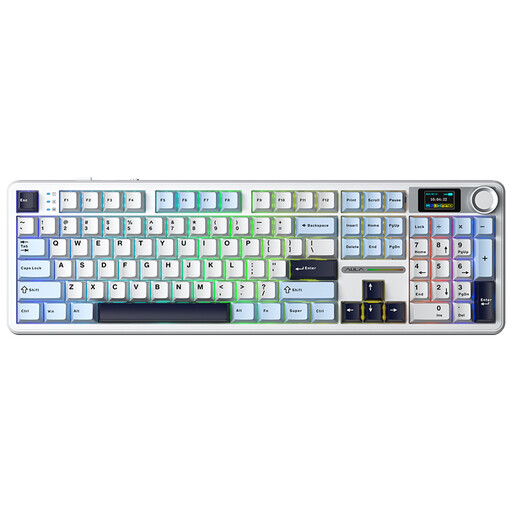
AULA F108 Pro, Light Blue, Reaper Linear Switch
Consider this model if connection choice and a listed linear switch appeal to you more than a particular keyboard size.
The product name specifies Bluetooth, 2.4G and USB-C connection options, hot-swap support, a gasket mount, an LCD screen and a knob. Confirm its physical layout and regional key legends before buying.
View on Joybuy
Common questions
Do point-and-click adventures need an esports-focused keyboard?
No competitive-input feature is necessary for basic point-and-click controls. For long sessions, choose a layout that fits your mouse space and a switch feel you can tolerate; consider specialised input features if you also want them for other games.
Will a wrist rest make long sessions comfortable?
A wrist rest is an option, not a complete solution. Check its height against your desk and consider your keyboard, mouse, chair and screen positions together; the Health and Safety Executive’s workplace display-screen guidance likewise treats the wider workstation as relevant.
How do I avoid ordering the wrong keyboard variant?
Check the complete model name and the product-detail page’s physical layout, regional legends, switch variant and included accessories. Similar family names can describe different keyboard sizes or switches, as the Razer Ornata and HyperX Alloy Origins examples show.
When is wireless connectivity useful for adventure games?
Wireless connectivity is worth considering if you switch between devices or want more flexibility in placing the keyboard. It is not required for point-and-click controls, and wireless use means keeping track of charging; check the exact connection modes of any model you consider.


