
24/7 Customer Support

Free returns

Same-day & Next-day Delivery

Quality Guaranteed

Unlock Your Welcome Offers: FREE Delivery | Up to 80% OFF | Free 30-day JoyPlus trial
Download the APP
Buying gaming keyboards and mice can quickly become confusing. Marketing often focuses on polling rates, RGB lighting and very high DPI figures, while overlooking the details that affect daily use: layout, switch behaviour, comfort, software support and connection reliability.
For UK buyers, there is another practical issue: a product may use a US layout, require a particular USB connection or have software features that work differently across Windows and macOS. Use the checks below before choosing a mechanical gaming keyboard, wireless gaming mouse or complete esports gaming accessories setup.
An 8000Hz gaming keyboard or mouse can report input more frequently than a 1000Hz model, but the difference depends on your computer, game, monitor refresh rate and settings. It may also increase processing demand. High polling is a useful feature for competitive players, but it should not outweigh layout, comfort or stable drivers.
Similarly, a mouse offering an extremely high DPI figure is not automatically more accurate for your preferred sensitivity. Sensor consistency, lift-off behaviour, surface compatibility and shape usually matter more.
A compact 60% keyboard normally removes the function row, arrow keys and navigation cluster. A 65% gaming keyboard usually retains arrow keys and some navigation controls, while a 75% model keeps more familiar functionality in a smaller footprint.
Compact designs create extra room for broad mouse movements, but they can slow down office work or require function-layer shortcuts. Check the layout diagram and language standard carefully. Several products use a US layout, whereas UK buyers may prefer UK ISO positioning.
A wireless gaming keyboard or wireless gaming mouse can reduce desk clutter, but connection mode, battery capacity, receiver placement and charging arrangements all matter. Bluetooth is convenient for everyday devices, while 2.4GHz wireless is generally the more suitable mode for gaming. A wired fallback is useful when the battery is low or when consistent connection is a priority.
A mechanical gaming keyboard uses individual switches, with different sound and feel depending on whether they are clicky, tactile or linear. Clicky switches, such as those fitted to the Razer BlackWidow V4 X Minecraft Edition, provide audible and tactile feedback. Linear switches are smoother and quieter, which may suit rapid key presses or shared rooms.
A magnetic switch keyboard detects movement through Hall Effect sensing rather than conventional metal contacts. Many models offer adjustable actuation, allowing a key to register at a shorter or longer distance. A Rapid Trigger keyboard can reset a key as soon as it moves upwards, which may be useful for repeated strafing or rapid directional changes in FPS games. These features are valuable only if the software is easy to configure and the layout suits you.
Polling rate indicates how often a peripheral reports its position or input to the computer. A 1000Hz keyboard or mouse reports every 1 millisecond, while 8000Hz is specified as every 0.125 milliseconds. These figures describe reporting intervals, not guaranteed improvements to aim or reaction time.
For competitive play, check that the product’s driver supports the advertised setting, that your PC can handle it and that the receiver is positioned appropriately. For everyday gaming, a reliable 1000Hz connection may be entirely sufficient.
For a gaming mouse, compare:
For keyboards, also check keycap material, stabiliser design, onboard profiles, detachable cables and whether replacement switches are compatible.
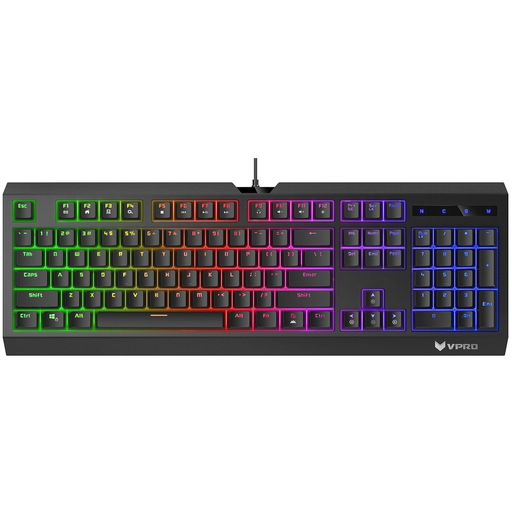
Why This Fits Their Persona: A practical choice for new PC gamers, students and mixed work-and-play desks that need a full-size UK-home setup with a quieter typing feel.
It does not rely on extreme polling figures. Instead, it provides plug-and-play USB, anti-ghosting, a full-size layout and spill-resistant construction.
Quiet membrane switches, customisable RGB modes, anti-ghosting and a dedicated number pad.

Why This Fits Their Persona: Suits UK gamers and streamers wanting a compact mechanical keyboard that can move between gaming, writing and multiple Bluetooth devices.
Its 75% format retains arrow, navigation and function keys, avoiding the inconvenience of an overly reduced layout. It also offers wired, 2.4GHz and Bluetooth modes.
Hot-swappable linear switches, per-key RGB, a volume knob, onboard profiles and stated battery life of up to 80 hours with RGB enabled.

Why This Fits Their Persona: Designed for players who prioritise adjustable inputs, a UK ISO layout and additional mouse room for low-sensitivity FPS play.
The 65% design retains arrow keys, while adjustable 0.1–4.0mm actuation lets users choose a setting rather than being locked to one fixed point.
Hall Effect magnetic switches, Rapid Trigger, 8000Hz polling, dual USB-C connections and five-layer sound dampening.

Why This Fits Their Persona: The button-heavy layout is suited to MMO players, streamers and anyone switching between gaming and general PC use.
It focuses on usable controls and connection flexibility rather than only weight or DPI, with 12 programmable buttons and both wireless and USB-C wired modes.
19,000 DPI optical sensor, six side buttons, hot-swappable switches, magnetic charging dock and stated battery life of up to 67 hours with RGB off.
We have compiled a complete, real-time list of products that fully satisfy these strict selection criteria and UK safety regulations.
They can be. Features such as programmable keys, adjustable lighting, durable keycaps and ergonomic shapes may be useful for work as well as games. However, a compact keyboard or clicky switch may not suit every office or shared household, so prioritise typing comfort and layout.
A 2.4GHz wireless gaming mouse can be suitable when its receiver connection is stable and the battery is charged. Wired mode remains a useful fallback. Bluetooth is generally more convenient for everyday use than for latency-sensitive competitive play.
Lifespan varies with switch construction, dust, spills, usage and maintenance. Product specifications may list a keystroke rating, but this is a component rating rather than a guarantee of how long the entire keyboard will operate. Look for replaceable switches, durable keycaps, detachable cables and accessible support information when long-term value matters.