Movement-focused ranked players
Players who want to configure actuation and Rapid Trigger for frequent changes of movement, and are willing to practise with their settings rather than rely on defaults.


A tenkeyless (TKL) or 80% keyboard is a useful starting point if you want room for mouse movement while keeping dedicated arrow and navigation keys; choose a 60% board only if its smaller footprint matters more than those keys. Rapid Trigger and adjustable actuation give you movement settings to tune, but very short settings can lead to unintended inputs. For a dark room, check the lighting controls and key legends on the exact layout you intend to buy rather than judging the board by RGB brightness alone.
Players who want to configure actuation and Rapid Trigger for frequent changes of movement, and are willing to practise with their settings rather than rely on defaults.
Players whose mouse sweeps are constrained by a full-size board but who still use dedicated arrow and navigation keys. CORSAIR describes TKL layouts as removing the number pad while retaining those keys.
Players who need to find keys reliably at night and want lighting they can adjust without assuming that a brighter keyboard improves match results.
Decide which physical keys you need before choosing a compact format, then check the movement settings and lighting controls on the exact variant. A switch feature or polling-rate specification alone cannot establish an advantage in ranked play.
| Concern | What to check | Who this matters to |
|---|---|---|
| Movement settings | Check that the exact model offers Rapid Trigger and adjustable actuation; start with a moderate setting and test for unintended inputs. | If repeated movement corrections are central to my matches, I want control over when a key activates and resets without making ordinary presses unreliable. Around 36% of consumers put configurable movement response first. |
| Mouse room and keys | Compare the board’s width and physical arrow, navigation and function keys with your desk space and everyday shortcuts. | When wide mouse sweeps compete with my keyboard for space, I need a smaller board but may not want to rely on layers for familiar controls. Roughly 29% of consumers prioritise that layout trade-off. |
| Dark-room visibility | Check brightness controls, adjustable lighting and the legibility of legends on the exact layout. | At night, I need to identify keys without distracting light or guessing where a secondary function sits. About 21% of consumers put readable, controllable lighting first. |
| Layout and compatibility | Confirm the physical layout and legends you want, plus the software, connection and switch-compatibility details relevant to your setup. | If I use UK ISO keys or plan to change switches later, the exact variant matters more to me than a shared model name. Around 14% of consumers prioritise layout and compatibility certainty. |
A 60% layout takes less desk space but can leave you using layers for arrow, navigation or function keys that you regularly need.
List the keys you use outside matches, then compare the physical arrangement of the exact variant before buying.
Short actuation can increase unwanted inputs. CORSAIR warns that settings outside its recommended 0.3–3.6 mm range on the K70 PRO TKL may increase sensitivity and affect consistency.
Begin with a moderate setting and change one control at a time after practising with ordinary movement and menu use.
Key shape and legends can differ even when keyboards share a language description or switch technology.
If you need UK ISO, check the variant label and product images for the exact keyboard you are ordering.
Lighting helps you see keys, while a stated polling rate describes a product setting; neither establishes better ranked results.
Choose lighting you can use comfortably and check the layout and configuration options you will actually rely on.
The 80HE is an 80% analogue keyboard aimed at players who want configurable movement inputs.
The Huntsman V3 Pro Tenkeyless is an analogue-optical option for players who want Rapid Trigger without moving to a 60% board.
The K70 PRO TKL combines a compact Hall-effect layout with documented lighting and actuation controls.
The Q1 HE is a 75% Hall-effect option with an explicitly identified UK-ISO variant.
These compact keyboards are choices to compare if movement settings and mouse space matter to you. Check each board’s physical layout and lighting controls separately for a dark-room setup; the models do not all make the same layout or lighting details explicit.
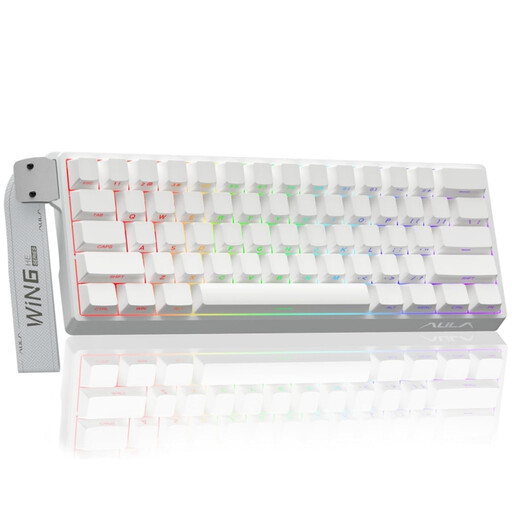 Image unavailable
Consider this wired board if a 60% footprint and configurable movement inputs take priority over dedicated keys.
The listing names magnetic switches, adjustable actuation, Rapid Trigger, RGB lighting, an 8,000 Hz polling rate and side-engraved keycaps. Check the physical layout, key arrangement and lighting controls before choosing it for a dark room.
The listing warns that its magnetic switches should be kept away from pacemakers and magnetic-sensitive medical devices.
 Image unavailable
The compact 68-key format is worth considering if mouse room matters and a US physical layout suits you.
The product name lists magnetic switches, Rapid Trigger and an 8,000 Hz polling rate. Check which keys require layers and whether its lighting brightness and controls suit night-time use.
 Image unavailable
This is another 60% option for players who accept fewer dedicated keys in exchange for a compact board.
Its title specifies Hall-effect magnetic switches, Rapid Trigger, 0.01 mm adjustable actuation, an 8K polling rate, RGB backlighting and side engraving. The US layout may not suit a UK ISO preference; check the key arrangement and lighting controls for your setup.
 Image unavailable
Consider this model if an explicitly named UK layout is important alongside an analogue gaming keyboard.
Confirm the exact key arrangement and the backlighting and brightness controls before relying on it for play in a dark room.
Choose TKL or 80% if you want more mouse room while retaining dedicated arrow and navigation keys; choose 60% if you are comfortable using layers for omitted keys. A 75% board can retain more keys than a 60% model in a smaller format, but compare the exact arrangement rather than relying on the percentage label.
Start with a moderate setting and test movement and ordinary key use before making it more sensitive. CORSAIR recommends 0.3–3.6 mm for optimal accuracy on its K70 PRO TKL and warns that settings outside that range may affect consistency; another model’s guidance may differ.
Check whether the exact variant has adjustable brightness, lighting controls and legends you can read in your preferred layout. CORSAIR documents per-key RGB on the K70 PRO TKL, but RGB lighting by itself does not establish that every board offers the same controls or improves gameplay.
Choose UK ISO if you need its physical key arrangement or UK legends. Keychron explicitly identifies a UK-ISO Q1 HE variant; for any model, check the selected variant’s layout field and images rather than assuming that an “English” label means UK ISO.