Who these keyboards suit

Dark-room sandbox builders

If you want to distinguish controls while building or exploring, configurable lighting and profiles may matter more to you than response-tuning features. SteelSeries lists per-key RGB and onboard-saved configurations for the Apex Pro TKL Gen 3.

Shortcut-heavy creators

If you regularly switch between building commands, inventory, chat and media controls, dedicated keys may be useful. Corsair lists six macro keys and dedicated media controls on the UK K55 RGB.

Compact mixed-genre players

If you also play faster-paced games, a TKL layout can free mouse space while offering configurable inputs. Logitech G and Razer describe adjustable actuation on their researched TKL models; the missing numpad remains a trade-off.

What to prioritise

Per-key RGB TKL

Choose when: individually configured lighting and a smaller footprint are central to your setup.

Trade-off: TKL removes the numpad; check whether you use it in games or other work.

Larger board with macro keys

Choose when: dedicated shortcuts and direct-access controls matter more than individual-key lighting.

Trade-off: Corsair’s K55 RGB offers three lighting zones rather than per-key RGB and uses rubber-dome keys.

Rapid-trigger TKL

Choose when: you also want to tune repeated movement inputs for faster-paced games.

Trade-off: these controls do not replace a numpad or establish how responsive your whole game setup will feel.

Concern What to check Who this matters to
Lighting control Check whether RGB is per-key or zoned, and whether the lighting and profiles can be configured as you want. I want to distinguish groups of controls in a dim room without relying on a single lighting zone; around 44% of consumers put configurable lighting first.
Shortcuts and layout Check for dedicated macro keys or remapping, and decide whether you need a numpad. Repeated build, inventory or media actions make direct-access controls more valuable to me; shortcuts and layout come first for around 33% of consumers.
Desk space and inputs Check the board size and whether adjustable actuation is relevant to the other games you play. If I switch from building to faster-paced play, I may value mouse room and tunable inputs; around 23% of consumers prioritise compactness and response controls.

Buying pitfalls

  • Assuming all RGB lighting works the same way

    Corsair specifies three lighting zones for the K55 RGB, whereas SteelSeries specifies individual-key RGB for the Apex Pro TKL Gen 3. Zoned lighting cannot provide the same individual-key grouping.

    Check the lighting type and whether the configuration can be saved onboard if you want to switch between layouts.

  • Choosing TKL without considering the numpad

    A TKL board gives the mouse more room but removes keys you may use for commands or everyday PC work.

    Consider how often you use the numpad before choosing a smaller layout.

  • Reading switch-latency figures as total game latency

    Razer’s stated latency measurement uses specified test settings; Razer notes that end-to-end latency can vary with the setup and devices.

    Compare polling and actuation features alongside layout, lighting and switch preferences rather than treating one figure as your gameplay result.

  • Putting an old keyboard in household rubbish

    Recycle Your Electricals advises recycling equipment with a plug, cable or battery.

    When replacing a keyboard, consider reuse or an appropriate electrical recycling route.

Brands to consider

SteelSeries

The researched Apex Pro TKL Gen 3 line is relevant if you want individual-key lighting and saved configurations in a TKL layout.

  • SteelSeries specifies per-key RGB and 0.1–4.0 mm adjustable actuation for this model.
  • It has no numpad, and SteelSeries notes that not all software features are supported on macOS.

Corsair

The UK K55 RGB line suits a preference for dedicated shortcuts, media controls and a larger layout.

  • Corsair specifies six dedicated macro keys, three-zone RGB and a detachable palm rest.
  • Its rubber-dome keys and zoned lighting are different from the analogue switches and per-key RGB considered in the TKL routes.

Logitech G

The PRO X TKL RAPID is a compact route for players who want remapping and configurable inputs alongside lighting.

  • Logitech G lists rapid trigger, adjustable actuation and multi-layer KEYCONTROL assignments.
  • It is a wired TKL model without a numpad or dedicated macro-key bank.

Razer

The Huntsman V3 Pro Tenkeyless 8KHz is relevant if tunable inputs for faster-paced games are also a priority.

  • Razer specifies Rapid Trigger and 0.1–4.0 mm adjustable actuation.
  • Razer’s latency figures depend on stated test conditions and do not establish end-to-end latency in another setup.

Joybuy keyboards for this setup

These keyboards offer different layout and lighting choices for a dark-room sandbox setup. Compare the stated variant and controls against your need for key-group lighting, shortcuts or a numpad.

Ticktype EVO75 Nebula keyboard, US layout

Ticktype EVO75 Nebula, US layout

Consider this compact board if a US layout suits you and you want to configure keys for repeated actions. The listed variant is tri-mode wireless, hot-swappable and VIA compatible, with Creamy Rye switches and an 8000mAh battery. Check whether profiles can be saved onboard if you need settings to persist without software.

View on Joybuy

HyperX Alloy Rise 75 Wireless keyboard

HyperX Alloy Rise 75 Wireless

Consider this wireless model if a smaller keyboard appeals, but check the exact key layout and legends before buying if UK keys matter to you. Confirm the lighting controls and profile-storage options against the configurations you want to use.

View on Joybuy

ASUS ROG Strix Scope II 96 Wireless keyboard, black UK-layout variant

ASUS ROG Strix Scope II 96 Wireless, UK layout

Consider this UK-layout wireless variant if you want a compact arrangement while keeping the direct-access keys you use. Check the exact numpad arrangement before buying. If individual-key lighting or keycap material matters to you, confirm those details for this variant.

View on Joybuy
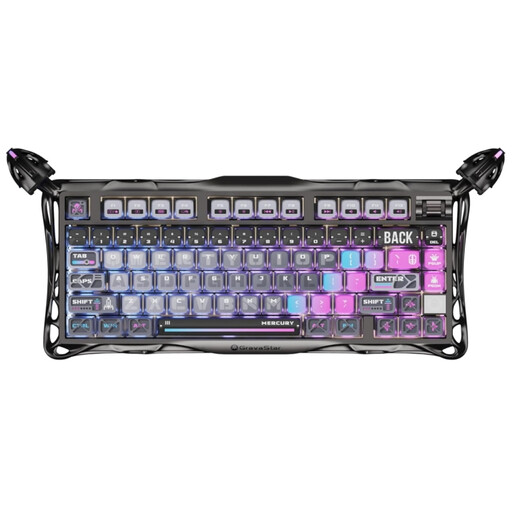
GravaStar Mercury K1 Pro Cyberpunk Edition keyboard, black US-layout Chinese retail version

GravaStar Mercury K1 Pro Cyberpunk Edition, US layout

This Chinese retail version is an option if a compact US-layout board with RGB backlighting suits your setup. Its title specifies a 75% layout, tri-mode wireless connectivity and hot-swappable switches. Check the lighting granularity and brightness if identifying individual key groups is important to you.

View on Joybuy

Frequently asked questions

Do I need per-key RGB to play in a dark room?

No: zoned RGB may be enough if you mainly want an illuminated keyboard. Choose per-key RGB if configuring individual keys or groups matters to you; SteelSeries specifies it for the Apex Pro TKL Gen 3, while Corsair specifies three-zone lighting for the K55 RGB.

Should I choose a larger keyboard or TKL for sandbox games?

Choose a larger layout if you regularly use a numpad or want dedicated controls; choose TKL if mouse space matters more. Check the exact key arrangement of any compact model rather than assuming its size retains the keys you need.

Will rapid trigger help with sandbox building?

Rapid trigger is chiefly worth considering if you also want configurable repeated inputs for faster-paced games. Logitech G and Razer list it on their researched TKL models, but lighting, layout and shortcuts may be more relevant to a building-focused setup.

Will keyboard configuration software work on my computer?

Check the exact model’s operating-system requirements and which features work on your system. SteelSeries notes that not all Apex Pro TKL Gen 3 software features are supported on macOS, so basic compatibility alone may not cover the configuration you want.

What should I do with an old keyboard?

Consider reuse or an electrical recycling route rather than putting an unwanted keyboard in household rubbish. Recycle Your Electricals advises recycling items with a plug, cable or battery.