What matters when choosing?
Start with the space available for both keyboard and mouse, then check your most-used game bindings. Consider switch adjustment and connection options only after the layout works for you.
| Concern | What to check | Who this matters to |
|---|
| Desk fit and mouse room |
Measure the available width and mouse-sweep area; compare the exact keyboard dimensions where listed. |
When mouse movement feels cramped, I would give keyboard width priority over extra keys. Around 36% of consumers put desk fit and mouse clearance first. |
| Direct access to commands |
Compare your regular bindings with the exact key map, including arrows, navigation keys and any function-layer shortcuts. |
If I often use game commands and navigation keys, I would rather reach them directly than rely on a layer. For around 29% of consumers, direct command access is the primary concern. |
| Input adjustment |
Check the stated actuation controls, required software and whether your intended connection mode supports the features you want. |
I would want to adjust key sensitivity only if it helps me control my own repeated or deliberate inputs. Input tuning comes first for around 21% of consumers. |
| Connections and customisation |
Confirm the exact wireless modes and battery conditions, or check switch compatibility before buying replacement parts. |
On a desk shared with other devices, easier connection changes or later switch changes may matter most to me. Around 14% of consumers prioritise that flexibility. |
Joybuy keyboards to consider
These Joybuy listings cover compact keyboards with 60%, 65%, 68-key and 75% descriptions. Compare their stated layouts with your desk measurements and bindings; the similarly named ASUS ROG Falchion Ace HFX 65 and ROG Falchion RX Low Profile are different models.
 No image available
ASUS ROG Falchion Ace HFX 65 Analogue Gaming Keyboard — UK Layout
Consider this 65% option if you want a compact board and are checking for direct access to arrows and navigation keys. The title identifies an analogue gaming keyboard and a UK-layout variant; confirm its dimensions and connection requirements against your setup.
View on Joybuy
 No image available
Redragon M68 68-Key Magnetic-Switch Keyboard — US Layout
The 68-key format may suit a small desk if its exact key map includes the commands you need. Its title states Rapid Trigger, an 8000 Hz polling rate and a metal top plate; check its physical dimensions and whether the US layout suits your typing.
View on Joybuy
 No image available
HyperX Alloy Rise 75 Wireless Keyboard — UK Variant
Consider this 75% wireless keyboard if having more keys available matters more than minimising width. Compare its exact dimensions and key map with your desk and bindings, and confirm the physical UK layout of the selected variant.
View on Joybuy
 No image available
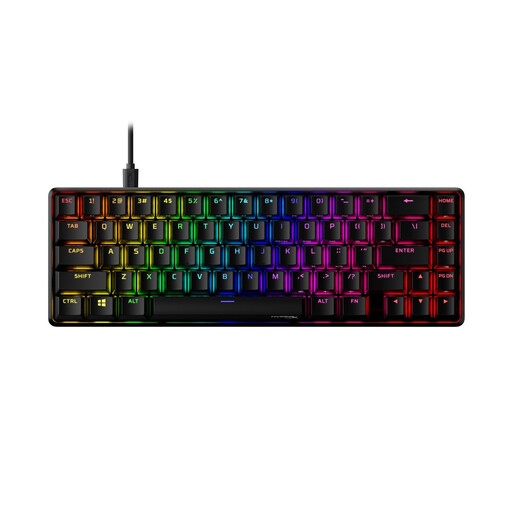
HyperX Alloy Origins 65 — HX Red, US Layout
This 65% mechanical option is worth comparing if you want a compact key arrangement but do not want to choose by switch-adjustment features alone. The title specifies HX Red and US layout; check its dimensions and exact key map before deciding.
View on Joybuy
 No image available
AULA Hero 68 60% Magnetic-Switch Keyboard — White & Black King Magnetic Switch, US Layout
Consider this wired 60% route if mouse room takes priority and you are comfortable checking which commands use layers. The title lists Hall Effect magnetic switches, adjustable actuation, Rapid Trigger and 8K polling; verify its dimensions, key map and US layout against your setup.
View on Joybuy
Common questions
Is a 60% keyboard the right choice for every small desk?
No: choose 60% when mouse room outweighs direct access to additional keys. If you frequently use arrows or navigation commands, compare a 65% key map instead; ASUS describes its ROG Falchion RX Low Profile as retaining those controls in a compact frame.
Do tactical games require adjustable actuation or Rapid Trigger?
No; those features are relevant if you want to tune when a key registers or how repeated inputs reset. Razer lists 0.1–4.0 mm adjustable actuation and Rapid Trigger for the Huntsman V3 Pro Mini 8KHz, while Keychron lists adjustable-actuation magnetic switches for the K2 HE. Neither feature replaces a key map that fits your bindings.
Does a UK product listing mean the keyboard has a UK layout?
No. Check the selected variant’s physical key arrangement and legends: Keychron distinguishes UK ISO layouts, while the shown Huntsman V3 Pro Mini 8KHz variant on Razer’s UK listing is labelled US layout.
What should I check about returns before ordering online?
Check the seller’s location, cancellation information and returns terms before ordering. GOV.UK states that, for applicable UK distance sales, customers can tell the seller they want to cancel within 14 days of receiving an item; remedies for faulty or misdescribed goods are a separate matter. Citizens Advice notes that rights may differ when buying from a company based outside the UK.


