Small-desk garden builders
Students who need mouse room for placing and arranging items on screen, but also use dedicated arrow and function keys for study and everyday PC tasks.


A tenkeyless (TKL) keyboard is a sensible starting point for a small student desk: it leaves more room for the mouse than a full-size board while keeping dedicated arrow, function and navigation keys. If you share a room, compare the exact switch option and any sound-dampening features; only choose extra macro controls after checking that your virtual-garden game and platform accept the inputs you want to use.
Students who need mouse room for placing and arranging items on screen, but also use dedicated arrow and function keys for study and everyday PC tasks.
Students choosing a keyboard for a shared bedroom or halls, where key noise matters more than a pronounced switch sound.
Players interested in remapping keys or using quick controls, provided their game, platform and applicable rules allow the intended inputs.
Check your desk space and the keys you use for coursework, then consider room noise and the exact game controls before choosing optional customisation features.
| Concern | Buying checks | Who this matters to |
|---|---|---|
| Desk space | Compare keyboard width and key groups; check whether you still need a number pad. | I need room to move the mouse while arranging my garden, without losing the keys I use for study. Roughly 36% of consumers put desk space first. |
| Shared-room noise | Check the exact switch option and whether the model is described as quiet or sound-dampened. | Late-evening keypresses could disturb someone sharing my room, so a less intrusive switch matters to me. For around 29% of consumers, noise is the primary concern. |
| Game and layout fit | Confirm the game's keyboard controls, host platform and operating system; check UK or US key layout if placement matters. | I want the keys to work as expected in my particular game and for everyday typing. About 21% of consumers place game and layout fit first. |
| Custom controls | Check software requirements and whether the game permits the bindings or macros you intend to use. | I would use assigned shortcuts for supported actions rather than leave extra controls unused. Custom controls come first for roughly 14% of consumers. |
TKL boards retain dedicated arrow, function and navigation keys, while smaller layouts can arrange those keys differently or move functions onto layers.
Check the key groups you use for assignments and everyday tasks before moving from TKL to a 75%, 65% or 60% layout.
Switch options and keyboard construction affect sound and feel; a gaming or mechanical-style label does not establish how quiet a particular variant will be.
If you share a room, check the exact switch variant and the maker's description of quiet switches or sound damping.
A programmable keyboard can offer shortcuts without the game accepting or permitting the actions you plan to assign.
Identify the game and platform, then check its control settings and rules before choosing a larger board for dedicated macro keys.
A retailer's voluntary return policy is separate from statutory rights when goods are faulty. The UK Consumer Rights Act 2015 requires goods to be of satisfactory quality, and its explanatory notes describe repair or replacement remedies for faulty goods.
Keep your order record, check the layout and switch variant on arrival, and contact the seller if you find a fault.
Its G515 LIGHTSPEED TKL is relevant if you want a low-profile board with several connection options and software customisation.
Its Apex 3 TKL is relevant when a compact layout and a quieter switch description are priorities.
The BlackWidow V4 range offers different routes for a compact, lower-profile board and a larger keyboard with dedicated macro keys.
Its K70 CORE TKL UK is relevant if you want a compact wired board with software-based key assignments.
These options span compact 65% and 75% boards and a 96% board. Compare the space available on your desk and each model's listed UK or US layout, then check your game's keyboard controls before choosing.
 No image available
The 65% format is worth considering when desk width is tight and you are willing to check how its key arrangement fits your study tasks.
Confirm the game's keyboard controls and whether this layout keeps the keys you use most.
 No image available
This compact option suits consumers considering a wireless desk setup, provided its US key layout works for their typing and game controls.
The title lists wired, Bluetooth and 2.4G connection modes and PBT keycaps. Check the exact keys and connections you need before choosing it.
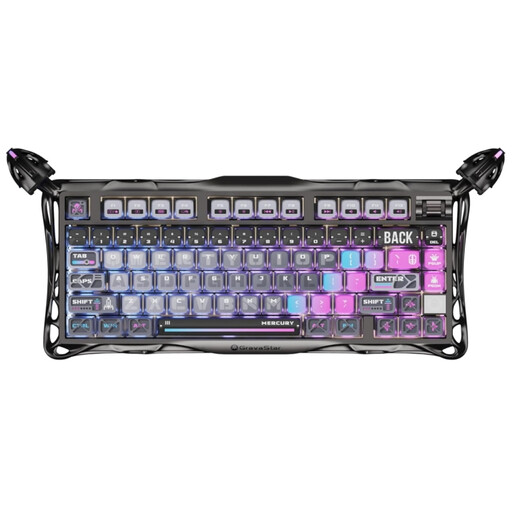 No image available
Consider this compact option if its QWERTY US layout suits your everyday work as well as the game you intend to play.
The title specifies hot-swappable mechanical switches and Win/Mac use. Confirm the connection mode and game controls you require for your setup.
 No image available
The 75% format may suit a student desk when you want a compact UK-designated wireless keyboard.
If low key noise is important in a shared room, check the exact switch variant and its sound description before choosing.
 No image available
The 96% format is an option to examine if you want a condensed layout but are not trying to minimise keyboard width above all else.
Compare its dimensions and key arrangement with your desk space, particularly if keeping a number pad matters for coursework.
Not necessarily: a TKL board removes the number pad while keeping the main typing area, function row, arrows and navigation keys. Consider a layout with a number pad if you regularly use one for coursework, other software or confirmed game controls.
Faults are distinct from a change of mind about a purchase. The UK Consumer Rights Act 2015 requires goods to be of satisfactory quality, and its explanatory notes describe repair or replacement for faulty goods at the trader's cost; keep your order record and contact the seller about the fault.
Check an electrical-waste collection route rather than putting the keyboard in general waste. GOV.UK says retailers must offer same-type take-back when customers buy an electrical item; check the retailer's instructions or local recycling arrangements.