What to check before buying
For a long space-exploration session, start with the constraint that affects your play most: wrist position, command access or mouse room. Treat switch customisation as a separate choice rather than a substitute for getting the layout and desk setup right.
| Concern | What to check | Who this matters to |
|---|
| Wrist position over long sessions |
Check the front height and whether your desk position lets you keep your wrists straight. Assess any palm rest at the same desk height you will use. |
If extended play leaves me adjusting my hands or reaching awkwardly, I want a setup I can position without bending my wrists. Around 36% of consumers may put sustained comfort first. |
| Direct access to commands |
Map your frequently used actions against the number pad, dedicated macro keys and available remapping; check the game mode's macro rules. |
When I use many cockpit controls, I would rather reach a command directly than rely on several layers. Roughly 29% of consumers may make command access their primary concern. |
| Mouse room |
Compare keyboard width with your available desk space, then inspect which arrow and navigation keys remain dedicated. |
If my mouse feels crowded beside the keyboard, I want more room without losing keys I use in-game. About 21% of consumers may prioritise that space. |
| Switch and response options |
Check the exact variant's switch type, hot-swap compatibility or actuation settings, plus any required configuration software. |
If I expect to change key feel or tune response, I need those options to fit the games I play. Around 14% of consumers may put customisation first. |
Joybuy product choices for compact layouts
These keyboards focus on compact layouts for players balancing mouse room against available controls. Check each variant's key layout and physical fit before deciding whether it suits a long session.
 No image available
AULA F99, Light Blue, Reaper Switch, US layout
Consider this option if you want a wireless mechanical keyboard but need to check how its F99 layout accommodates your game controls.
The title specifies wired, Bluetooth and 2.4G connection modes, a QWERTY US layout and the Reaper Switch variant. Check whether that key layout, the keyboard height and any palm-rest arrangement suit your desk setup.
View on Joybuy
 No image available
AULA F75 75% Wireless Gaming Keyboard, US layout
The 75% layout is worth considering when mouse room matters more than a dedicated number pad; check that its key arrangement works for your bindings.
The title specifies wired, Bluetooth and 2.4G connection modes, RGB backlighting, PBT keycaps and a QWERTY US layout. Check the front height and palm-rest fit if either affects your wrist position.
View on Joybuy
 No image available
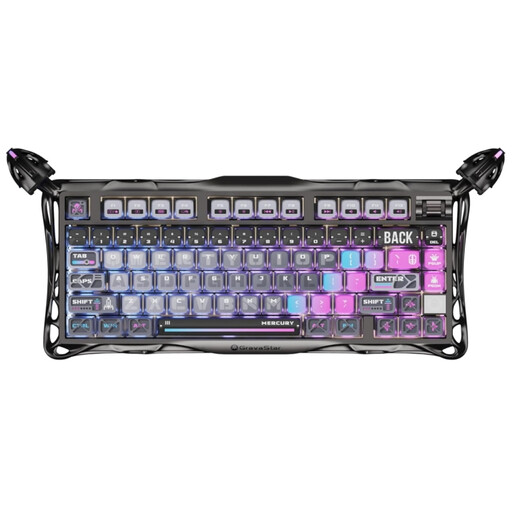
GravaStar Mercury K1 Pro 75%, Cyberpunk Edition, Black
Consider its 75% layout if you want a smaller board and are prepared to check the exact keys available for your commands.
The title identifies a Chinese retail version with a QWERTY US layout, wired, Bluetooth and 2.4G modes, hot-swappable mechanical switches and Win/Mac labelling. Confirm the package contents, applicable support and software compatibility before choosing this variant.
View on Joybuy
 No image available
AULA S75 Pro 75%, Star Vektor Switch
This 75% option is for players considering a compact keyboard with a readily accessible knob; check whether its physical key arrangement suits your bindings.
The title specifies tri-mode connectivity, a TFT display, side-printed keycaps and a hot-swappable Star Vektor Switch variant. Confirm the regional key layout, package contents and front height before ordering.
View on Joybuy
Common questions
Should I choose a full-size or compact keyboard for a space game?
Choose a full-size or macro-equipped keyboard when direct access to many mapped actions matters more than desk width; choose a compact board when mouse room matters more and its remaining keys suit your bindings. Razer lists six dedicated macro keys on the BlackWidow V4 X, while its BlackWidow V4 75% retains a function row and arrow keys without a number pad.
Will a wrist rest make long gaming sessions comfortable?
A wrist rest cannot make an unsuitable keyboard and desk setup comfortable by itself. The Health and Safety Executive advises keeping wrists straight while using the keys and leaving room to rest hands and wrists when not keying; assess a rest against your keyboard height and desk position.
What should I check before relying on keyboard macros?
Check that the exact keyboard and its software support the profile you want, then check whether your game mode permits the intended macro. Logitech G describes KEYCONTROL remapping for the G515 TKL, while Corsair lists on-the-fly macros for the K70 RGB PRO; those are different ways to access configured actions.
What if a keyboard arrives faulty or unlike its description?
A faulty or misdescribed keyboard is different from one you simply decide does not suit your preferred key feel. GOV.UK says a trader must offer a full refund if an item is faulty, not as described or does not do what it is supposed to do; check the seller's separate procedure for a change-of-mind return.
How should I dispose of an old keyboard?
Look for an appropriate electrical-equipment collection or retailer take-back route when replacing a keyboard. UK waste electrical and electronic equipment rules, described by the Office for Product Safety and Standards and the Department for Environment, Food & Rural Affairs, aim to reduce electrical waste sent to landfill or incineration; check which collection options apply locally.


