What to check before choosing
Map your game and playback shortcuts to the available keys before weighing switch settings, room-sharing needs and connections. The priorities below concern one keyboard used for competitive play and tournament-footage review at a student-room desk.
| Concern |
What to check |
Who this matters to |
| Desk space and controls |
Compare the layout with your available mouse space; check access to playback, annotation and game shortcuts. |
I need room to move my mouse without hunting for keys when reviewing a clip. Around 27% of consumers put usable controls and desk space first. |
| Sound and key feel |
Check the exact switch option; treat dampening and lubrication as construction details, not a measured quietness rating. |
When I type or game near a housemate, how the keys feel and sound matters to me. For around 20% of consumers, that shared-room concern comes first. |
| Input customisation |
Decide whether you will use adjustable actuation or key remapping; check any required software and switch compatibility. |
If I change controls for competitive play, I want those settings to suit my game and review shortcuts. Around 33% of consumers place input customisation first. |
| Connections and playback |
Confirm the modes your devices need; read battery figures alongside their lighting and connection conditions. |
I move between a gaming PC and a laptop and want playback controls within reach. Switching and media access are the first concern for around 20% of consumers. |
Joybuy product choices
These keyboards offer different layout and connection choices for gaming and reviewing footage at a student-room desk. Check the exact variant against your shortcut list: a compact layout, a retained number pad and a US or UK key arrangement will not serve the same workflow.
 No image available
ASUS ROG Falchion Ace HFX 65 Analog Gaming Keyboard, UK layout
Consider this wired option if desk space and access to gaming controls are priorities. Check where your playback and function-key shortcuts sit on its UK layout, and whether a cabled connection works at your desk.
View on Joybuy
 No image available
ASUS ROG Strix Scope II 96 Wireless Gaming Keyboard, White, UK layout
This variant is worth considering if you want wireless use while keeping a number pad for work and review tasks. Check its width against your mouse space; its 96% layout is a different desk-space compromise from TKL or 65%.
View on Joybuy
 No image available
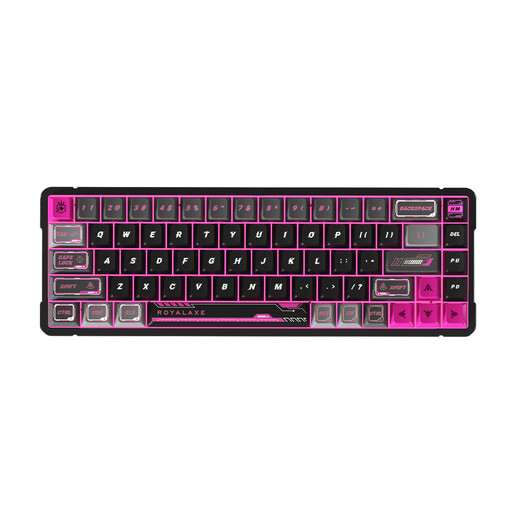
Royalaxe X68 Bright Red Magnetic Switch Keyboard, 68-key
The 68-key layout may appeal if a smaller keyboard is your starting point, but key placement matters when you review clips. Compare the exact layout diagram and legends with the shortcuts you use before choosing this variant.
View on Joybuy
 No image available
AULA F75 75% Wireless Gaming Keyboard, QWERTY US layout
Consider the 75% arrangement if you want a compact desk setup and use more than one connection mode. The named variant offers wired, Bluetooth and 2.4 GHz modes; check whether its QWERTY US layout and shortcut placement suit your typing and review work.
View on Joybuy
 No image available
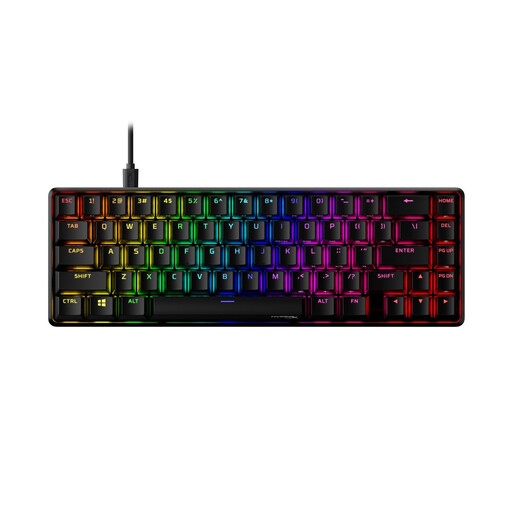
HyperX Alloy Origins 65 Mechanical Gaming Keyboard, HX Red, US layout
This wired 65% option suits a desk where reducing keyboard width matters more than keeping a dedicated function row. Check access to your review shortcuts and whether the listed US layout works for your typing.
View on Joybuy
Common questions
Should I choose TKL, 75% or 65% for footage review?
Choose TKL if dedicated function keys are central to your gaming and review shortcuts; choose 65% if desk width matters more and its key arrangement passes your shortcut check. A 75% layout offers another compact arrangement, but inspect the exact key diagram rather than assuming every model places controls alike. Corsair describes retained function keys on its cited TKL model, while ROG specifies arrow and navigation keys on its Falchion RX Low Profile 65% model.
Will dampening foam make a keyboard quiet enough for a shared room?
Not necessarily: dampening describes construction, not how loud a particular keyboard will sound at your desk. The cited Logitech G, Corsair and ROG material does not provide a comparable sound measurement, so check the exact switches and consider how you can assess the keyboard in your intended room.
What should I look for in a wireless battery-life claim?
Look for the connection mode and RGB-lighting setting attached to the figure. Corsair’s K70 CORE TKL Wireless manual states up to 890 hours on 2.4 GHz and 2,400 hours on Bluetooth with RGB off, but up to 39 hours with 100% per-key RGB; ROG’s 430+ hour 2.4 GHz figure for the Falchion RX Low Profile also assumes RGB is off.
What if a keyboard arrives faulty?
Contact the retailer and keep your order details and evidence of the fault. GOV.UK explains that UK consumer law protects purchases made online or in person; those statutory protections are separate from a manufacturer’s voluntary warranty. Read the relevant retailer terms for the purchase without treating them as a replacement for statutory rights.
How should I dispose of an old keyboard?
Use an appropriate electrical-waste collection or take-back route rather than putting the keyboard in general rubbish. Oxfordshire County Council classifies items with electrical parts, a plug or a battery as waste electrical and electronic equipment; check your own local authority or retailer for the arrangements available to you, particularly if the keyboard has a rechargeable battery.


