Players managing desk cables
You want fewer permanent connections at a simulation desk or need to move between a PC and another device, and you can make room for occasional charging.


Choose wireless if removing a permanent keyboard cable or switching between devices matters more to you than managing charging; it will not necessarily free up a mains socket. If your transport-sim bindings rely on a numeric keypad or dedicated macro keys, check those controls before moving to a compact layout. Confirm the physical UK layout, connection modes and charging arrangement for the exact model you choose.
You want fewer permanent connections at a simulation desk or need to move between a PC and another device, and you can make room for occasional charging.
You assign driving, camera, menu or vehicle commands to physical keys and need to decide whether a numeric keypad or dedicated macro keys matter more than a smaller keyboard.
You play in a shared room or in the evening and want to examine switch choices and sound-dampening construction rather than assume a wireless or mechanical keyboard will be quiet.
For a transport-simulation desk with limited plug sockets, identify whether the constraint is a mains socket, a PC connection or desk space before choosing a keyboard layout and connection method.
| Concern | What to check | Who this matters to |
|---|---|---|
| Desk connections | Check the available wireless modes and where and how the keyboard charges. | I want to move between devices or clear a permanent cable from my desk, but I can plan for charging. Around 33% of consumers put connection flexibility first. |
| Direct controls | Compare your simulator bindings with the exact key map, including any numeric keypad or dedicated macro keys. | If my driving and camera commands use dedicated keys, I do not want to lose quick access to them. For around 27% of consumers, retaining direct controls is the main concern. |
| Desk width | Compare full-size, tenkeyless and 75% layouts against the space and keys you need. | I need room beside the keyboard for other controls, provided the smaller layout still fits my bindings. Saving desk width comes first for around 20% of consumers. |
| Keyboard noise | Check the precise switch variant and any stated sound-dampening construction. | When I play in a shared room, key noise matters more to me than extra dedicated keys. Around 20% of consumers place quieter operation first. |
Wireless removes a permanent keyboard-to-PC cable during use, but the keyboard still needs charging. A crowded desk, an occupied USB port and a shortage of mains sockets are different problems.
Identify which connection is causing trouble, then check the chosen model’s wireless modes and charging arrangement.
A tenkeyless layout omits the dedicated numeric keypad found on a traditional full-size keyboard. That matters if your own simulator commands use those keys.
List the numpad and navigation keys in your current bindings, then compare them with the exact key map before ordering.
Switch options and sound-dampening features vary by model and variant. A stated construction feature is not a measured noise result for your desk.
Check the precise model, switch variant and physical layout rather than relying on a brand-wide description.
Product listings can offer more than one physical key layout. Razer, for example, lists UK and US layout options for its low-profile tenkeyless model.
Confirm the selected UK-layout variant in the configuration and order details.
Its G915 X range provides a choice between full-size and tenkeyless wireless layouts.
Its Apex Pro TKL Wireless Gen 3 is relevant if you want a UK-labelled compact layout with wireless connection options.
Its BlackWidow V4 models offer different choices for wireless switching, dedicated controls and switch variants.
These wireless keyboard choices are relevant to transport-simulation desks where a permanent cable is inconvenient. Compare their physical key layouts, charging arrangements and UK-layout suitability before deciding which fits your controls.
 No image available
Consider this wireless, UK-layout option if you want to compare a 96-layout keyboard with your current simulator bindings.
Confirm the exact keys you use, the supplied switch variant and how you would charge it.
 No image available
The 75 layout is worth comparing with your current key bindings if desk width matters more than keeping every dedicated key.
Confirm the physical UK key arrangement and charging method for the selected keyboard.
 No image available
This compact option suits consideration only if its US QWERTY physical layout and key map work with your UK setup and simulator bindings.
The product name specifies wired, Bluetooth and 2.4G modes, PBT keycaps and a gasket design. Check its charging arrangement before choosing it to reduce desk cables.
 No image available
Compare this 75% keyboard with your key bindings if a compact wireless board appeals to you.
Its product name specifies tri-mode connection, a TFT display, a knob and five-layer padding. Check the physical key layout, UK-layout suitability and charging method; padding is not a measured noise rating.
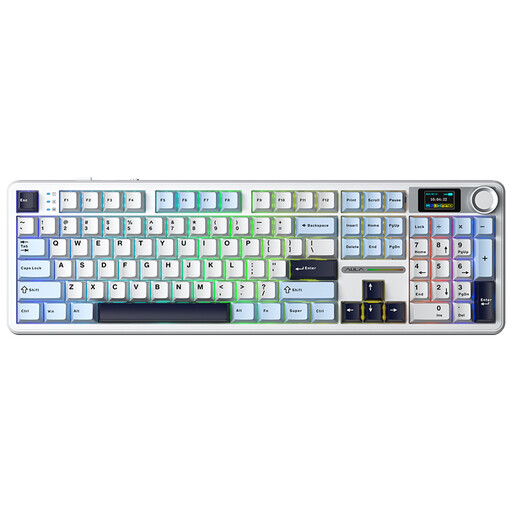 No image available
Its stated Bluetooth, 2.4G and USB-C modes make connection choice the reason to consider this model for a cable-constrained desk.
The product name also specifies an LCD screen and knob. Check its physical size, UK-layout suitability, key map and charging arrangement against your own setup.
Not necessarily: it can remove the permanent keyboard-to-PC cable during use, but it still needs charging. Check how the chosen model charges and which PC connection its wireless mode requires.
Choose a full-size layout if your existing bindings need a dedicated numeric keypad; consider tenkeyless or 75% only after checking the exact keys you would give up. SCS Software describes configurable controller settings, so use your own command assignments rather than the keyboard’s gaming label to make the decision.
Select a variant explicitly labelled UK Layout or UK English and check the physical key arrangement in the order details. An English-language description alone does not settle the layout: Razer, for example, offers separate UK and US choices for a low-profile tenkeyless model.
Keep your order details and contact the retailer about a fault; GOV.UK says repair or replacement may be required even after an item has been accepted. For an old keyboard, check your local authority or retailer for an applicable electrical-equipment collection route rather than assuming it belongs in ordinary household waste.