Choose a full-size or tenkeyless keyboard if you regularly need shortcuts and menus within easy reach; consider a smaller layout when desk space matters more than direct access to every key. For long tactical sessions, check the exact switch feel, sound, physical layout and connection options against the way you play and share your desk.
Who this suits
Hotkey-heavy commanders
If you repeatedly call up unit commands, menus or desktop shortcuts, start by checking how many keys you can reach directly and which controls you can programme. Razer and Logitech G list programmable controls on particular keyboard models; the layout and controls vary by model.
Long-session strategy players
If you spend extended sessions planning and entering commands, compare switch feel, key sound and board height. Check the precise switch variant rather than assuming every version of a keyboard feels alike.
Compact or multi-device desk users
A tenkeyless or smaller board may appeal if mouse space is tight, while wireless connection options may matter if you use more than one device. Check which keys move to layers and how the keyboard connects or charges.
What to prioritise
For turn-based tactics, work out which commands need their own keys before choosing a keyboard size. Then consider how the switches sound and feel, and whether the connection options suit your desk.
| Concern |
What to check |
Who this matters to |
| Shortcut access |
Count the commands you want on reachable keys; check dedicated controls, remapping and any required software. |
If I use unit commands and menus repeatedly, I want shortcuts I can reach without searching through layers. Around 33% of consumers put shortcut access first. |
| Key feel and sound |
Check the installed switch variant and its stated feel; consider the sound where you play. |
For a long planning session in a shared room, I want keys whose feedback and sound I can live with. Key feel and noise come first for roughly 25% of consumers. |
| Connections and desk setup |
Check receiver, Bluetooth and wired modes separately, along with charging arrangements. |
When I move between devices or want fewer desk cables, connection choices shape what I can use comfortably. Approximately 25% of consumers prioritise that flexibility. |
| Compact layout and customisation |
Check access to navigation and function keys, plus switch compatibility if you intend to change switches. |
With limited desk space, I may accept more key combinations if the smaller board still handles my regular commands. For about 17% of consumers, compactness or switch customisation is the primary need. |
Buying pitfalls
-
Choosing a 60% board without mapping your commands
A 60% layout saves desk space but puts some functions behind key combinations, which may be awkward for commands you use often.
List your camera, unit, menu and desktop shortcuts, then check how each works on the keyboard you are considering.
If layers prove inconvenient, an external keypad becomes another item to keep on the desk or carry.
-
Assuming every switch variant feels the same
Switch choices within a keyboard family can change the feedback and sound you get when pressing a key.
Read the exact variant and switch specification. If other people share the room, check the stated sound characteristics of that variant rather than relying on the model family name.
-
Assuming a UK storefront means a UK key layout
Physical layouts need checking product by product: a Joybuy keyboard listing explicitly identifies a US layout.
Confirm that the product detail states the physical layout you want before ordering, including the key positions and legends you use for typing.
-
Treating wireless battery life as fixed
Lighting settings can change a wireless keyboard’s stated runtime, so a headline figure may not reflect your intended setup.
Compare battery claims under the lighting settings you expect to use and check whether wired use while charging suits your desk.
A lighting setup with shorter stated runtime may mean charging more often.
Brands to consider
Razer
Razer has models worth examining if you want dedicated macro controls or a tenkeyless board with changeable switches.
- Razer lists six dedicated macro keys on the BlackWidow V4 and compatibility with 3- or 5-pin switches on the BlackWidow V4 Tenkeyless HyperSpeed.
- Check the exact model, switch variant and space needed on your desk; these features do not apply to every Razer keyboard.
Logitech G
Logitech G offers models to compare if wireless connections and programmable controls matter to your setup.
- Logitech G describes programmable G keys on the G915 X LIGHTSPEED and tri-mode connectivity on the G515 LIGHTSPEED TKL.
- A tenkeyless layout removes the dedicated number pad. Check charging arrangements and the connection modes of the particular model.
Corsair
Corsair’s K70 PRO MINI WIRELESS is a model to consider when a 60% layout and switch changes are priorities.
- Corsair lists wireless modes and hot-swappable switches for the K70 PRO MINI WIRELESS.
- Check access to the tactics-game commands you use, switch compatibility and the exact physical layout before choosing this compact model.
Joybuy keyboard options
These keyboards offer a range of stated sizes and layouts for comparing direct-key access with desk space. Check each model’s physical key layout and shortcut controls against the commands you use.
 Image unavailable
ASUS ROG Strix Scope II 96 Wireless, White, UK Layout
Consider this wireless model if you want a UK-layout option and are checking how a 96 layout accommodates your regular commands.
Confirm the supplied switch variant and whether its programmable controls support the shortcuts you intend to use.
View on Joybuy
 Image unavailable
Ticktype DP104, 108-key, Gecha Gray, Silent Tactile, US Layout
The stated full-size 108-key layout suits a preference for direct key access; check whether its US layout fits your typing habits.
This variant is described with Silent Tactile switches, tri-mode connectivity and hot-swappable switches. Confirm that its controls can be assigned the shortcuts you need.
View on Joybuy
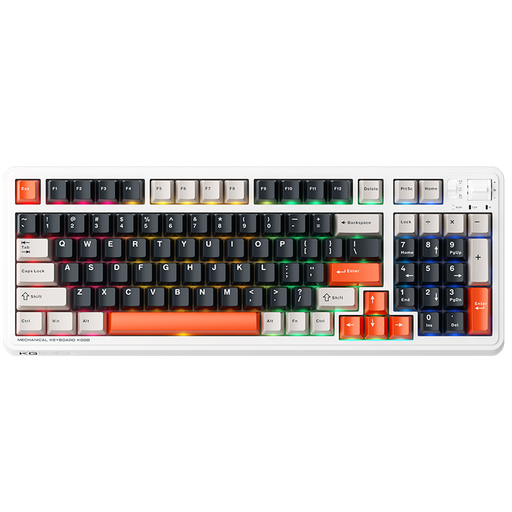 Image unavailable
MACHENIKE KG98 96% Tri-Mode, Black White Orange, US QWERTY
Consider the 96% layout if you want to compare a smaller footprint with access to your usual commands.
The name specifies tri-mode connectivity, hot-swappable switches and a US QWERTY layout. Check the installed switch type and shortcut controls before choosing it.
View on Joybuy
 Image unavailable
AULA F75 75% Wireless Gaming Keyboard, US QWERTY
The 75% layout is an option when desk space matters, provided its key arrangement keeps your frequent commands convenient.
The name specifies wired, Bluetooth and 2.4G modes, RGB backlighting and a US QWERTY layout. Check its shortcut controls and the switch options for this variant.
View on Joybuy
 Image unavailable
HyperX Alloy Rise 75 Wireless Keyboard UK
If you are considering a compact wireless keyboard, check whether this model gives you convenient access to navigation and tactics-game shortcuts.
Confirm its physical key layout and the connection methods you need; UK in the product name alone does not establish the key arrangement.
View on Joybuy
Common questions
Should I choose full-size, tenkeyless or 60% for turn-based tactics?
Choose by the keys you need directly: full-size retains a number pad, tenkeyless removes it, and a 60% layout places more functions behind key combinations. Map your regular game and desktop commands before accepting a smaller layout.
Is wireless worth considering for a tactics-game desk?
Wireless is worth considering if you switch between devices or want fewer desk cables, provided you are comfortable with its charging needs. Check the precise receiver, Bluetooth and wired modes on the model you choose rather than assuming that every wireless keyboard supports all three.
Which switches should I consider for a shared room?
Look for a switch variant whose stated sound and feedback suit the room, rather than choosing by a colour name alone. Corsair describes CHERRY MX Brown as tactile and lists separate quieter switch options; check which switches are installed in the exact keyboard variant.
Do I need to check the physical UK keyboard layout?
Yes, if UK key positions and legends matter to you. A keyboard offered through a UK storefront can still specify a US layout, so confirm the physical arrangement on the individual product detail before ordering.


