What matters when choosing
An occupied wall socket does not rule out a wired keyboard: the immediate choice is whether a permanent cable or periodic charging fits your setup better.
Wireless TKL
Choose it when: You want fewer permanent desk cables and do not need a number pad. Logitech G lists 2.4 GHz, Bluetooth and wired modes for the G915 X TKL.
Trade-off: You still need a workable charging arrangement and, where required, a compatible USB receiver.
Wired TKL or full-size
Choose it when: You prefer a continuous USB connection to managing a rechargeable keyboard.
Trade-off: The cable remains on your desk. SteelSeries lists three-way cable routing for its wired Apex 3 if the cable path is the main difficulty.
Wireless 60%
Choose it when: Keyboard footprint matters more to you than having a conventional set of directly accessible keys.
Trade-off: Some commands may require shortcut layers; compare them with your game bindings before committing.
| Concern | What to check | Who this matters to |
|---|
| Connections |
Check the available connection modes, host compatibility and how a wireless model charges or uses a receiver. |
I want to avoid another permanent cable without discovering that my gaming device cannot use the connection I chose. Around 31% of consumers put connection flexibility first. |
| Command access |
Compare your map, inventory and menu bindings with dedicated keys and any shortcut layers. |
When I reach for game menus frequently, I want those commands to be comfortable to use. Command access comes first for around 31% of consumers. |
| Control options |
If these features matter to you, check for a compatible 2.4 GHz mode or model-specific adjustable switch actuation. |
I care about the connection and key settings available while controlling movement, not just how the keyboard looks. Around 23% of consumers prioritise these control options. |
| Desk space |
Measure the available area and compare TKL, 75% and 60% layouts against the keys you use. |
My keyboard has to fit a tight desk, even if a smaller layout changes how I reach some commands. A smaller footprint is the main concern for around 15% of consumers. |
Joybuy keyboard choices
These keyboards cover wireless and wired ways to manage a limited-socket desk, with layouts ranging from 60% to 96%. Compare connection requirements and key access rather than assuming the smallest or wireless option suits every exploration game.
 No image available
ASUS ROG Strix Scope II 96 Wireless, white, UK layout
Consider its wireless design if you want to reduce a permanent desk cable without choosing a 60% keyboard.
The named variant has a 96% layout and UK key layout. Check charging, receiver requirements and compatibility with your gaming device before buying.
View on Joybuy
 No image available
MACHENIKE K500A-B84 75% wired keyboard, US layout
Choose a wired option if you would rather keep a keyboard cable than manage charging and have a suitable USB connection on your gaming device.
This light-grey variant is listed with a 75% layout, US QWERTY keys, red switches and LED backlighting. Check that the US layout suits your typing as well as your game bindings.
View on Joybuy
 No image available
HyperX Alloy Rise 75 Wireless, UK variant
Consider this 75% wireless model if you want a smaller keyboard without moving straight to a 60% layout.
Before relying on its wireless connection, confirm receiver inclusion, compatibility and how you will charge it. Compare its key layout with the commands you use most.
View on Joybuy
 No image available
AULA F75 PRO 75% wireless mechanical keyboard, US layout
Its connection choices suit a desk where you want the option to remove a permanent keyboard cable.
The product name specifies Bluetooth, 2.4 GHz and wired modes, hot-swappable switches, RGB backlighting and a US QWERTY layout. Check which game commands have dedicated keys, along with receiver inclusion and charging arrangements.
View on Joybuy
 No image available
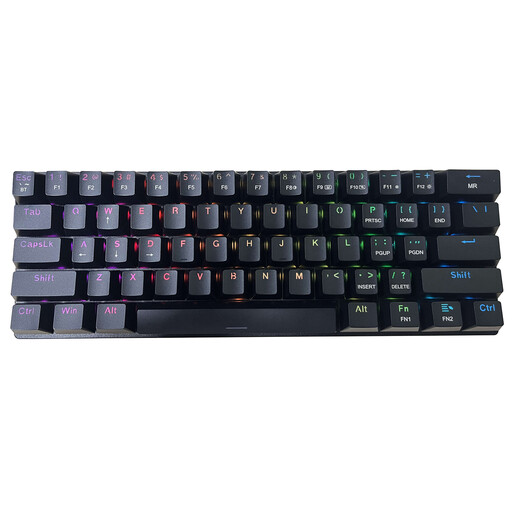
ET 60% tri-mode mechanical keyboard, 61 keys, US layout
Consider its compact layout if desk space matters more to you than having every command on a dedicated key.
The product name specifies a rechargeable keyboard with 61 keys, US QWERTY layout, RGB backlighting and clicky blue switches. Check the connection and charging arrangements, then compare your game bindings with the keys and shortcuts available.
View on Joybuy
Common questions
Will a wireless keyboard solve a shortage of wall sockets?
A wireless keyboard can remove a permanent keyboard cable during play, but it may still need USB charging or a receiver. For example, Logitech G lists 2.4 GHz, Bluetooth and wired modes for the G915 X TKL; check which mode your gaming device can use and how you will charge the keyboard.
Is a 60% keyboard practical for exploration games?
A 60% keyboard is practical if its shortcuts work comfortably with the commands you use. Corsair describes onboard shortcuts for full-size commands on its K70 PRO MINI WIRELESS, so compare your map, inventory and journal bindings with the layout before choosing it for its smaller footprint.
Can I return an online keyboard if I change my mind?
A qualifying purchase from a company of goods you have not seen in person normally has a 14-day cooling-off period under the UK guidance from Citizens Advice, subject to exceptions. Check the circumstances of your purchase; if the keyboard is faulty or misdescribed, explain that problem to the seller rather than treating it as a simple change-of-mind return.
What should I do with an old keyboard in the UK?
Use an appropriate electrical-recycling or retailer take-back route available locally rather than putting the keyboard in ordinary household waste. UK guidance from the Office for Product Safety and Standards and the Department for Environment, Food & Rural Affairs explains that waste electrical and electronic equipment rules aim to reduce disposal by incineration or landfill.


