What to check before buying
Start by isolating the local connection, then choose equipment for the specific weak point: cable access, coverage between rooms, available ports or competing household traffic.
| Priority |
What to check |
Your needs |
| Identify the source of the problem |
Compare direct Ethernet with Wi-Fi on the same device; check provider outage information; note whether symptoms continue on wired devices. |
I want to know whether local equipment is likely to help before I replace it. Ofcom notes that Wi-Fi can be affected by the router, device, distance, walls and interference. |
| Stable local connection |
Check whether a practical Ethernet route exists; use gigabit-capable connections where needed; count the router uplink and every simultaneous wired device. |
A wired link is preferable when I can run a cable and want to remove Wi-Fi interference from the local path. Ofcom reports that Ethernet connections are generally more consistent and have lower latency than Wi-Fi. |
| Coverage beyond the main router |
Map cable routes to the gaming area; confirm the exact mesh model supports the intended backhaul arrangement; check node ports and operating-mode wiring. |
I need coverage in a distant room without depending on a weak wireless hop between mesh units when a cable can reach a node. TP-Link identifies wired backhaul as useful in long-distance, thick-wall and multi-floor homes. |
| Household traffic control |
Check whether QoS and per-device limits are available on the exact router; set them for the actual connection capacity; confirm compatibility with the current broadband setup. |
I want gaming traffic to remain usable when another device is streaming or downloading heavily. ASUS states that QoS can prioritise selected traffic and bandwidth limits can restrict a device using available capacity. |
Joybuy product options
These Joybuy options focus on mesh coverage for gaming areas away from the main router and a cable tester for checking an Ethernet run before replacing network hardware.
 No image available
TP-Link Deco BE22 BE3600 Mesh Wi-Fi 7 System (3-Pack)
Consider this three-unit mesh system for a distant gaming room where cable can reach a mesh unit.
The listing states wired-and-wireless combined backhaul and two 1 Gbps Ethernet ports per unit. Check the planned cabling route and mesh wiring before purchase; it does not identify the cause of lag that continues on wired devices.
Joybuy
 No image available
NETGEAR Orbi 370 RBE373 Wi-Fi 7 Mesh System (3-Pack)
This three-pack is relevant when a satellite can sit near a gaming device in a room away from the main router.
The model name specifies dual-band BE3600 and 2.5Gbps Ethernet. Confirm Ethernet backhaul support and the approved router-to-satellite wiring arrangement for this exact system before buying.
Joybuy
 No image available
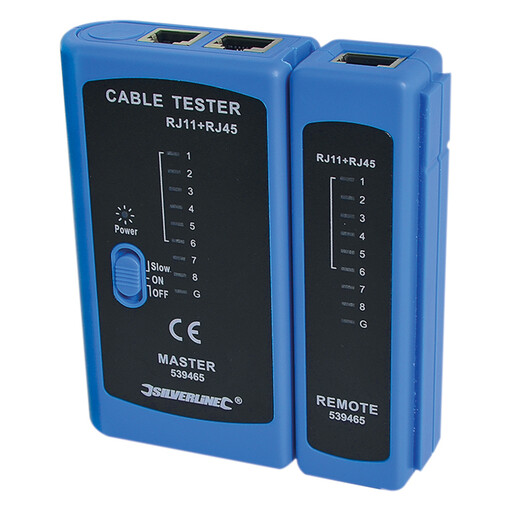
Silverline LAN Tester RJ11, RJ12 and RJ45
Use this tool to check a suspected Ethernet cable or termination before replacing other network equipment.
It tests RJ11, RJ12 and RJ45 connections and uses separate master and remote units. It checks cable continuity, opens and shorts, not gaming latency, Wi-Fi interference or provider outages; a 9V PP3 battery is required.
Joybuy
 No image available
TP-Link Deco BE25 Mesh Wi-Fi 7 System (3-Pack)
This three-unit mesh option suits a home with coverage gaps across several rooms.
The listing names 2.5 Gbps Ethernet ports and app management. Confirm the port allocation on each unit, Ethernet-backhaul support and the required wiring before relying on it for a wired gaming setup.
Joybuy
Frequently asked questions
How can I tell whether Wi-Fi is the likely cause before buying hardware?
Test the same gaming device on a direct wired connection to the router where practical, then compare it with Wi-Fi under similar conditions. Pause large downloads and streams, reboot local equipment and check the provider's outage information; a problem that continues on multiple wired devices does not show that a Wi-Fi upgrade will fix it.
When is a switch more useful than a new gaming router?
Choose a switch when the router is otherwise adequate but has too few Ethernet ports for a console, PC, access point or other wired devices. A gigabit unmanaged switch expands local wired connections, but it does not add Wi-Fi coverage, configurable QoS or a remedy for provider-side faults.
Can mesh Wi-Fi help gaming in a room far from the router?
It can improve a weak-coverage room, but wired backhaul is the stronger mesh arrangement when cable can reach the mesh node. It removes the node-to-node wireless hop; check the exact model's ports and follow its manufacturer's wiring instructions for the chosen operating mode.
Will QoS lower ping for every game?
No. QoS is most relevant when household traffic is competing for limited available bandwidth. It can prioritise gaming traffic or restrict another device, but it cannot demonstrate or repair a problem outside the home network.


