Choose a laptop for virtual spacecraft design around your software and project workload, not its gaming label. For Unreal Engine or Blender work, Epic Games and the Blender Foundation recommend 32 GB RAM and at least 8 GB graphics memory. Compare the exact GPU and screen finish, then decide whether a desk-first setup or a lighter laptop suits where you work.
Who this choice affects
Real-time spacecraft-world builders
If you build interactive interiors, planets or simulations in Unreal Engine, start by comparing configurations with Epic Games’ recommended 32 GB RAM and 8 GB or more graphics memory. Those figures are a starting point, not a promise of identical performance in every scene.
3D modellers and render-focused creators
If your work centres on spacecraft meshes, materials, lighting and renders in Blender, the Blender Foundation’s recommended Windows specification includes 32 GB RAM, 8 GB graphics memory and a display resolution of at least 1920 × 1080.
Dark-room desk users who also travel
If the laptop moves between a dark-room workspace and other locations, compare its weight and power adapter as well as its display. Check the exact panel finish for reflections and whether the selected model’s memory can be upgraded.
What to check before buying
For Unreal Engine or Blender projects, establish the memory and graphics configuration first. Then assess the screen in your room and the practical burden of moving or powering the laptop.
| Concern |
What to check |
Who this matters to |
| Graphics memory |
Check the selected laptop GPU’s stated graphics memory. Epic Games and the Blender Foundation recommend at least 8 GB for the respective Unreal Engine and Blender workflows. |
If I am building complex real-time scenes or rendering spacecraft assets, I want to know the GPU configuration rather than rely on an RTX name alone. Around 33% of consumers put graphics-memory headroom first. |
| Project capacity |
Compare RAM and CPU specifications with your applications’ guidance; check whether RAM is fixed and whether storage suits your project files. |
When I have large models or several design applications open, I need enough working capacity without counting on a later memory upgrade. Roughly 27% of consumers make project capacity their primary concern. |
| Dark-room display |
Confirm resolution and panel finish on the exact model, then consider reflections from any nearby lighting. |
I spend long sessions inspecting dark scenes and small interface details, so the screen needs to work in my actual lighting. Around 20% of consumers put display usability first. |
| Workspace and travel |
Compare laptop weight, adapter requirements and space for unobstructed ventilation. |
If I move between workspaces, the machine and its adapter must be practical to carry and set up. For about 20% of consumers, that is the primary concern. |
Buying pitfalls
-
Choosing by RTX name without checking graphics memory
An RTX model name alone does not tell you whether a particular laptop configuration reaches the graphics-memory recommendation for your software. Epic Games recommends 8 GB or more for Unreal Engine, while the Blender Foundation recommends 8 GB for Blender on Windows.
Record the exact laptop GPU and its stated graphics memory before comparing models for these workloads.
-
Treating basic CAD capability as a professional-workflow match
Autodesk distinguishes lighter Fusion use from resource-heavy work involving large assemblies, long design histories or mission-critical output. A gaming GPU specification alone does not establish that a graphics card and driver meet a certification-sensitive requirement.
If Fusion is central to your spacecraft project, check Autodesk’s requirements for your workload and its certified graphics-hardware list where certification matters.
-
Assuming laptop memory can be upgraded
Some slim configurations have fixed RAM. Razer lists memory as fixed for the cited Blade 16 range, while Epic Games and the Blender Foundation recommend 32 GB RAM for the workflows discussed here.
Check the selected model’s upgradeability before purchase and choose a capacity that accommodates the projects you expect to work on.
Brands to consider
Lenovo Legion
The cited Legion Pro 7i Gen 10 configuration is relevant to a desk-first, 16-inch Unreal Engine or Blender setup.
- Lenovo UK lists 32 GB RAM and an RTX 5070 Ti Laptop GPU with 12 GB graphics memory for that configuration, above the published 8 GB graphics-memory recommendations.
- Its listed glossy display and 400 W UK adapter make reflections, power access and desk space worth checking.
ASUS ROG
The Zephyrus G16 range offers a 16-inch route for consumers balancing creative work with portability.
- ASUS ROG lists the GU605CP-QR007W configuration with 32 GB RAM and RTX 5070 graphics with 8 GB memory, matching the cited Unreal Engine and Blender memory recommendations.
- Check the exact variant rather than applying those specifications to every G16. Its stated graphics memory is lower than that of the cited 12 GB Legion configuration.
Razer
Blade 16 configurations are relevant if a thinner 16-inch chassis is important alongside creative and gaming hardware.
- Razer lists OLED options and Blade 16 configurations with up to 64 GB memory; the cited chassis is 14.9 mm thick.
- Razer describes the memory as fixed, so check the RAM and GPU of the particular configuration before choosing it.
Alienware
The configurable Alienware 16 Area-51 AA16250 is another 16-inch gaming-laptop route to assess against your design applications.
- Dell UK lists selectable processor configurations and RTX 5060 graphics among the displayed options.
- Confirm the selected configuration’s graphics memory, RAM and display before comparing it with software recommendations.
Joybuy product choices
These laptops offer different approaches to a spacecraft-design workspace, from larger gaming machines to a creator-focused model. Compare each exact configuration with your software and check its screen and setup needs for your room.
 Image unavailable
Lenovo Legion Pro 7 16IAX10H, 83F5000UUK
A 16-inch gaming-laptop choice for a desk-based design setup. Its named configuration has an Intel Core Ultra 9 processor, 64 GB RAM, a 2 TB SSD and RTX 5090 graphics; confirm the graphics-memory figure against your software needs and check the screen finish and adapter for your workspace.
View on Joybuy
 Image unavailable
MSI Stealth 18 AI Studio, A1VGG-001UK
Consider this 18-inch model if a larger on-laptop workspace matters more than a compact setup. The named configuration includes an Intel Core Ultra 9 processor, 32 GB RAM, a 2 TB SSD and RTX 4070 graphics; check the graphics memory and display finish before matching it to your design work and room.
View on Joybuy
 Image unavailable
ASUS ProArt P16 H7606WW-SE006W
This creator-focused laptop is an option if modelling and visual work take priority; confirm that it also suits the games you intend to play. Its named configuration includes a 16-inch 4K OLED touchscreen, AMD Ryzen AI 9 HX 370, RTX 5080 graphics with 16 GB memory, 64 GB RAM and a 2 TB SSD. Check screen reflections and power requirements for your desk.
View on Joybuy
 Image unavailable
Stormforce Exobook 16 QHD+, Ultra 9, 5080
The named 16-inch configuration offers 32 GB RAM and a 4 TB SSD for consumers keeping substantial project files on the laptop. Confirm the exact graphics variant and its memory before relying on the title’s 5080 designation for Unreal Engine or Blender work; check the panel and applicable adapter as well.
View on Joybuy
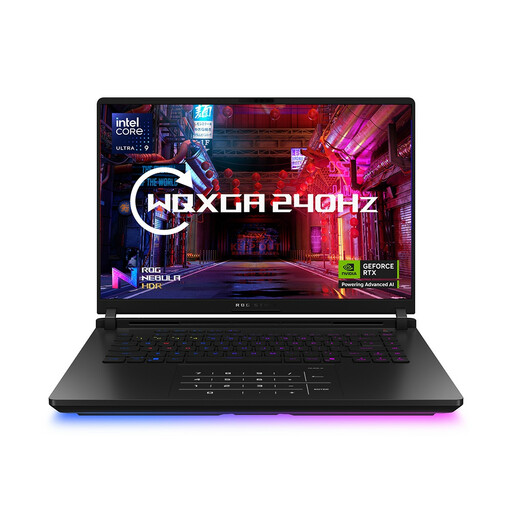 Image unavailable
ASUS ROG Strix SCAR 16 G635LW WQXGA
This 16-inch gaming model has a named configuration with an Intel Core Ultra 9 processor, 64 GB RAM, a 2 TB SSD and an RTX 5080 designation. Confirm the exact GPU and graphics memory before assessing demanding 3D work, and check the display finish and adapter for your dark-room setup.
View on Joybuy
Frequently asked questions
What laptop specification should I start with for Unreal Engine spacecraft scenes?
Start by comparing laptops with Epic Games’ recommended 32 GB RAM, 8 GB or more graphics memory and DirectX 12-compatible graphics. Larger scenes may need more resources, so treat the recommendation as a starting point rather than a performance guarantee.
Is 32 GB RAM worth choosing for Blender spacecraft modelling?
Yes, if Blender is central to your work: the Blender Foundation lists 32 GB RAM in its recommended Windows specification, alongside 8 GB graphics memory and an eight-core CPU. Check the exact laptop configuration rather than assuming every variant of a model has that memory.
Can I use a consumer RTX gaming laptop for Autodesk Fusion?
A consumer graphics laptop may suit hobbyist Fusion use, but a gaming GPU name does not establish certification for professional work. Autodesk distinguishes generally compatible consumer graphics from validated hardware; if certification matters to your workflow, check its list for the exact graphics card and driver.
What matters during long design sessions in a dark room?
Check reflections on the exact screen and make room for the laptop’s vents and compatible power adapter. A glossy display can reflect nearby lamps even in an otherwise dark room; keep intake and exhaust vents unobstructed during demanding work.


